# Prototyping for Evaluation

<figure>
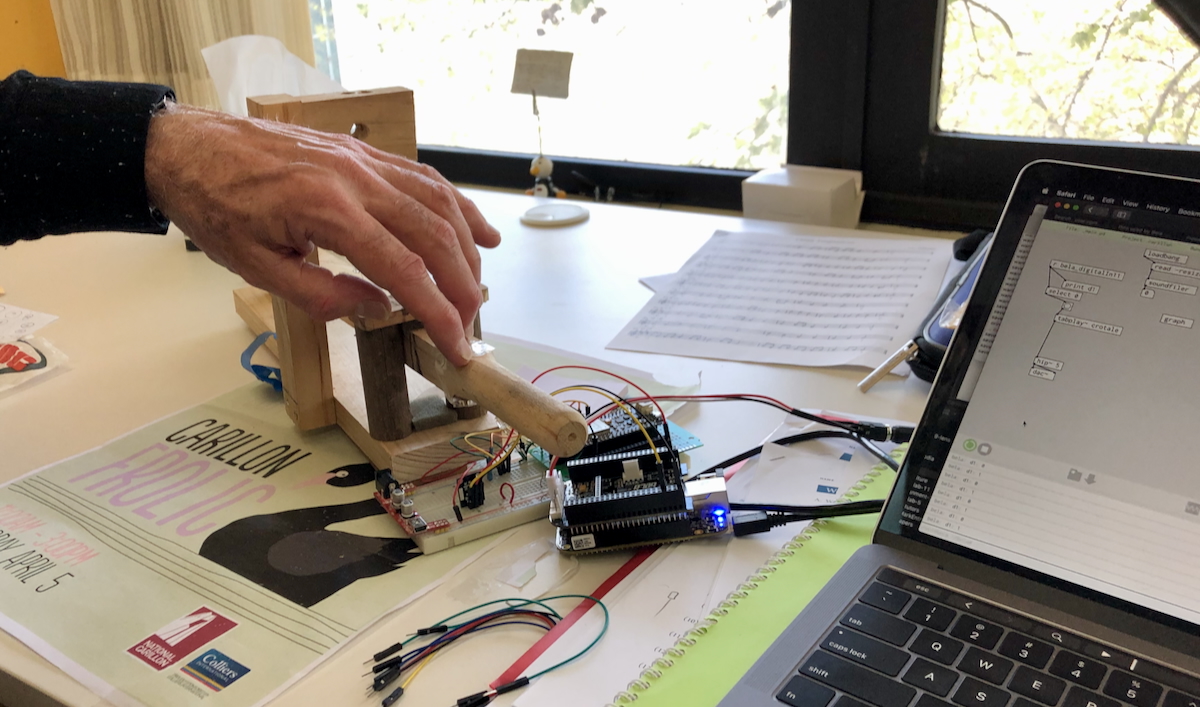
<img src="img/prototype-carillon-2019.jpg" alt="A wooden prototype carillon key on a desk with electronic sensor and spring to simulate the carillon action. A Bela embedded computer sits next to it. A man&#39;s hand presses the key down." />
<figcaption>Testing a prototype electronic carillon key (a <a href="https://www.nca.gov.au/attractions/national-carillon">carillon is a big bell tower</a> with bells controlled from a big keyboard). This prototype was interactive, clear, evaluative and focused.</figcaption>
</figure>

This tutorial will guide you in building prototypes that move beyond expressing a design concept and are prepared for evaluation. We will particularly focus on what makes a prototype testable and criteria that you might apply to prototypes you create for your final project.

## Pre-Class Tasks

1.  Read Houde & Hill ([1997](#ref-houde1997prototypes)) “What do prototypes prototype?”,

2.  Choose a user interface described in a [UIST](https://dl.acm.org/conference/uist) or [CHI](https://dl.acm.org/conference/chi) paper

3.  Post a forum post (100–200 words) answering:

    - **What is the system and what does it do?**
    - **Which parts of the interface are interactive?** How does the user engage with the system?
    - **What steps/tasks did participants do in the user study?**
    - **If you made a prototype of this interface, what would you need to include to test it?**
    - Include **one image or sketch** to illustrate the interface (figure from paper, screenshot, or your annotated sketch highlighting key interactive components).

N.B., for this task, make sure you choose a paper from CHI or UIST that actually describes a novel interface. If your answer to “what is the system” is “this paper did not introduce a system” then you did not choose an appropriate paper!

## Plan for the Class

1.  Task 1: Understand the Concept of Testable Interactions (10m)
2.  Task 2: Build a Testable Prototype (50 min)
3.  Task 3: Prototype Showcase and Peer Feedback (30 min)

## In-Class Tasks

### Task 1: Understand the Concept of Testable Interactions (10 minutes)

In this task, you will think about **what makes a prototype testable** and apply these criteria to a prototyping plan.

A prototype is testable if it lets you **observe and learn from real user interactions**. Below, we have set out some criteria for a testable prototype that we developed within the tutors. While these criteria aren’t identical to others found in HCI literature (e.g., [Houde & Hill, 1997](#ref-houde1997prototypes); [Lim et al., 2008](#ref-lim-prototypes:2008); [Odom et al., 2016](#ref-odom-research-prototype:2016)), we feel that our criteria work for the context of this class and the needs of our assessment. Each criterion does have close relatives in that literature, noted below as *scholarly kin*.

Read through the criteria, and keep them in mind for the activity below:

1.  **Interactive:** Can users actually perform the steps or tasks you’re trying to test? (even if simulated)
    - Users must be able to take action and see a response, even if it’s simulated.
    - Examples: pressing a paper button triggers a screen change, dragging a card moves it to a new location, or speaking a command triggers a response.
    - Ask: “Can someone unfamiliar with this prototype actually perform the task I want to test?”
    - *Tip: A static sketch is not enough—the user must act on the prototype.*
    - *Scholarly kin:* a prototype is a manifestation of a design that stakeholders can **interact** with ([Rogers et al., 2023](#ref-rogers-beyond-hci:2023)); where a sketch *suggests* and *questions*, a prototype *tests* and *answers* ([Buxton, 2007](#ref-buxton-sketching:2007)).
2.  **Clear:** Can users understand what the system is, what to do, and how it works?
    - Make the system’s state and feedback obvious.
    - Examples: highlighting selections, showing confirmation messages, or providing visual cues for next steps.
    - Ask: “Will a new user generally know what to do next without explanation?”
    - *Scholarly kin:* a classic weakness of low-fidelity prototypes is being *facilitator-driven* — only working while their maker narrates ([Rudd et al., 1996](#ref-rudd-fidelity-debate:1996)).
3.  **Evaluative:** Can you observe users, gather feedback, or identify what works and what doesn’t?
    - Decide what success looks like and what errors or hesitation mean.
    - Examples: did the user complete the action correctly? Did they get confused or hesitate?
    - Ask: “What can I measure or observe that tells me if this interaction is effective?”
    - *Scholarly kin:* a good prototype makes the possibilities and limitations of a design idea **visible and measurable** ([Lim et al., 2008](#ref-lim-prototypes:2008)).
4.  **Focused:** Are you including only what’s needed to test the intended interaction or task?
    - Include the elements needed to test the key task; less focus on aesthetics or extra features.
    - Ask: “Does every part of this prototype help answer my testing question, or can something be removed?”
    - *Scholarly kin:* the *economic principle of prototyping*: the best prototype is the **simplest** one that does the job ([Lim et al., 2008](#ref-lim-prototypes:2008)); prototype one question at a time, whether *role*, *look and feel*, or *implementation* ([Houde & Hill, 1997](#ref-houde1997prototypes)).

If you’re curious how far this thinking goes: Odom et al. ([2016](#ref-odom-research-prototype:2016)) push prototypes all the way to *research products*, judged on being *inquiry driven* and on their *finish*, *fit*, and *independence*.

Now, complete this **activity**:

1.  In your group, look at the pre-class forum posts.
2.  Choose **the most interesting system or interface** posted by a group member.
3.  Discuss:
    - Which part of the system could you prototype?
    - What is the key interaction?
    - What feedback would make it **clear** to users?
    - How could you **observe success**?
    - Would your prototype meet the **four criteria** above?

### Task 2: Build a Testable Prototype (50 mins)

Now you’re going to try building a quick low-fidelity prototype that can help test a specific problem and interaction. Your prototype can be made with paper, click-through slides, or another super quick method of assembling a testable prototype. In groups, your tutor will give you a **random user problem**. Focus on **one key interaction**.

| \# | Scenario | Task (Key Interaction to Prototype) |
|----|----|----|
| 1 | **Cat Cafeteria**: Patrons interact with digital feeders to dispense snacks to cats. | Prototype **one interaction** for choosing a cat and triggering a response from the feeder. |
| 2 | **Alien Plant Gardener**: Manage a garden of alien plants. | Prototype **one interaction** for taking an action that affects the plant’s state. |
| 3 | **Ghostly Museum Guide**: Friendly ghosts guide visitors via AR projections. | Prototype **one interaction** for a visitor to communicate or elicit a response from the ghost. |
| 4 | **Intergalactic Grocery Store**: Shopping in zero gravity with floating items. | Prototype **one interaction** for selecting or moving a floating item. |
| 5 | **Robo-Barista**: Robot makes drinks based on user input. | Prototype **one interaction** for specifying or changing a drink order. |
| 6 | **Secret Spy Office**: Hide/reveal documents using a smart desk. | Prototype **one interaction** for revealing or moving a confidential file. |
| 7 | **Pet Translator**: Device translates pet sounds into messages. | Prototype **one interaction** for capturing a pet signal and generating a readable output. |
| 10 | **Mini-Magic Keyboard**: Typing triggers tiny illusions. | Prototype **one interaction** for creating an effect based on user input. |

Here’s the activity:

1.  In your group, **identify the key interaction** you want to focus on testing.
2.  **Sketch and build a testable prototype** based on that key interaction.
3.  Build your prototype!
4.  Assess whether your prototype is *interactive*, *clear*, *evaluative*, and *focused* (you can use the mapping table below to help structure your responses). If it isn’t, change it until it is!

A few prototyping notes:

- Focus only on the **essential elements needed to test the interaction** — do not worry about polish or aesthetics.
- Materials can include **paper, printed screens, simple click-through slides, or other low-fidelity tools**.
- Use a **Wizard of Oz** approach if needed to simulate system responses ([Porcheron et al., 2021](#ref-porcheron-wizard:2020)).

#### Mapping Table

| Scenario | Key Interaction | Interactive (User Action) | Clear (Feedback) | Evaluative (Observable Success) | Focused (Essential Elements) |
|----|----|----|----|----|----|
| … | … | … | … | … | … |

### Task 3: Prototype Showcase & Peer Feedback (30 mins)

Groups will **present and demonstrate their testable prototypes** to the class, allowing peers to interact and provide feedback. The focus is on **observing real user interactions**, not just explaining how the prototype works. Follow these steps:

1.  **Group Demo (1–2 min per group)**
    - Introduce the **scenario and user problem**.
    - Highlight the **key interaction**.
2.  **Peer Interaction (2–3 min per group)**
    - Each **other group** tries the interaction.
    - Observers record **one positive observation** and **one question or point of confusion** about the interaction.
    - Use a **feedback sheet** or notebook to capture responses.
3.  **Group Reflection (1–2 min per group)**
    - Each presenting group reads aloud **the one positive and one question** received from peers.
    - Discuss briefly how they might **improve the prototype** based on this feedback.

## Resources

- “What do prototypes prototype?” ([Houde & Hill, 1997](#ref-houde1997prototypes)), available online [here](https://hci.stanford.edu/courses/cs247/2012/readings/WhatDoPrototypesPrototype.pdf)
- “The anatomy of prototypes: Prototypes as filters, prototypes as manifestations of design ideas” ([Lim et al., 2008](#ref-lim-prototypes:2008))
- “From Research Prototype to Research Product” ([Odom et al., 2016](#ref-odom-research-prototype:2016))
- [Week 3 lecture on prototyping (link)](https://smcclab.github.io/thirty-nine-hundred-hci/lectures/03-prototype.html#/title-slide)
- [NNgroup: Paper Prototyping 101](https://www.nngroup.com/videos/paper-prototyping-101/)
- [NNgroup: Paper prototyping article](https://www.nngroup.com/articles/paper-prototyping/)
- [NNgroup: the Goldilocks principle for prototyping](https://www.nngroup.com/videos/goldilocks-principle/)

## References

<div id="refs" class="references csl-bib-body hanging-indent" data-entry-spacing="0" data-line-spacing="2">

<div id="ref-buxton-sketching:2007" class="csl-entry">

Buxton, B. (2007). *Sketching user experiences: Getting the design right and the right design*. Morgan Kaufmann Publishers Inc.

</div>

<div id="ref-houde1997prototypes" class="csl-entry">

Houde, S., & Hill, C. (1997). What do prototypes prototype? In M. G. Helander, T. K. Landauer, & P. V. Prabhu (Eds.), *Handbook of human-computer interaction* (pp. 367–381). North-Holland. <https://doi.org/10.1016/B978-044481862-1.50082-0>

</div>

<div id="ref-lim-prototypes:2008" class="csl-entry">

Lim, Y.-K., Stolterman, E., & Tenenberg, J. (2008). The anatomy of prototypes: Prototypes as filters, prototypes as manifestations of design ideas. *ACM Trans. Comput.-Hum. Interact.*, *15*(2). <https://doi.org/10.1145/1375761.1375762>

</div>

<div id="ref-odom-research-prototype:2016" class="csl-entry">

Odom, W., Wakkary, R., Lim, Y., Desjardins, A., Hengeveld, B., & Banks, R. (2016). From research prototype to research product. *Proceedings of the 2016 CHI Conference on Human Factors in Computing Systems*, 2549–2561. <https://doi.org/10.1145/2858036.2858447>

</div>

<div id="ref-porcheron-wizard:2020" class="csl-entry">

Porcheron, M., Fischer, J. E., & Reeves, S. (2021). Pulling back the curtain on the wizards of oz. *Proc. ACM Hum.-Comput. Interact.*, *4*(CSCW3). <https://doi.org/10.1145/3432942>

</div>

<div id="ref-rogers-beyond-hci:2023" class="csl-entry">

Rogers, Y., Sharp, H., & Preece, J. (2023). *Interaction design: Beyond human-computer interaction, 6th edition*. John Wiley & Sons, Inc. <https://quicklink.anu.edu.au/kv9b>

</div>

<div id="ref-rudd-fidelity-debate:1996" class="csl-entry">

Rudd, J., Stern, K., & Isensee, S. (1996). Low vs. High-fidelity prototyping debate. *Interactions*, *3*(1), 76–85. <https://doi.org/10.1145/223500.223514>
</div>

</div>
