## Announcements
- final project specification available
- final project repo not available yet
- assignment 2: marks out next week.
- week 11: analysis tutorial
- week 12: new positionality tutorial (best 10 of 11 tutorial marks count), drop-in after as usual
- weather is getting nice! go outside! (watch this lecture outside!)
## Plan for the class
1. Performing data analysis in details.
2. Understand the *contexts* of use and *assumptions* of each method.
3. Interpret results *appropriately*.
4. Justify the validity of findings in academic contexts.
Reference book this class is Lazar et al. ([2017](#ref-lazar-research-methods:2017)) chapter 4 “Statistical Analysis”. This book discusses statistical analysis in the context of HCI (but doesn’t show how to do it in Python).
## Preparing Data for Analysis
**Think:** Week 5 content recap—what data pre-processing do we need to do?
- Manually entered, errors, inconsistent formats.
- Primitive which need higher level coding.
- Specific statistical analysis method or software require layout or format ([Delwiche & Slaughter, 2019](#ref-delwiche2019little)).
## Steps for preparing data
1. Cleaning up data: basic check for manual errors, all data are correctly grouped, remove problematic ones.
2. “Coding” data, sometimes need to manually change data to numerical codes (e.g., Likert scales)
3. Organising data: make sure your data is in sensible formats and can be safely saved for publication or storage.
## Descriptive Stats Revision
- measures of central tendency:
- describe where most data is clustered, shows the representative characteristic.
- Mean, median, mode.
- measures of spread:
- *measuring variability*, tells us how much data values differ from the center.
- Range, variance, std.
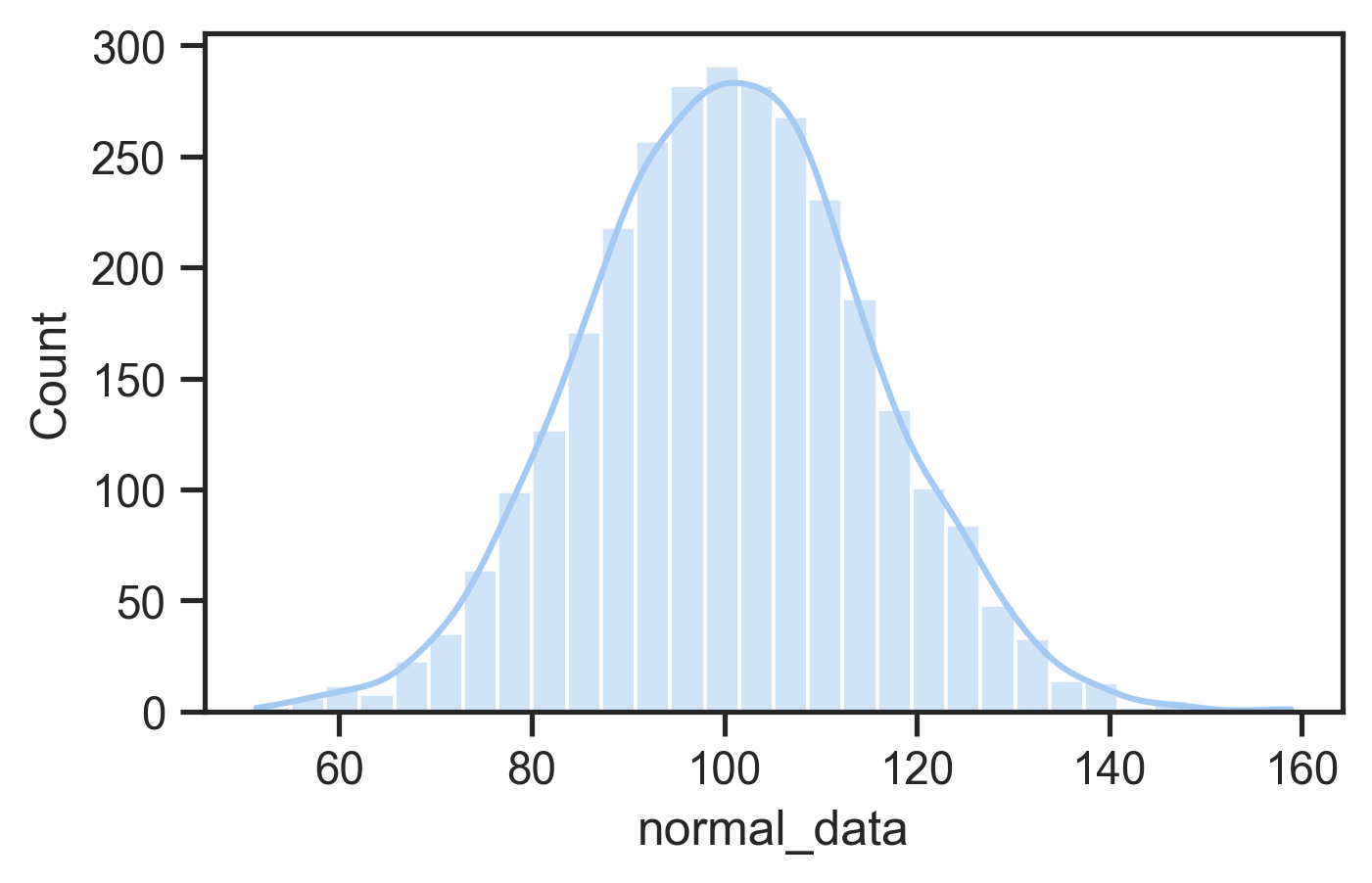
- normal distribution defined by mean and standard deviation
- Many statistical tests (e.g., t-tests, ANOVAs) assume normality
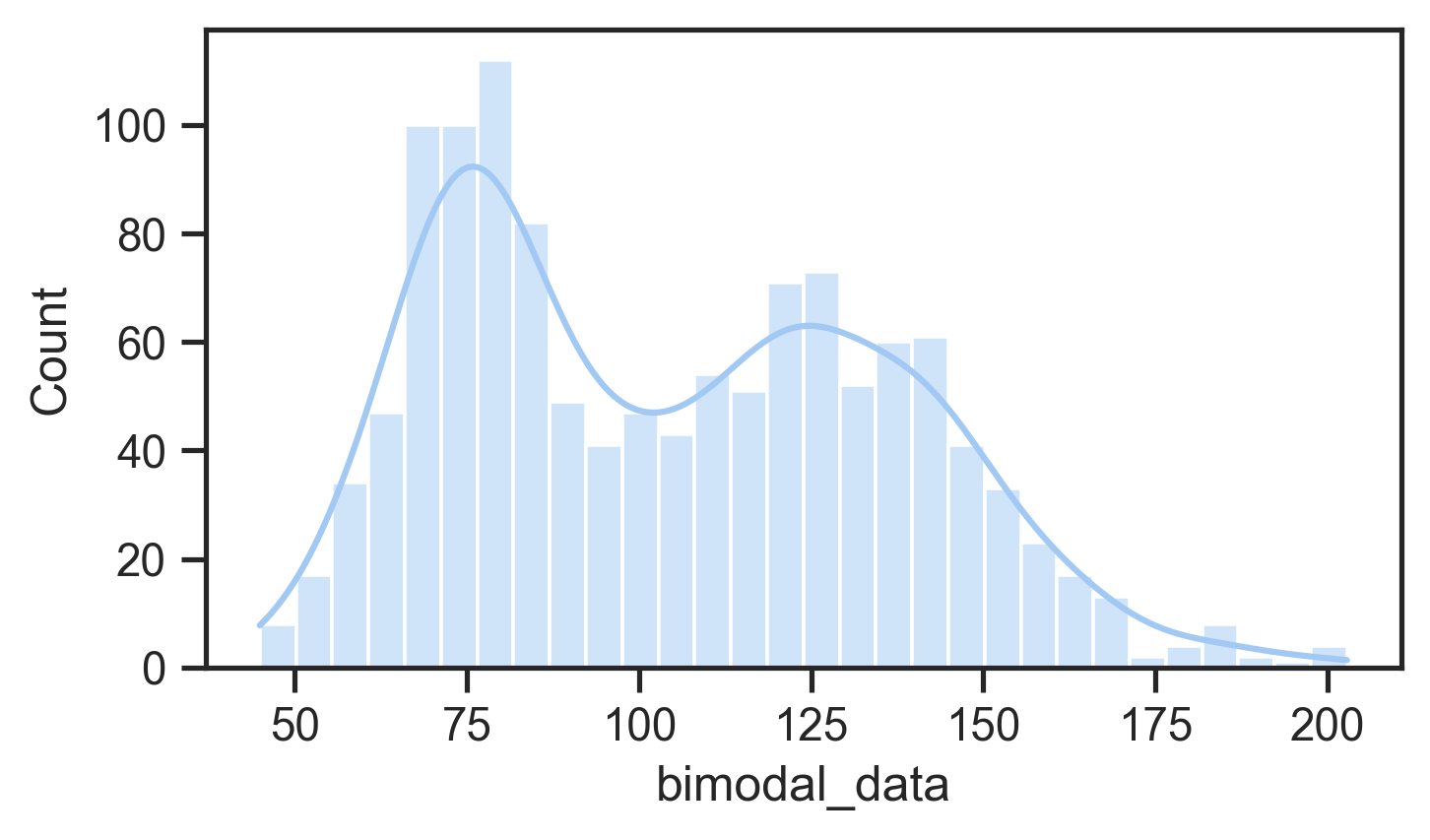
- Can use tests or plots to check for normality
- If not normal: consider data transformation or nonparametric tests
Normal distributionNon-normal (bimodal) distribution
## Why compare means
In an evaluation with two groups or conditions, we want to know whether differences are meaningful or not.
- Between-group design: Different participants in each condition.
- Within-group design: Same participants experience all conditions.
Feels like we doing chemistry or biology… (Photo by CHUTTERSNAP on Unsplash)
## Why Not Just Compare Means?
As an example: Is an height difference of 20cm meaningful?
- If talking about adult people, probably yes.
- If talking about mature Eucalyptus trees, probably no.
- Means don’t account for data variance.
So what do we do?
- Significance testing
- Compares explained variance (from independent variable) vs. unexplained variance (random/error).
A tall tree (Photo by gryffyn m on Unsplash)
## What’s a *p*-value?
- *p*-values are thrown around a lot in some scientific fields
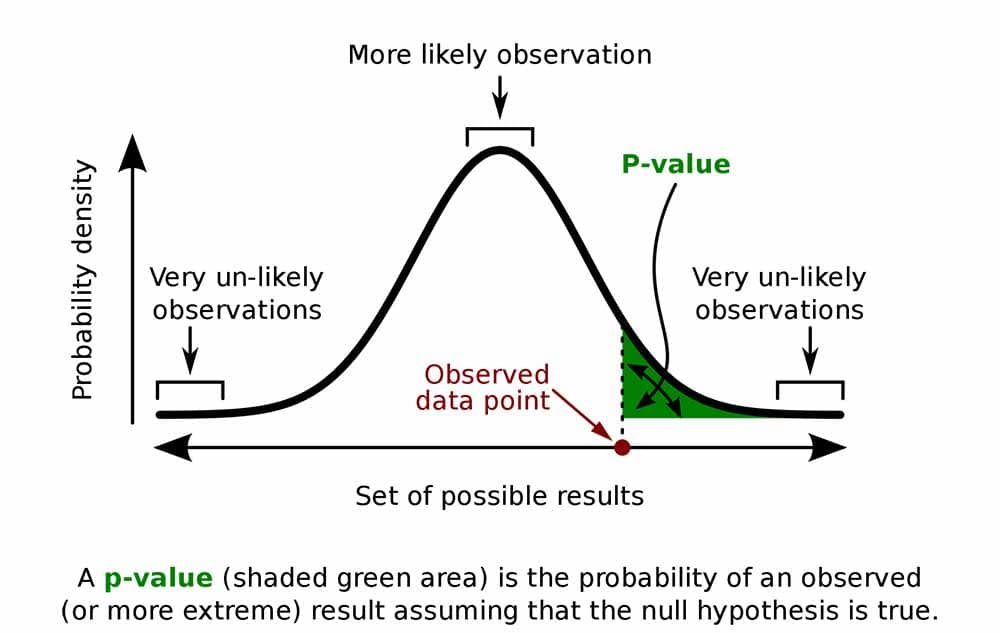
- *p* is the probability of obtaining a measurement by chance given the existing distribution of measurements.
- low *p*-value = low probability difference occurred by chance: likely a real effect
- low *p*-value is evidence supporting a hypothesis
**Think:** a typical cut-off for “significance” is $`p=0.05`$. Is this the best choice?
p-value diagram with a normal distribution (source)
## Case Study: 689,003 News Feeds (2014)
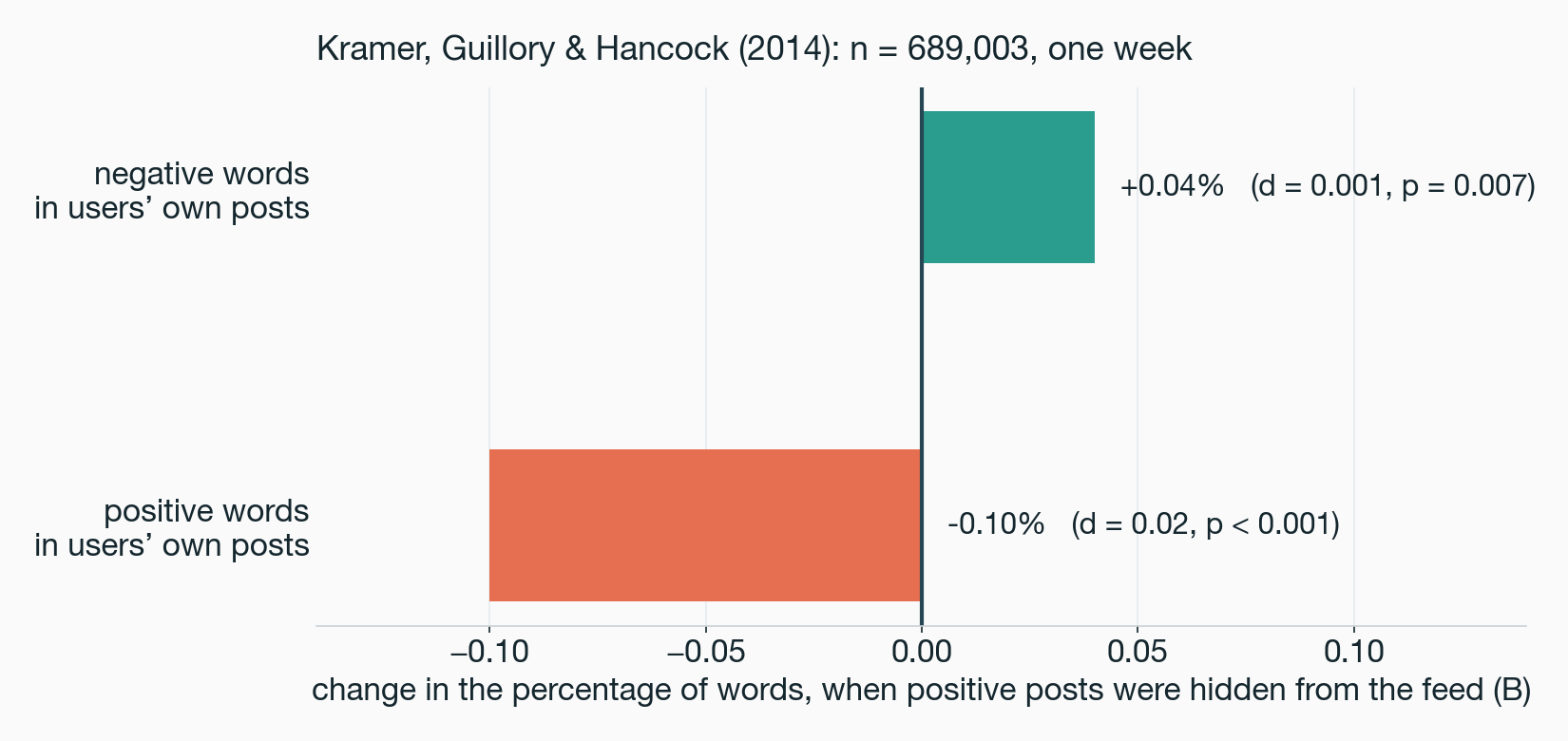
For one week Facebook hid some positive posts from some users’ feeds, then measured the words those users wrote ([Kramer et al., 2014](#ref-kramer-emotional-contagion:2014)). Exactly as reported:
- positive words in their own posts: $`B = -0.1\%`$, $`p < 0.001`$, $`d = 0.02`$
- negative words: $`B = +0.04\%`$, $`p = 0.007`$, $`d = 0.001`$
**Think:** you’re the reviewer. Is this a finding, or too small to mean anything? Decide before the next slide.
Small effects, small p values.
## 689,003 News Feeds: Is It a Finding?
- **Yes, say the authors, fairly:** a minimal manipulation, and word choice is hard to move. At Facebook’s scale, $`d = 0.001`$ is hundreds of thousands of emotional expressions a day.
- **No, says your gut:** a tenth of one percent. Nobody would notice this in their own feed.
- No gotcha here: it depends what decision you’d make with the number. (PNAS did publish an Expression of Concern, about consent, not statistics ([Verma, 2014](#ref-verma-expression-of-concern:2014)).)
**The rule:** report an effect size with every $`p`$, and decide *in advance* the smallest effect that would change what you build. Next: an effect that expert judgement missed and measurement found.
## What are degrees of freedom?
Significance tests involve estimating probability distributions and a concept called **degrees of freedom (df)** representing the number of independent values that can vary in your analysis while still calculating the statistic you need.
- **how much information you have left** after using some data to estimate parameters. For example, if you know the mean of 10 scores, only 9 can vary freely—the last one is determined.
- **different tests use different df calculations:** for independent samples t-test comparing two groups $`df = n_1 + n_2 - 2`$
- **few samples leads to low df:** more samples leads to higher df, more complex tests consume more degrees
- **low df leads to higher *p*.** Fewer degrees of freedom requires a stronger test statistic to reach significance because you have less information.
- **df often reported alongside your test statistic** (e.g., $`t(28) = 2.45, p < 0.05`$) so readers can evaluate analysis and sample constraints
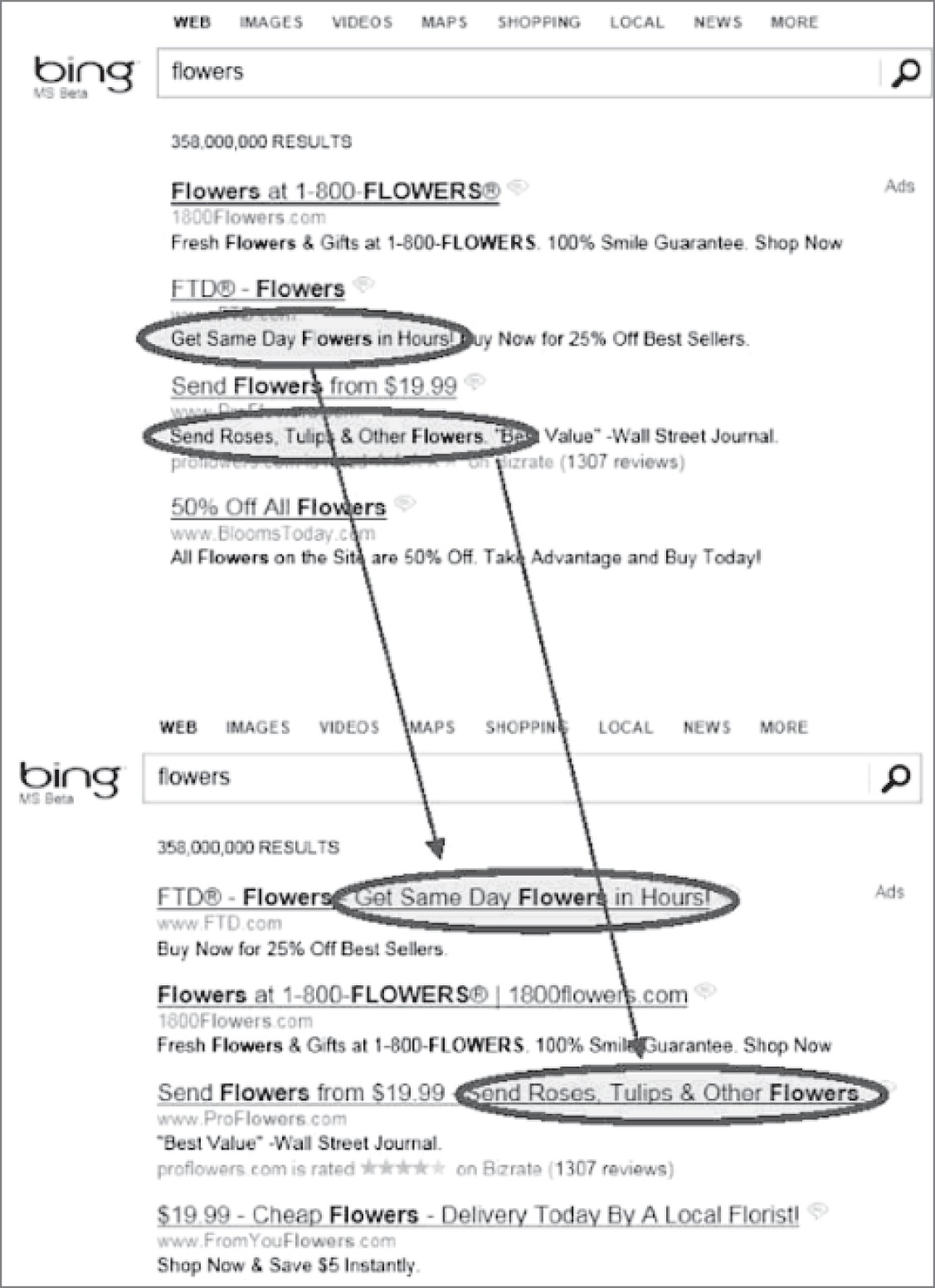
## Case Study: One Line of Ad Copy at Bing (2012)
An employee proposed longer ad headlines: pull the first line of ad text up into the title. A few days’ work.
- **The fork:** build it, or leave it? Program managers ranked it low. It sat for more than six months, until a different engineer noticed it was cheap to test ([Kohavi & Thomke, 2017](#ref-kohavi-online-experiments:2017)).
- **What happened:** the A/B test showed revenue up 12%, over \$100M a year in the US alone. So large it tripped the “too good to be true” alarm that normally means a bug ([Kohavi et al., 2020](#ref-kohavi-trustworthy-experiments:2020)).
**Concept:** expert judgement ranked Bing’s best-ever revenue idea near the bottom. Only the A/B test found it, and the same test stops a bad idea shipping because somebody felt confident about it.
## A Significance Test Menu
| **Test Type** | **Specific Test** | **Use Case** |
|----|----|----|
| **t Test** | Independent-samples t test | Between-group comparison (2 groups) |
| | Paired-samples t test | Within-group comparison (same participants, 2 conditions) |
| **ANOVA** | One-way ANOVA | 1 independent variable, 3+ groups |
| | Factorial ANOVA | 2+ independent variables |
| | Repeated measures ANOVA | Same participants across 3+ conditions |
| | Split-plot ANOVA | Mix of between- and within-subject factors |
These tests are for *continuous* (parametric) data, and assume that the data is normally distribution.
## Statistics: *t*-tests
- Used in HCI to compare means between two conditions (e.g., menu selection times)
- Include the t-value, degrees of freedom (df), and $`p`$-value, where df depends on participant numbers, and $`p`$ indicates the probability the result is due to chance.
- `p < 0.05` (1-in-20 chance of a random result) typically taken as evidence supporting a hypothesis
- smaller p-values (e.g., \<0.01) indicating stronger evidence
- independent values: when comparing samples from different participants
- paired values: comparing different observations of the same participants.
``` python
from scipy.stats import ttest_ind, ttest_rel
# independent values t-test
t_stat, p_value = ttest_ind(group1, group2, equal_var=False)
# observations of different participants
print(f"t-statistic: {t_stat:.4f}, p-value: {p_value:.4f}")
# paired-values t-test
t_stat, p_value = ttest_rel(observation1, observation2)
# different observations of the same participant.
print(f"t-statistic: {t_stat:.4f}, p-value: {p_value:.4f}")
```
## Analysis of Variance
What if you have more than two groups to compare? (e.g., three+ interface variations?)
What if you have more than one independent variable? (e.g., comparing the individual and combined effects of two separate aspects of an interface)
Analysis of variance (ANOVA) enables these more complicated comparisons.
An ANOVA’s output is a statistic called F so sometimes called an *F-test*.
(Photo by Jack Dixon on Unsplash)
## Different ANOVAs
ANOVAs can be used in lots of situations: between-groups, within-groups, one or multiple independent variables, even multiple dependent variables.
- Need to design experiments carefully for valid statistical analysis.
- Need to take care of the programming API for calling an ANOVA procedure.
Types of ANOVAs:
- One-way ANOVA: comparing means of two or more groups with one independent variable
- Factorial ANOVA: comparing means of two or more groups with multiple independent variables
- Repeated measures ANOVA: comparing means of different observations of one group
- Multivariate ANOVA (MANOVA): comparing multiple means (more than one response variable) of different/same groups
## Assumptions of *t* tests and *F* tests
- Homogeneity of variance: when multiple groups are compared, tests are more accurate if variances of the sample population are nearly equal.
- Use transformation techniques when not.
**Careful:** errors should be normally distributed, otherwise highly skewed data result in false results!
## ANOVA examples
One-way ANOVA:
``` python
from scipy.stats import f_oneway
import statsmodels.api as sm
from statsmodels.formula.api import ols
# group by 'independent' column and compare dependent column
groups = [group['dependent'].values for _, group in df.groupby('independent')]
f_stat, p_value = f_oneway(*groups)
# create a Model from a formula and dataframe and run anova on that
model = ols('dependent ~ C(independent)', data=df).fit()
anova_table = sm.stats.anova_lm(model, typ=2)
```
Factorial ANOVA:
``` python
# factorial anova: example effects of two independent variables and their interaction
# model: tempo ~ key + mode + key:mode
model = ols('dep ~ C(ind_1) + C(ind_2) + C(ind_1):C(ind_2)', data=df).fit()
anova_table = sm.stats.anova_lm(model, typ=2)
```
These examples use the [`statsmodels` package](https://www.statsmodels.org/stable/index.html) which allows more serious statistical modelling for complex experiments.
## Identifying relationships
Understand how variables relate to each other (e.g., is age or experience related to performance?)
Correlation:
- Measures the strength and direction of the linear relationship between two variables.
- Most common method: Pearson’s $`r`$: range: -1.00 (negative) to 1.00 (positive). 0 indicates no linear relationship.
Pearson’s $`r^2`$ (Coefficient of Determination)
- Represents the shared variance between two variables.
- Example: If $`r = 0.70`$, then $`r^2 = 0.49`$, meaning 49% of variance in one variable is explained by the other.
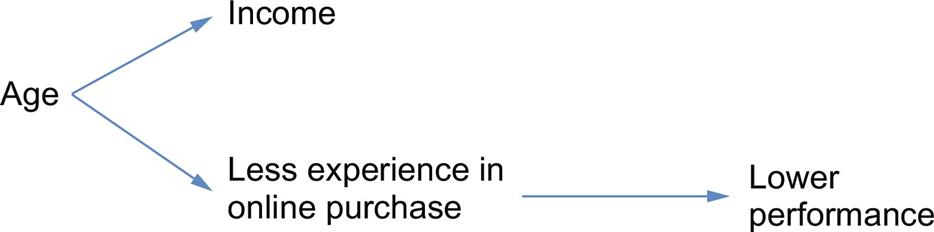
**Careful:** correlation is not causation!
Imagine an experiment measuring time spent in an online shopping app vs income.
Relationship between correlated variables and an intervening variable.
E.g., income vs. performance may be correlated due to an intervening variable (e.g., age) rather than directly related.
## Regression
Examine the relationship between one dependent variable and one or more independent variables.
Simultaneous (Standard) Regression
- All independent variables entered at once.
- Measures combined influence on the dependent variable.
- Result: $`R^2 = \%`$ variance explained by all predictors as a group.
Hierarchical Regression
- Variables entered in blocks/steps, based on theory.
- Testing individual predictors after accounting for others (e.g., covariates).
- Controlling for known influences (e.g., age) before testing new variables.
## Nonparametric statistical tests
Many situations where data does not fit the expectations for *t* or ANOVA tests, e.g.:
- it’s categorical
- skewed
Non-parametric tests can help with this data:
- data collected from two independent samples (e.g., between group): Mann-Whitney $`U`$ test
- two datasets from the same user group - paired-samples t test; otherwise Wilcoxon signed ranks test
- three or more datasets: Kruskal-Wallis one-way ANOVA
- dependent: Friedman’s two-way ANOVA
- Factorial ANOVA: Aligned rank transform ANOVA ([Wobbrock et al., 2011](#ref-wobbrock-aligned-rank-transform:2011))
## Chi-squared test
Helps to analyse categorical data: e.g., a yes/no choice.
**Think:** does this look random?
| Group | Yes | No |
|-------|-----|-----|
| A | 5 | 7 |
| B | 11 | 1 |
Results:
- Chi-square statistic: 4.6875
- Degrees of freedom: 1
- *p*-value: 0.0304 ($`p < 0.05`$)
# Case Studies
## Comparing AI models on a physical musical instrument
Research question:
> What effects will different machine learning models and feedback mechanisms have on simple improvised music performances?
“Understanding Musical Predictions with an Embodied Interface for Musical Machine Learning” Martin et al. ([2020](#ref-martin-understanding-musical-predictions:2020))
The Embodied Musical Predictive Instrument (EMPI)
## IMPSY Experiment Design
- 12 participants did a short improvisation with each ML model and with the motor turned on and off.
- Six improvisation for each performer!
- 3 by 2 design
- Used quantitative data to compare the six experiences
- Survey of 8 aspects of the performance
- Measured length of improvisations
| X | Motor off | Motor on |
|-------|-----------|----------|
| Human | Human/Off | Human/On |
| Synth | Synth/Off | Synth/On |
| Noise | Noise/Off | Noise/On |
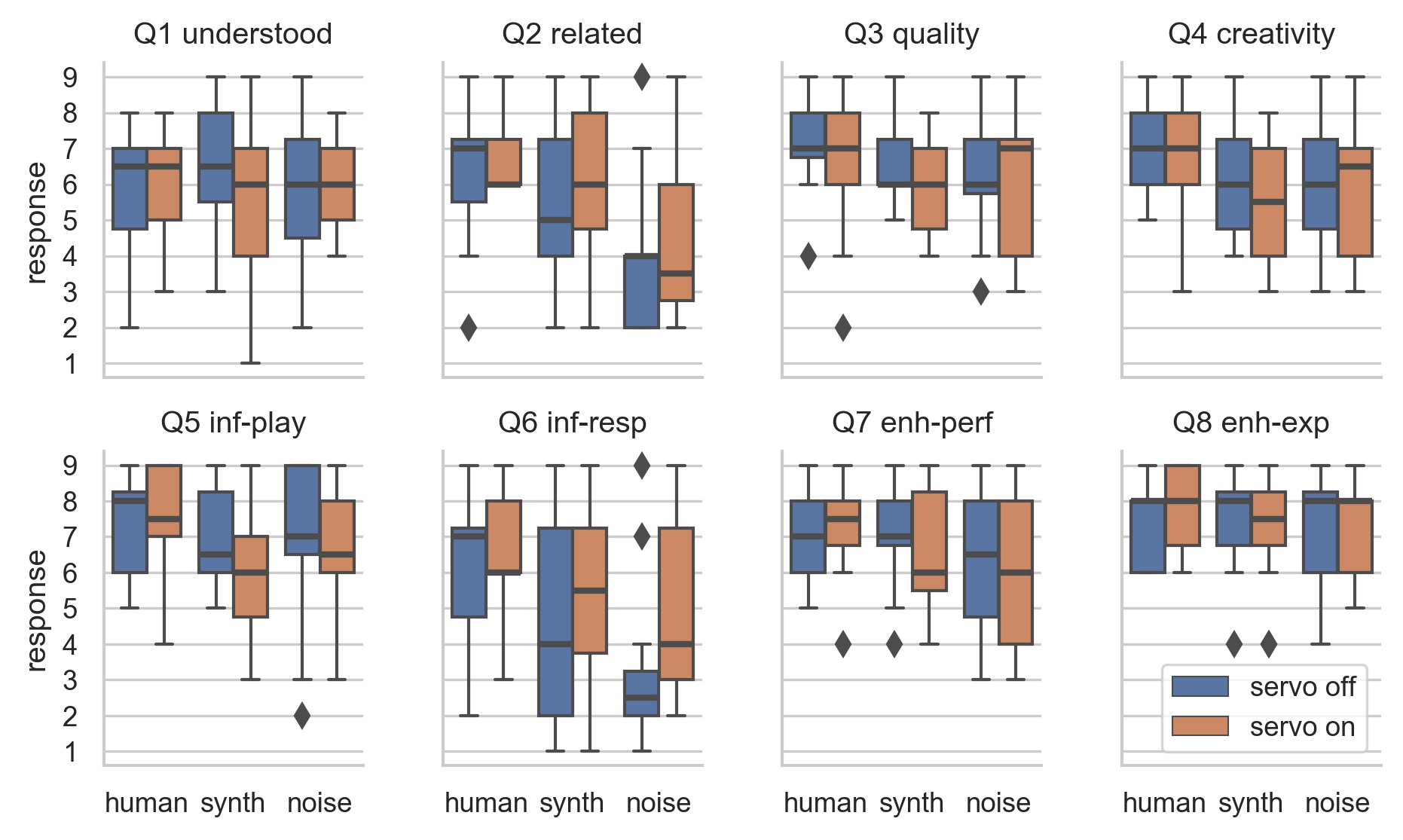
## Survey Results: ART ANOVA and pairwise t-tests
- Change of ML model has significant effect: Q2, Q4, Q5, Q6, Q7
- Human model most “related” and “creative”, noise least.
- Noise model not rated badly!
Distributions of survey results.
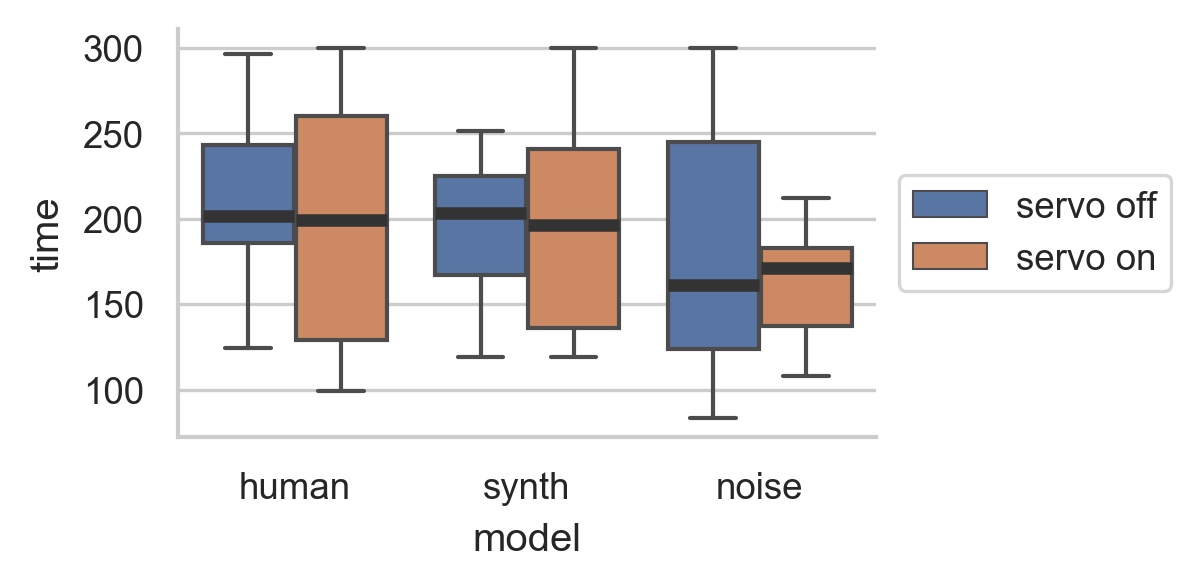
## Performance Length
- Human and synth: more range of performance lengths with motor on.
- Noise: more range with motor off.
Distributions of performance lengths.
## EMPI Takeaways
- Studied self-contained intelligent instrument in genuine performance.
- Physical representation could be polarising.
- Performers work hard to understand and influence ML model.
- Constrained, intelligent instrument can produce a compelling experience.
A participant performing with EMPI in the study
# Questions: Who has a question?
**Talk:** 🙋🏽♀️🤷💁🏻🗣️ Who has a question?
Meet you *at the bar* afterwards. 🍸🥤🫖☕️ Unfortunately no drinks served! 🙃
# References
Delwiche, L. D., & Slaughter, S. J. (2019). *The little SAS book: A primer*. SAS institute.
Kohavi, R., Tang, D., & Xu, Y. (2020). *Trustworthy online controlled experiments: A practical guide to A/B testing*. Cambridge University Press.
Kohavi, R., & Thomke, S. (2017). The surprising power of online experiments. *Harvard Business Review*, *95*(5).
Kramer, A. D. I., Guillory, J. E., & Hancock, J. T. (2014). Experimental evidence of massive-scale emotional contagion through social networks. *Proceedings of the National Academy of Sciences*, *111*(24), 8788–8790.
Lazar, J., Feng, J. H., & Hochheiser, H. (2017). *Research methods in human-computer interaction* (Second). Morgan Kaufmann.
Martin, C. P., Glette, K., Nygaard, T. F., & Torresen, J. (2020). Understanding musical predictions with an embodied interface for musical machine learning. *Frontiers in Artificial Intelligence*, *3*, 1–13.
Verma, I. M. (2014). Editorial expression of concern: Experimental evidence of massive-scale emotional contagion through social networks. *Proceedings of the National Academy of Sciences*, *111*(29), 10779.
Wobbrock, J. O., Findlater, L., Gergle, D., & Higgins, J. J. (2011). The aligned rank transform for nonparametric factorial analyses using only anova procedures. *Proceedings of the SIGCHI Conference on Human Factors in Computing Systems*, 143–146.