Statistical Analysis

Dr Charles Martin

Announcements

  • final project specification available
  • final project repo not available yet
  • assignment 2: marks out next week.
  • week 11: last “tutorial”
  • week 12: drop ins (same time) to help with your final project.
  • weather is getting nice! go outside! (watch this lecture outside!)

Plan for the class

  1. Performing data analysis in details.
  2. Understand the contexts of use and assumptions of each method.
  3. Interpret results appropriately.
  4. Justify the validity of findings in academic contexts.

Reference book this class is Lazar et al. (2017) chapter 4 “Statistical Analysis”. This book discusses statistical analysis in the context of HCI (but doesn’t show how to do it in Python).

Preparing Data for Analysis

Week 5 content recap: What data pre-processing do we need to do?

  • Manually entered, errors, inconsistent formats.
  • Primitive which need higher level coding.
  • Specific statistical analysis method or software require layout or format (Delwiche & Slaughter, 2019).

Steps for preparing data

  1. Cleaning up data: basic check for manual errors, all data are correctly grouped, remove problematic ones.
  2. “Coding” data, sometimes need to manually change data to numerical codes (e.g., Likert scales)
  3. Organising data: make sure your data is in sensible formats and can be safely saved for publication or storage.

Descriptive Stats Revision

  • measures of central tendency:
    • describe where most data is clustered, shows the representative characteristic.
    • Mean, median, mode.
  • measures of spread:
    • measuring variability, tells us how much data values differ from the center.
    • Range, variance, std.
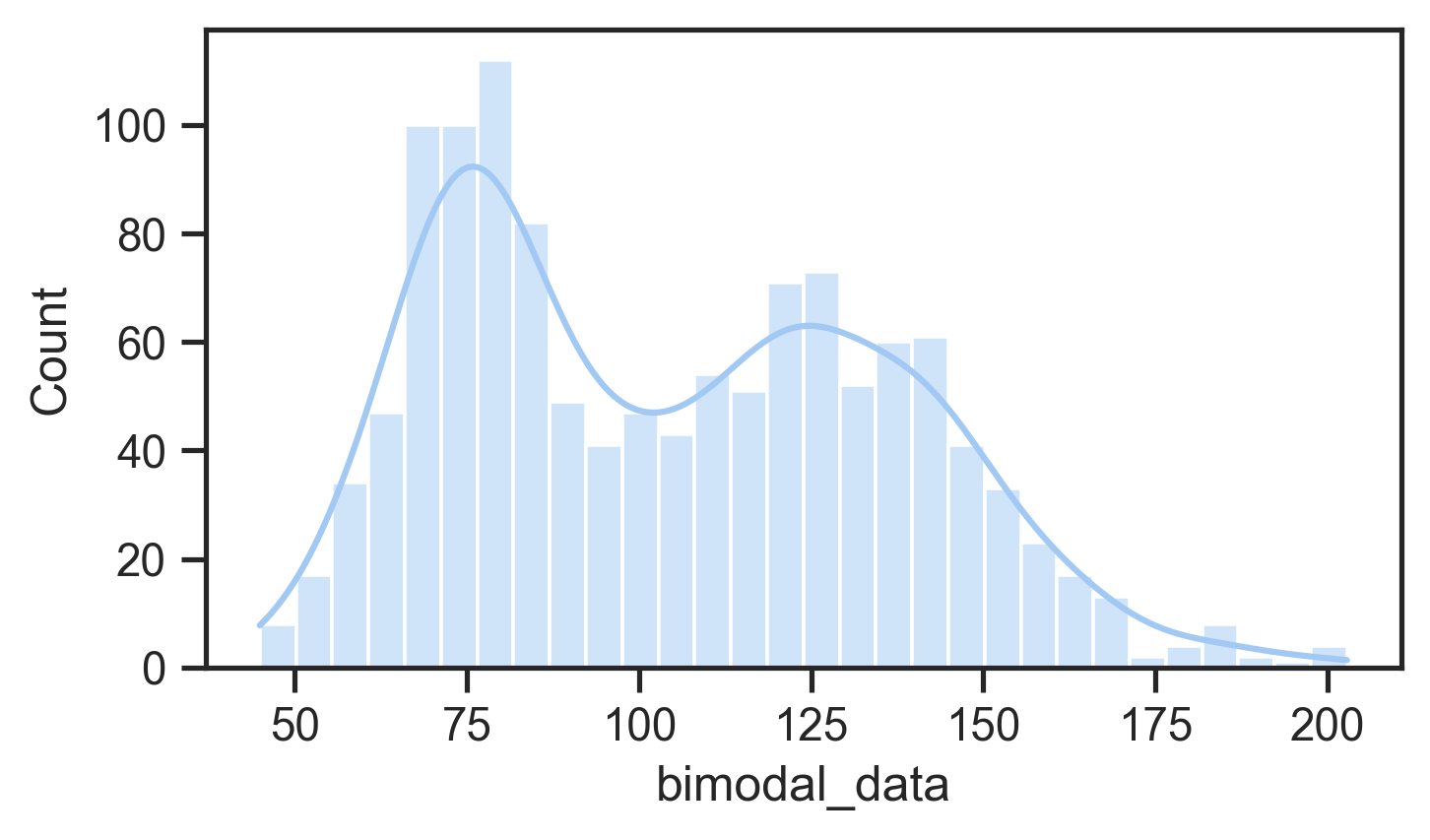
  • normal distribution defined by mean and standard deviation
    • Many statistical tests (e.g., t-tests, ANOVAs) assume normality
    • Can use tests or plots to check for normality
    • If not normal: consider data transformation or nonparametric tests
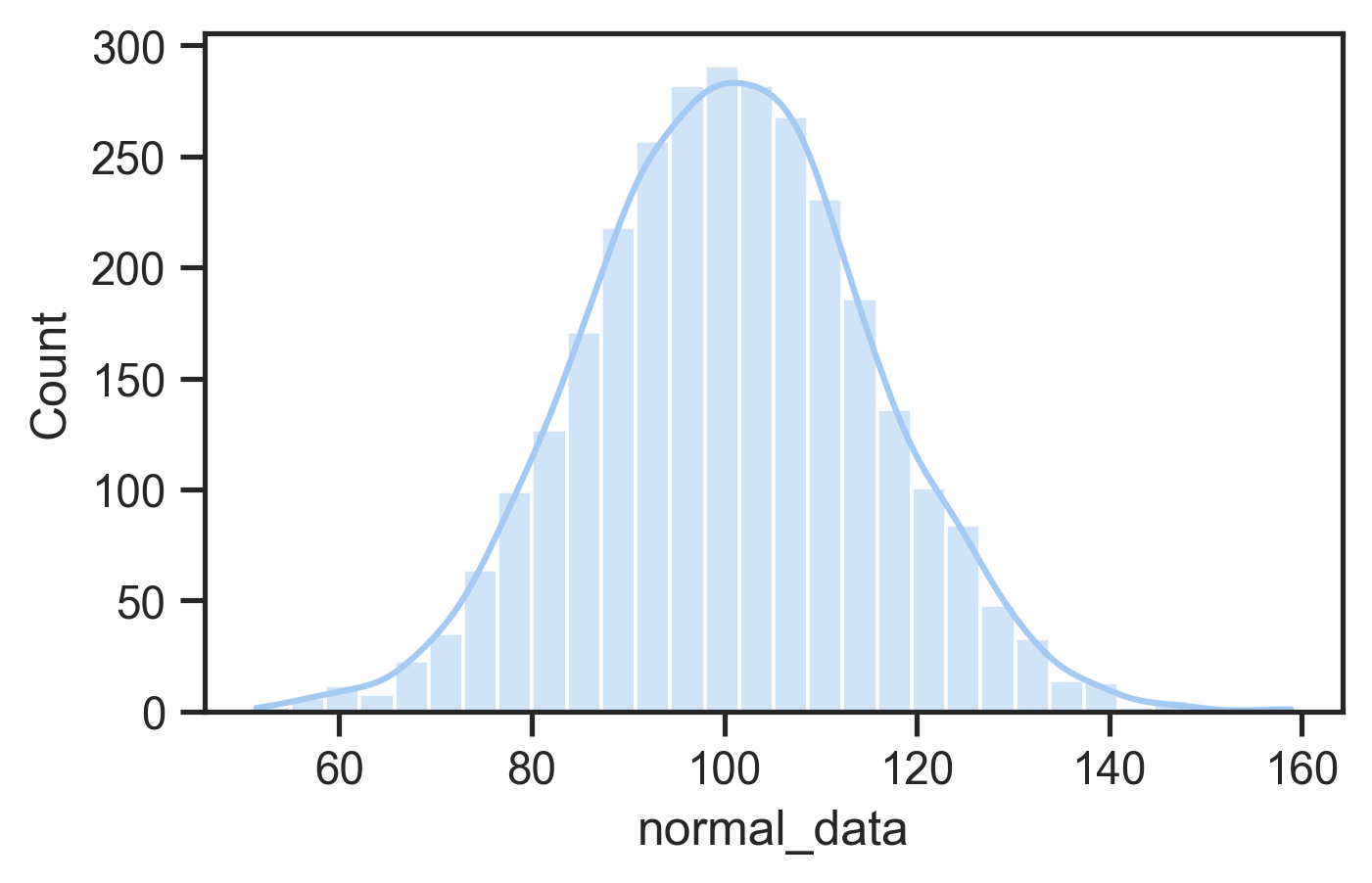
Normal distribution
Non-normal (bimodal) distribution

Why compare means

In an evaluation with two groups or conditions, we want to know whether differences are meaningful or not.

  • Between-group design: Different participants in each condition.
  • Within-group design: Same participants experience all conditions.

Feels like we doing chemistry or biology… (Photo by CHUTTERSNAP on Unsplash)

Why Not Just Compare Means?

As an example: Is an height difference of 20cm meaningful?

  • If talking about adult people, probably yes.
  • If talking about mature Eucalyptus trees, probably no.
  • Means don’t account for data variance.

So what do we do?

  • Significance testing
  • Compares explained variance (from independent variable) vs. unexplained variance (random/error).

A tall tree (Photo by gryffyn m on Unsplash)

What’s a p-value?

  • p-values are thrown around a lot in some scientific fields
  • p is the probability of obtaining a measurement by chance given the existing distribution of measurements.
  • low p-value = low probability difference occurred by chance: likely a real effect
  • low p-value is evidence supporting a hypothesis

A typical cut-off for “significance” is p = 0.05. Is this the best choice?
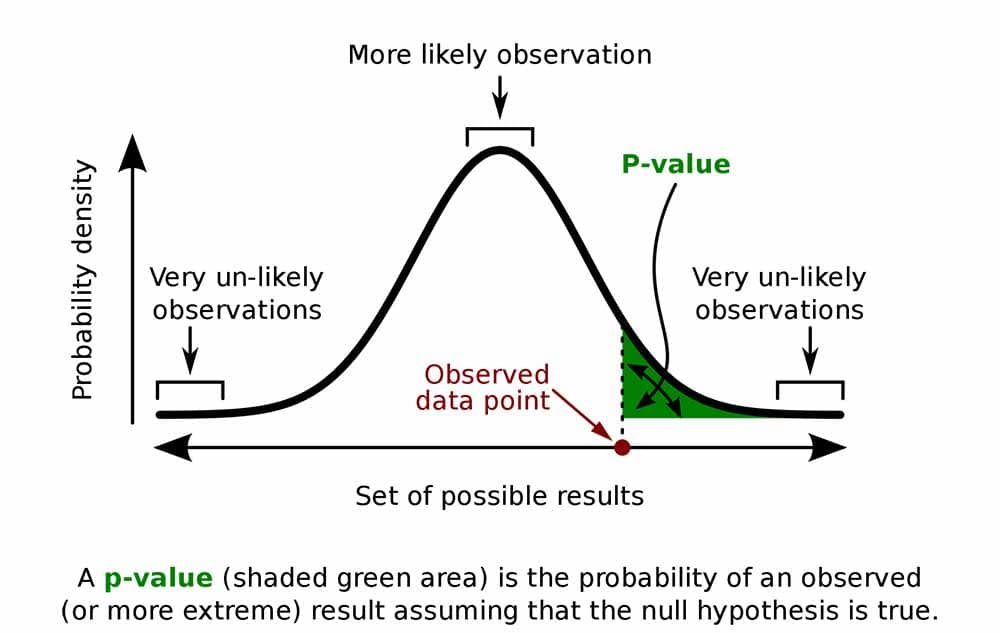
p-value diagram with a normal distribution (source)

What are degrees of freedom?

Significance tests involve estimating probability distributions and a concept called degrees of freedom (df) representing the number of independent values that can vary in your analysis while still calculating the statistic you need.

  • how much information you have left after using some data to estimate parameters. For example, if you know the mean of 10 scores, only 9 can vary freely—the last one is determined.

  • different tests use different df calculations: for independent samples t-test comparing two groups df = n1 + n2 − 2

  • few samples leads to low df: more samples leads to higher df, more complex tests consume more degrees

  • low df leads to higher p. Fewer degrees of freedom requires a stronger test statistic to reach significance because you have less information.

  • df often reported alongside your test statistic (e.g., t(28) = 2.45, p < 0.05) so readers can evaluate analysis and sample constraints

A Significance Test Menu

Test Type Specific Test Use Case
t Test Independent-samples t test Between-group comparison (2 groups)
Paired-samples t test Within-group comparison (same participants, 2 conditions)
ANOVA One-way ANOVA 1 independent variable, 3+ groups
Factorial ANOVA 2+ independent variables
Repeated measures ANOVA Same participants across 3+ conditions
Split-plot ANOVA Mix of between- and within-subject factors

These tests are for continuous (parametric) data, and assume that the data is normally distribution.

Statistics: t-tests

  • Used in HCI to compare means between two conditions (e.g., menu selection times)
  • Include the t-value, degrees of freedom (df), and p-value, where df depends on participant numbers, and p indicates the probability the result is due to chance.
  • p < 0.05 (1-in-20 chance of a random result) typically taken as evidence supporting a hypothesis
  • smaller p-values (e.g., <0.01) indicating stronger evidence
  • independent values: when comparing samples from different participants
  • paired values: comparing different observations of the same participants.
from scipy.stats import ttest_ind, ttest_rel

# independent values t-test
t_stat, p_value = ttest_ind(group1, group2, equal_var=False) 
# observations of different participants
print(f"t-statistic: {t_stat:.4f}, p-value: {p_value:.4f}")

# paired-values t-test
t_stat, p_value = ttest_rel(observation1, observation2) 
# different observations of the same participant.
print(f"t-statistic: {t_stat:.4f}, p-value: {p_value:.4f}")

Analysis of Variance

What if you have more than two groups to compare? (e.g., three+ interface variations?)

What if you have more than one independent variable? (e.g., comparing the individual and combined effects of two separate aspects of an interface)

Analysis of variance (ANOVA) enables these more complicated comparisons.

An ANOVA’s output is a statistic called F so sometimes called an F-test.

(Photo by Jack Dixon on Unsplash)

Different ANOVAs

ANOVAs can be used in lots of situations: between-groups, within-groups, one or multiple independent variables, even multiple dependent variables.

  • Need to design experiments carefully for valid statistical analysis.
  • Need to take care of the programming API for calling an ANOVA procedure.

Types of ANOVAs:

  • One-way ANOVA: comparing means of two or more groups with one independent variable
  • Factorial ANOVA: comparing means of two or more groups with multiple independent variables
  • Repeated measures ANOVA: comparing means of different observations of one group
  • Multivariate ANOVA (MANOVA): comparing multiple means (more than one response variable) of different/same groups

Assumptions of t tests and F tests

  • Homogeneity of variance: when multiple groups are compared, tests are more accurate if variances of the sample population are nearly equal.
  • Use transformation techniques when not.
  • Errors should be normally distributed, otherwise highly skewed data result in false results!

ANOVA examples

One-way ANOVA:

from scipy.stats import f_oneway
import statsmodels.api as sm
from statsmodels.formula.api import ols

# group by 'independent' column and compare dependent column
groups = [group['dependent'].values for _, group in df.groupby('independent')]
f_stat, p_value = f_oneway(*groups)

# create a Model from a formula and dataframe and run anova on that
model = ols('dependent ~ C(independent)', data=df).fit()
anova_table = sm.stats.anova_lm(model, typ=2)

Factorial ANOVA:

# factorial anova: example effects of two independent variables and their interaction
# model: tempo ~ key + mode + key:mode
model = ols('dep ~ C(ind_1) + C(ind_2) + C(ind_1):C(ind_2)', data=df).fit()
anova_table = sm.stats.anova_lm(model, typ=2)

These examples use the statsmodels package which allows more serious statistical modelling for complex experiments.

Identifying relationships

Understand how variables relate to each other (e.g., is age or experience related to performance?)

Correlation:

  • Measures the strength and direction of the linear relationship between two variables.
  • Most common method: Pearson’s r: range: -1.00 (negative) to 1.00 (positive). 0 indicates no linear relationship.

Pearson’s r2 (Coefficient of Determination)

  • Represents the shared variance between two variables.
  • Example: If r = 0.70, then r2 = 0.49, meaning 49% of variance in one variable is explained by the other.

Note: correlation not equal to causation!

Imagine an experiment measuring time spent in an online shopping app vs income.
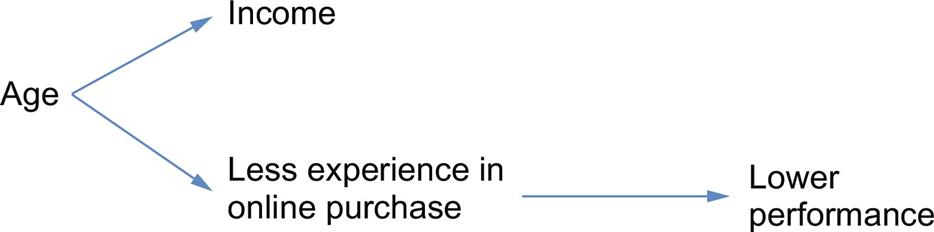
Relationship between correlated variables and an intervening variable.

E.g., income vs. performance may be correlated due to an intervening variable (e.g., age) rather than directly related.

Regression

Examine the relationship between one dependent variable and one or more independent variables.

Simultaneous (Standard) Regression

  • All independent variables entered at once.
  • Measures combined influence on the dependent variable.
  • Result: R2 = % variance explained by all predictors as a group.

Hierarchical Regression

  • Variables entered in blocks/steps, based on theory.
  • Testing individual predictors after accounting for others (e.g., covariates).
  • Controlling for known influences (e.g., age) before testing new variables.

Nonparametric statistical tests

Many situations where data does not fit the expectations for t or ANOVA tests, e.g.:

  • it’s categorical
  • skewed

Non-parametric tests can help with this data:

  • data collected from two independent samples (e.g., between group): Mann-Whitney U test
  • two datasets from the same user group - paired-samples t test; otherwise Wilcoxon signed ranks test
  • three or more datasets: Kruskal-Wallis one-way ANOVA
    • dependent: Friedman’s two-way ANOVA
  • Factorial ANOVA: Aligned rank transform ANOVA (Wobbrock et al., 2011)

Chi-squared test

Helps to analyse categorical data: e.g., a yes/no choice.

Does this look random?

Group Yes No
A 5 7
B 11 1

Results:

  • Chi-square statistic: 4.6875
  • Degrees of freedom: 1
  • p-value: 0.0304 (p < 0.05)
data = {
    'Group': ['A', 'A', 'A', 'A', 'A', 'A', 'A', 'A', 'A', 'A', 'A', 'A', 'B', 'B', 'B', 'B', 'B', 'B', 'B', 'B', 'B', 'B', 'B', 'B'],
    'Answer': ['Y', 'Y', 'N', 'N', 'Y', 'N', 'Y', 'Y', 'N', 'Y', 'N', 'Y', 'Y', 'N', 'N', 'N', 'N', 'N', 'N', 'N', 'N', 'N', 'N', 'N']
}
df = pd.DataFrame(data)
contingency_table = pd.crosstab(df['Group'], df['Answer'])
print(contingency_table)
chi2, p, dof, expected = chi2_contingency(contingency_table)
print(f"Chi-square statistic: {chi2:.4f}")
print(f"Degrees of freedom: {dof}")
print(f"P-value: {p:.4f}")

Case Studies

Studying different kinds of musical instruments.

Comparing AI models on a physical musical instrument

Research question:

What effects will different machine learning models and feedback mechanisms have on simple improvised music performances?

“Understanding Musical Predictions with an Embodied Interface for Musical Machine Learning” Martin et al. (2020)
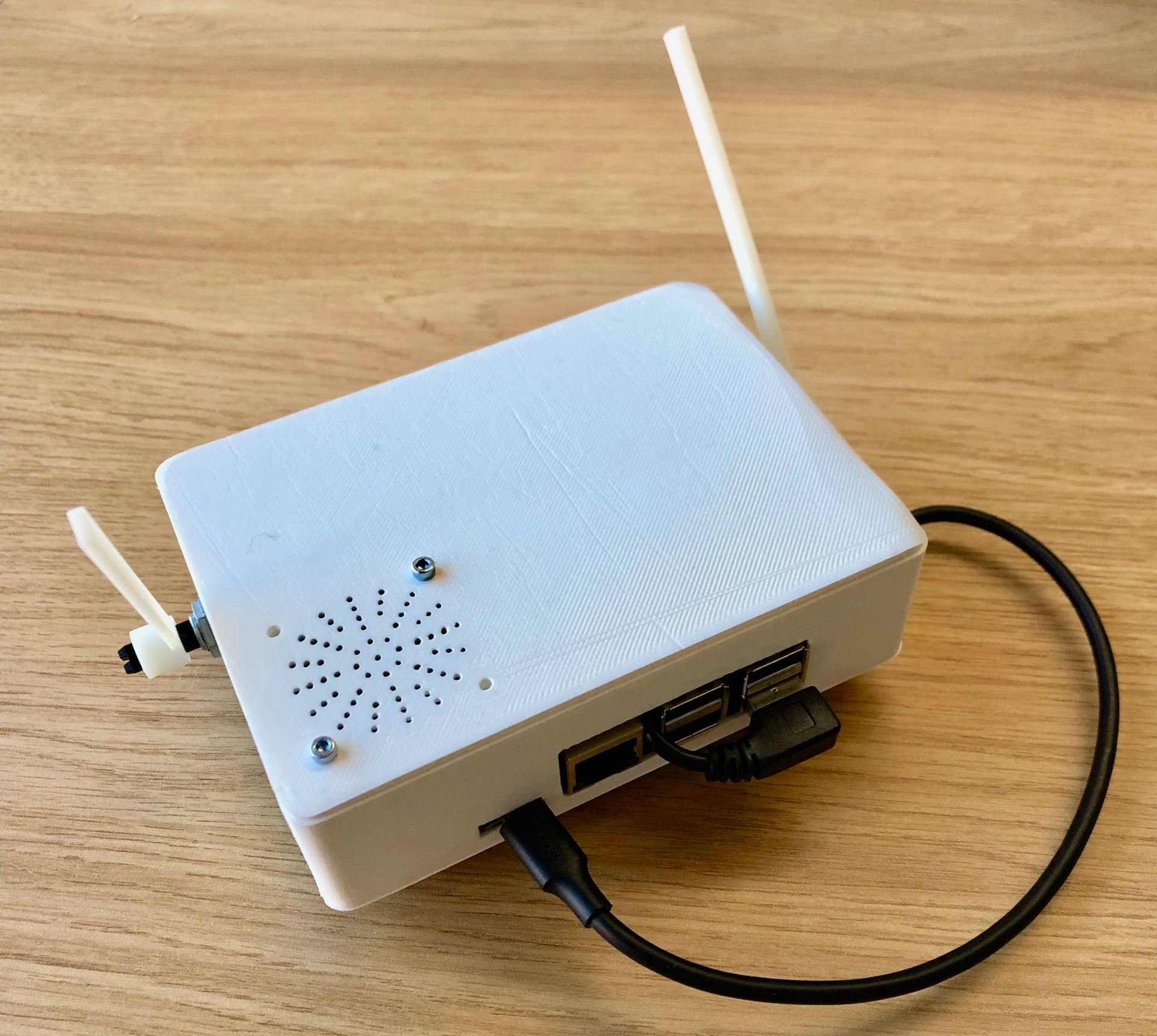
The Embodied Musical Predictive Instrument (EMPI)

IMPSY Experiment Design

  • 12 participants did a short improvisation with each ML model and with the motor turned on and off.
  • Six improvisation for each performer!
  • 3 by 2 design
  • Used quantitative data to compare the six experiences
  • Survey of 8 aspects of the performance
  • Measured length of improvisations
X Motor off Motor on
Human Human/Off Human/On
Synth Synth/Off Synth/On
Noise Noise/Off Noise/On

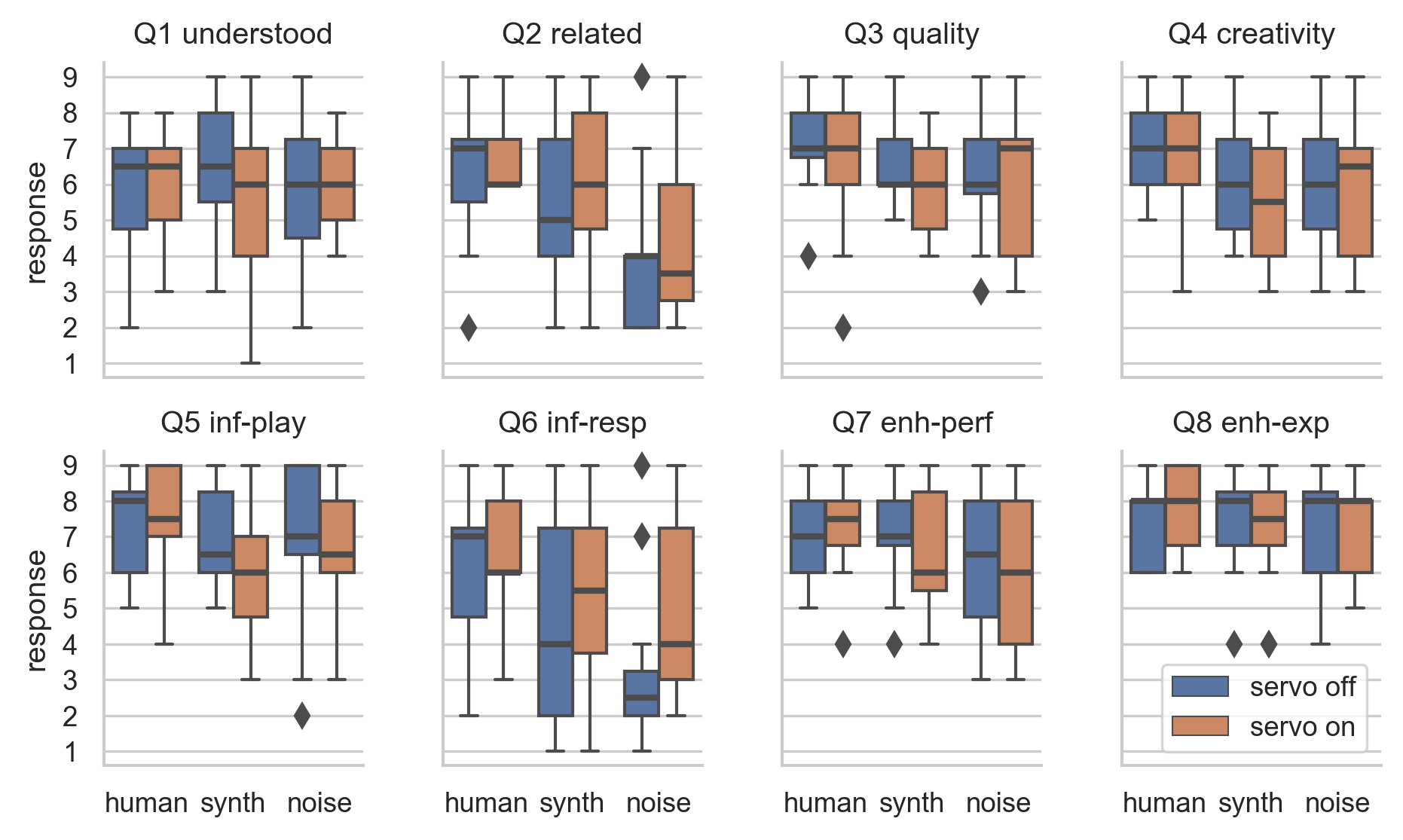
Survey Results: ART ANOVA and pairwise t-tests

  • Change of ML model has significant effect: Q2, Q4, Q5, Q6, Q7
  • Human model most “related” and “creative”, noise least.
  • Noise model not rated badly!
Distributions of survey results.

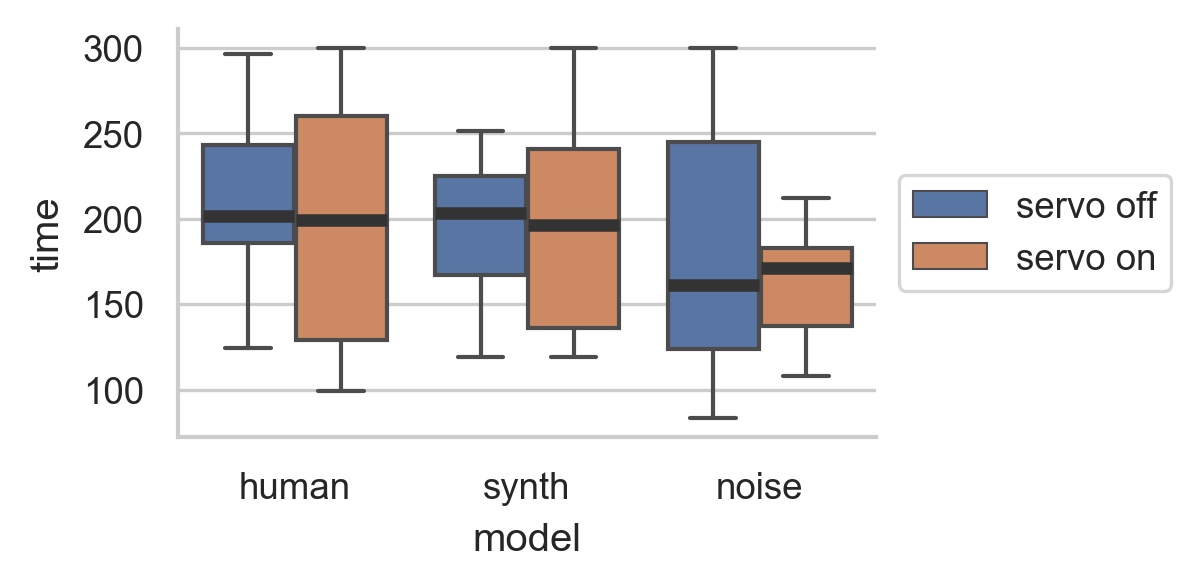
Performance Length

  • Human and synth: more range of performance lengths with motor on.
  • Noise: more range with motor off.
Distributions of performance lengths.

EMPI Takeaways

  • Studied self-contained intelligent instrument in genuine performance.
  • Physical representation could be polarising.
  • Performers work hard to understand and influence ML model.
  • Constrained, intelligent instrument can produce a compelling experience.

A participant performing with EMPI in the study

Questions: Who has a question?

Who has a question?

Meet you at the bar for questions. 🍸🥤🫖☕️ Unfortunately no drinks served! 🙃

References

Delwiche, L. D., & Slaughter, S. J. (2019). The little SAS book: A primer. SAS institute.
Lazar, J., Feng, J. H., & Hochheiser, H. (2017). Research methods in human-computer interaction. Morgan Kaufmann.
Martin, C. P., Glette, K., Nygaard, T. F., & Torresen, J. (2020). Understanding musical predictions with an embodied interface for musical machine learning. Frontiers in Artificial Intelligence, 3, 6. https://doi.org/10.3389/frai.2020.00006
Wobbrock, J. O., Findlater, L., Gergle, D., & Higgins, J. J. (2011). The aligned rank transform for nonparametric factorial analyses using only anova procedures. Proceedings of the SIGCHI Conference on Human Factors in Computing Systems, 143–146. https://doi.org/10.1145/1978942.1978963