## Announcements

- **Assignment 2** is due in two weeks!
- Next **two tutorials** include assignment support baked into the activities.
- Still processing a few queries related to Assignment 1, should be finished soon.
- New **FAQ page** on the course website.
- **Final project** involves thinking about alternative *interfaces* so this is an important lecture!

**Who has a question about assignment 2?**

## Plan for the class

- Research skills (how to use Google Scholar and cite references)
- Overview of the diversity of interfaces in use and in research!
- A method for looking at any interface: *affordance analysis*
- Outline key design and research considerations
- A case study: Apple’s Newton vs the Palm Pilot (who does the learning?)
- Think about *natural* user interfaces
- Think about which interface is *best* for a given application or activity

# Research Skills

## Finding a source

- Assignments in this class require you to make independent choices
- Your choices should be backed by a source of knowledge, e.g.,
  - *what* abilities does a particular animal have?
  - *what* research plan makes sense for particular interface?
  - *why* do human-AI interfaces have usability problems?

In scholarly writing, we need to **support** every statement we make. Support can be: either (1) a citation to a scholarly source *or* (2) evidence from a study. **Where do you find these sources?**

## Google Scholar

<div class="columns">

<div class="column" width="60%">

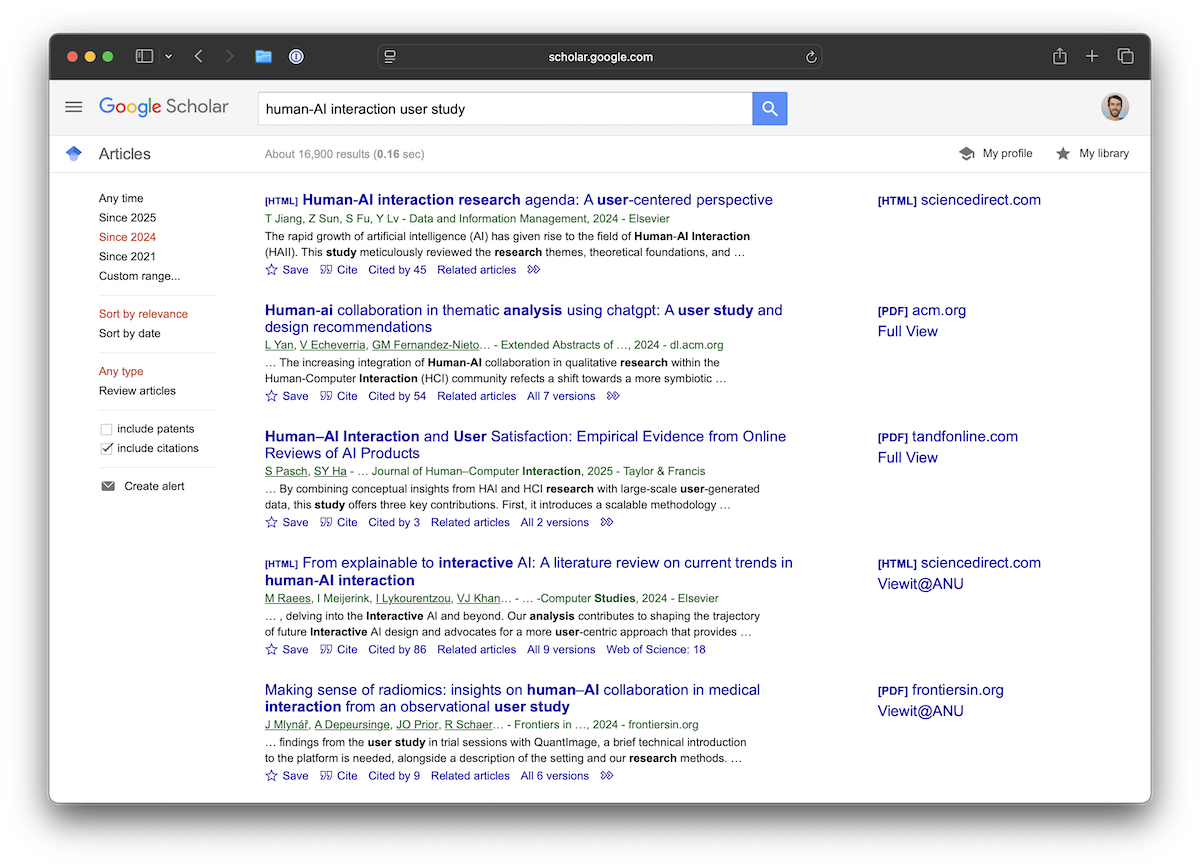
- search engine for scholarly sources
- add more search terms to get more specific
- you can use the “time” selector on the left column to find recent work

<div class="warn-box">

**Careful:**

- Google Scholar indexes anything that *looks* like scholarly research (e.g., any PDFs on a website in a conference/journal format). Need to use critical thinking to decide whether sources are good quality or not.
- Google Scholar can give you a formatted citation but it may not have all information (e.g., URL, DOI)

</div>

</div>

<div class="column" width="40%">

<figure>
<img src="img/sources-google-scholar.png" alt="Finding sources with Google Scholar" />
<figcaption aria-hidden="true">Finding sources with Google Scholar</figcaption>
</figure>

</div>

</div>

## ACM Digital Library

<div class="columns">

<div class="column" width="60%">

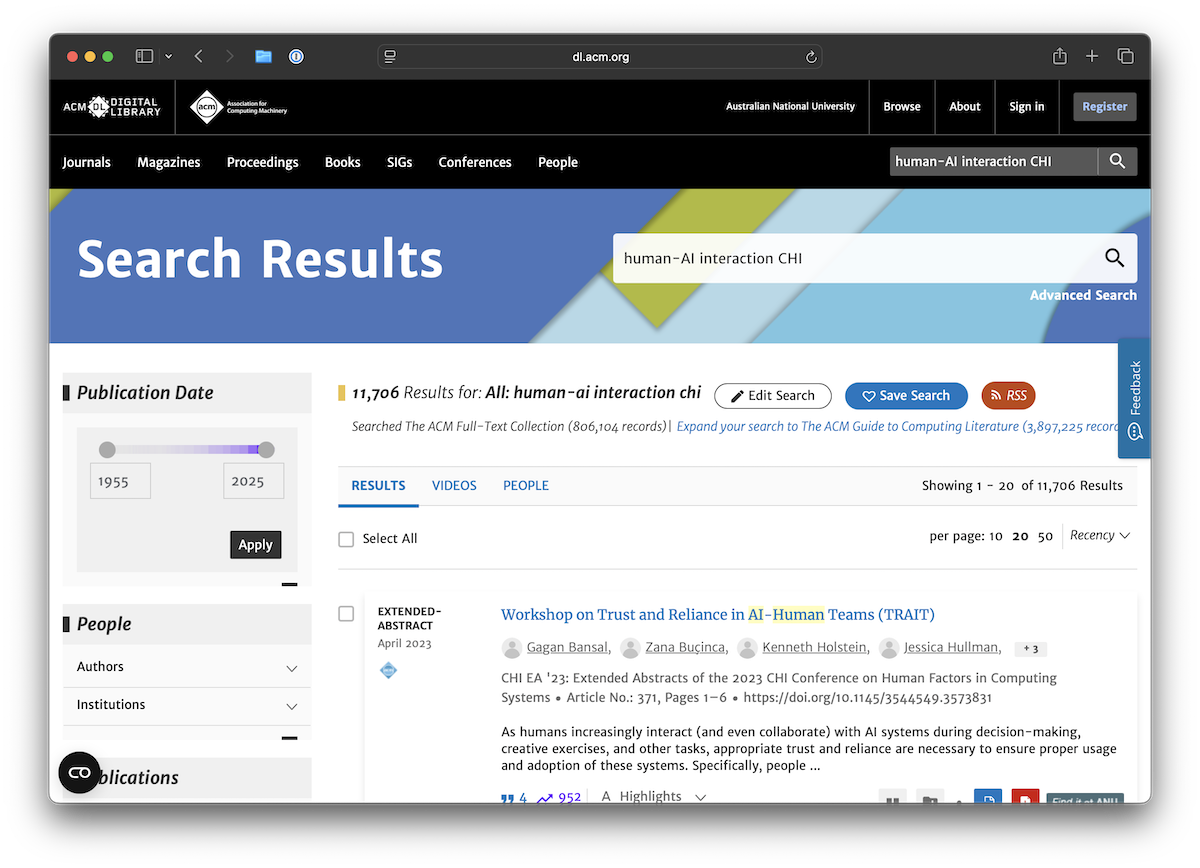
- ACM Digital Library archives proceedings of ACM conferences and journals.
- not as good at searching, but will show you only peer-reviewed works

<div class="warn-box">

**Careful:**

- CHI and ACM are centres of HCI research, but there are other non-ACM venues that could be missed.
- ACM DL is open access, some other publishers may require `virtual.anu.edu.au` to access papers.

</div>

</div>

<div class="column" width="40%">

<figure>
<img src="img/sources-acm-dl.png" alt="Finding sources with ACM Digital Library" />
<figcaption aria-hidden="true">Finding sources with ACM Digital Library</figcaption>
</figure>

</div>

</div>

## Citations

In this class, we are going to standardise on numerical citations. When you state something in your text that needs support, you put the citation at the end of the sentence \[1\].

### References

1.  Kazuhiro Wada, Masaya Tsunokake, and Shigeki Matsubara. 2025. Citation-Worthy Detection of URL Citations in Scholarly Papers. Proceedings of the 24th ACM/IEEE Joint Conference on Digital Libraries. Association for Computing Machinery, New York, NY, USA, Article 28, 1–5. <https://doi.org/10.1145/3677389.3702570>

## Writing references in Markdown

Write your reference list as a **numbered Markdown list**, and end every entry with a working link — a DOI written as a URL, or `Retrieved Month Day, Year from <URL>` for web sources:

``` markdown
### References

1. Kazuhiro Wada, Masaya Tsunokake, and Shigeki Matsubara. 2025. Citation-Worthy
   Detection of URL Citations in Scholarly Papers. Proceedings of the 24th ACM/IEEE
   Joint Conference on Digital Libraries. Association for Computing Machinery,
   New York, NY, USA, Article 28, 1–5. <https://doi.org/10.1145/3677389.3702570>
```

<div class="warn-box">

**Careful:** don’t type `[1]` yourself at the start of a line. `[1]: ...` is Markdown link-definition syntax — the line **vanishes** from the rendered page — and `[1] ...` paragraphs merge together unless you leave blank lines between them. A numbered list avoids both. (A bare `[1]` in your sentences is fine — that’s how you cite.)

</div>

## Metadata vs citation format

<div class="columns">

<div class="column" width="42%">

- metadata for a reference can be used with any citation format
- academics often use special tools for storing reference metadata
- computer scientists tend to use `BibTeX` format
- `BibTeX` is part of the venerable (`La`)[`TeX` ecosystem originally developed by CS luminary Donald Knuth](https://en.wikipedia.org/wiki/TeX) in the late 70s
- in LaTeX you can select citation format (e.g., ACM, IEEE, Chicago, Harvard, APA)

</div>

<div class="column" width="58%">

    @inproceedings{adiwangsa-charades:2025,
      author = {Adiwangsa, Michelle and Bransky,
        Karla and Wood, Erika and Sweetser, Penny},
      title = {A Game of ChARades: Using Role-Playing
        and Mimicry with and without Tangible Objects
        to Ideate Immersive Augmented Reality
        Experiences},
      year = {2025},
      isbn = {9798400714863},
      publisher = {Association for Computing
        Machinery},
      address = {New York, NY, USA},
      url = {https://doi.org/10.1145/3715668.3736382},
      abstract = {Using tangible objects for
        immersive augmented reality (AR) ...},
      booktitle = {Companion Publication of the 2025
        ACM Designing Interactive Systems Conference},
      pages = {440–445},
      numpages = {6}
    }

The entry for Adiwangsa et al. ([2025](#ref-adiwangsa-charades:2025)), cited as `[@adiwangsa-charades:2025]` in Markdown or `\cite{adiwangsa-charades:2025}` in LaTeX.

</div>

</div>

## Big BibTeX files

<div class="columns">

<div class="column" width="50%">

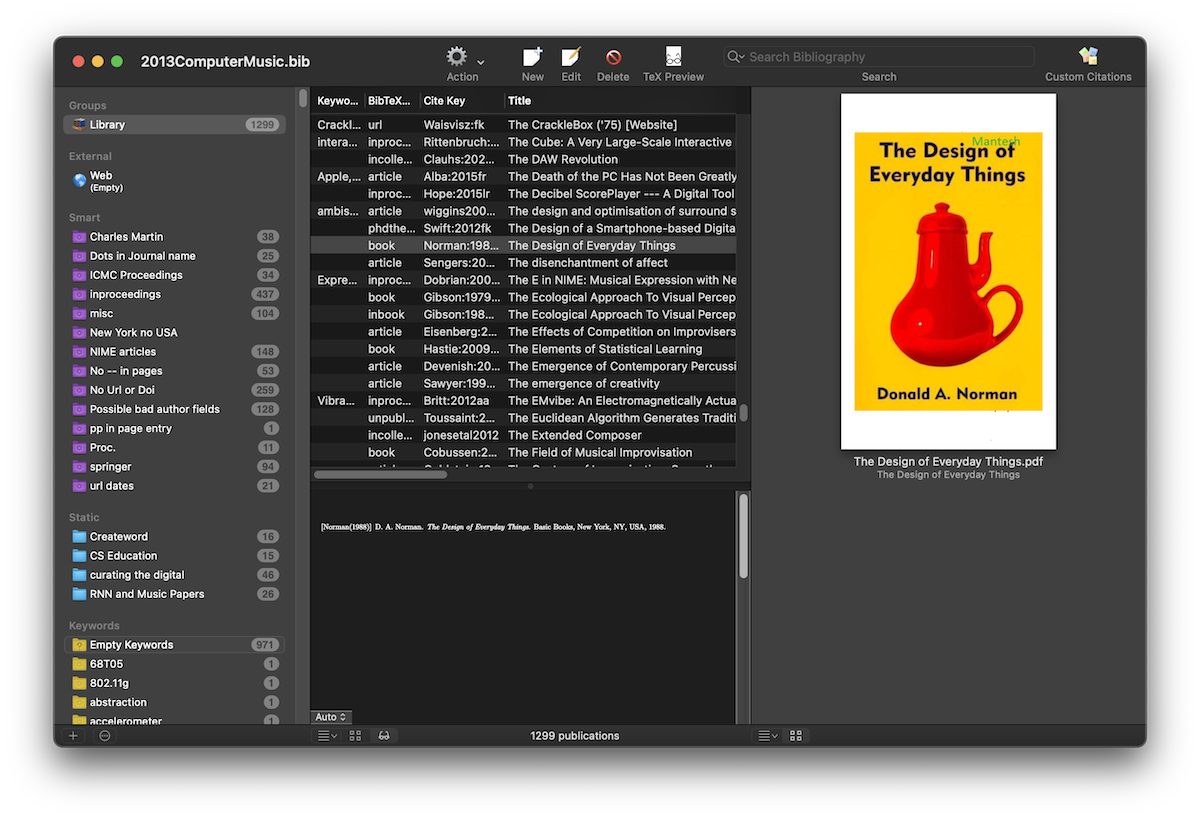
Big reference libraries are part of academic work.

- Charles’ “main” `.bib` file has ~1300 entries (started in 2013, first year of Charles’ PhD!)
- `references.bib` for [this course](https://github.com/smcclab/thirty-nine-hundred-hci/blob/main/references.bib) has about 100 entries.
- Charles uses [BibDesk](https://bibdesk.sourceforge.io) to manage the big file, but usually just VSCode for smaller bibtex libraries.
- Other popular reference managers are Zotero, Mendeley and Endnote.
- Opinion time: Bibdesk is nice because the database is just a text file.

</div>

<div class="column" width="50%">

<figure>
<img src="img/bibdesk.png" alt="References listed in Bibdesk" />
<figcaption aria-hidden="true">References listed in Bibdesk</figcaption>
</figure>

</div>

</div>

## In this class…

<div class="columns">

<div class="column" width="60%">

- Not expecting you to use BibTeX (yet)
- Expecting you to list references in “ACM format”.
- ACM format is inspired by APA referencing
  - supports both numerical \[1, 2\] and author-date (Martin, 2020) referencing.
  - includes *full* names of authors and publication details for clarity
  - includes DOI as a full URI
- [ACM page](https://www.acm.org/publications/authors/reference-formatting) plain text examples for references to different types of source
- [CSL version](https://github.com/citation-style-language/styles/blob/master/association-for-computing-machinery.csl) (Citation Style Language)
- [BST version](https://github.com/borisveytsman/acmart/blob/primary/ACM-Reference-Format.bst) (BibTeX Style)

</div>

<div class="column" width="40%">

</div>

</div>

## Rules for this course:

1.  all references **must exist!** (!!!) – every entry ends with a working link (DOI as a URL, or `Retrieved ... from <URL>`) so we can check
2.  use ACM format
3.  use numerical citation (not author date) – saves words in your word count
4.  write your list as a numbered Markdown list (`1.`, `2.`, …) under a References heading
5.  all references in your list should be cited in text
6.  you have actually read references and that they are relevant to your work
7.  at least two references should be *scholarly* (so not a medium article) and *external* (so not course lecture notes or textbook)
8.  expectation: ✨✨*perfection*✨✨

## Who has a question about referencing and finding sources?

<div class="warn-box">

**Careful:** mucking up citations is a risk to lose marks unnecessarily. Easy to do, but looks really bad to markers.

</div>

<div class="talk-box">

**Talk:** 🙋🏽‍♀️🤷💁🏻🧠🗣️ Let’s clear up some questions now if you have them!

</div>

# Understanding Interfaces

## Describing Interfaces

How would you describe a computer interface?

> graphical, command, speech, ambient, intelligent, tangible, touch free, natural, etc.

Focus of interface can change:

- **function** e.g., *smart*phones
- **interaction style** used e.g., command, graphical or multimedia
- **input/output device** e.g., pen-based, speech-based, or gesture-based
- **platform** e.g., tablet, mobile, PC, or wearable

## Interaction Types

<div class="columns">

<div class="column" width="40%">

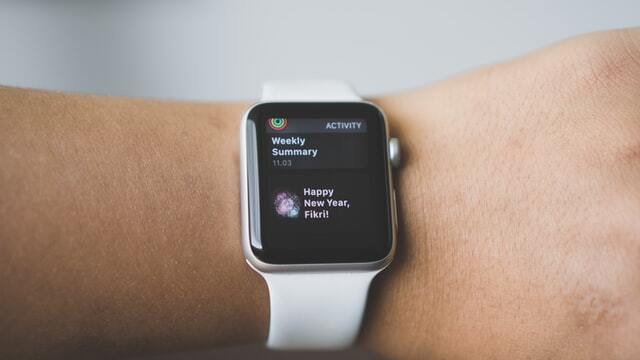
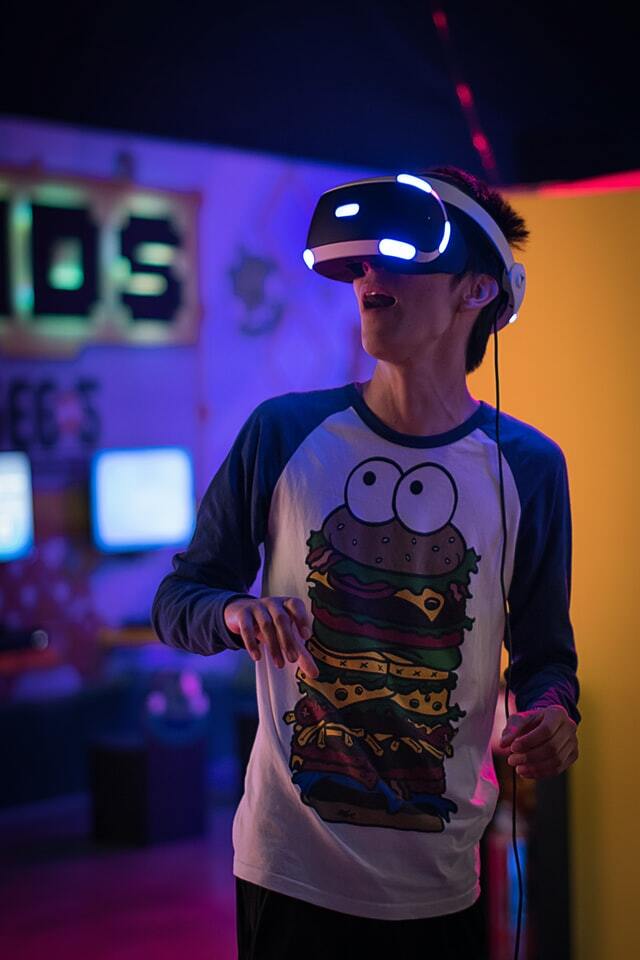
There are many interfaces, but only a handful of ways of *interacting* with them ([Rogers et al., 2023](#ref-rogers-beyond-hci:2023)):

- Instructing: issue commands
- Conversing: having a dialogue
- Manipulating: acting on objects
- Exploring: moving through a space
- Responding: being addressed by the system

</div>

<div class="column" width="60%">

<img src="img/01_02_conceptualising_interaction_7.jpg" style="width:30.0%" alt="Image source: Uriel Soberanes" /> <img src="img/01_02_conceptualising_interaction_8.jpg" style="width:30.0%" alt="Image source: Fikri Rasyid" /> <img src="img/01_02_conceptualising_interaction_9.jpg" style="width:30.0%" alt="Image source: Szabo Viktor" />

</div>

</div>

## 45 years of interface types!

<div class="columns">

<div class="column" width="50%">

- Command Line
- Graphical
- Multimedia
- Virtual reality
- Web
- Mobile
- Appliance
- Voice
- Pen
- Touch
- Touchless

</div>

<div class="column" width="50%">

- Haptic
- Multimodal
- Shareable
- Tangible
- Augmented reality
- Wearables
- Robots and drones
- Brain-computer
- Smart
- Shape-changing
- Holographic

</div>

</div>

## What does an interface *offer* you?

<div class="columns">

<div class="column" width="55%">

What do these interfaces let you do, and how do you know?

- **Affordance**: a relationship between what a person can do and what a thing allows (not *just* a property of the interface) ([Norman, 2013](#ref-Norman:2013)).
- **Signifier**: the perceivable cue that the affordance is there. Buttons look pressable. A prompt invites typing.
- **Constraint**: what the interface stops you doing. Constraints can give character ([Magnusson, 2010](#ref-magnusson2010designconstrain)).

</div>

<div class="column" width="45%">

Gaver ([1991](#ref-gaver-technology-affordances:1991)) organised affordances by whether you can perceive them:

|                   | **can do**  | **can’t do** |
|-------------------|-------------|--------------|
| **signified**     | perceptible | *false*      |
| **not signified** | *hidden*    | (nothing)    |

Hidden: A shortcut you discover.

False: A button that’s too small to hit.

</div>

</div>

## Affordance analysis

Pick an interface and a task. Analyse in terms of affordances:

1.  **Interaction type**: are you instructing, conversing, manipulating, exploring or responding? ([Rogers et al., 2023](#ref-rogers-beyond-hci:2023))
2.  **Affords**: what does it let you do that other interfaces wouldn’t?
3.  **Constrains**: what can’t you do, or what is it steering you away from?
4.  **Hidden**: what’s possible but not signified? (What did you only find out by being told?)
5.  **False**: what looks possible but isn’t? (Things you tried that didn’t work?)
6.  **Learning**: what does the user have to know or learn to use it, and how much of that does the design carry for them? (Knowledge in the world, or in the head? ([Norman, 2013](#ref-Norman:2013)))

This analysis helps us answer “what is the best way for an interface to work?”

## Worked example: the thing in front of me

<div class="columns">

<div class="column" width="50%">

Let’s do it live on something easy…

| Question         | Answer |
|------------------|--------|
| Interaction type |        |
| Affords          |        |
| Constrains       |        |
| Hidden           |        |
| False            |        |
| Learning         |        |

</div>

<div class="column" width="50%">

<div class="think-box">

**Think:** As I go, think of something you might add to my analysis.

</div>

</div>

</div>

<div class="notes">

Floor for the live fill, object: the lectern (touchscreen control panel + microphone + slide clicker).

- Interaction type: instructing (press a labelled button: “Projector on”, “Mute”), with a bit of manipulating (volume slider).
- Affords: switching sources, mic level, lights, a dozen room states from one place without moving. One-handed while talking.
- Constrains: fixed menu of room states; can’t do anything the AV team didn’t pre-program. Can’t take it with me. Volume in steps not continuous.
- Hidden: long-press or a hidden “advanced” page; that the clicker also has a blank-screen button; that the mic mutes itself when docked. All things told to me by a tech, not discovered.
- False: on-screen buttons that look pressable but are greyed out / do nothing when no source connected; a “help” button that calls no one after 5pm.
- Learning: the lecturer, every new room, with no manual. Labelled buttons carry some of it; the hidden page carries none. Contrast: the AV team learned once and encoded it.

Fallbacks: the lecture-theatre door (push plate vs pull handle, Norman’s classic) or my phone lock screen (swipe up, camera shortcut hidden, notification you can’t act on = false).

</div>

## Activity: one task, three interfaces

<div class="columns">

<div class="column" width="60%">

<div class="push-box">

**Do:** The task is *tell someone you’re running late*. Do it three ways on the phone in your hand:

1.  **Type** it in your messaging app.
2.  **Dictate** it (voice keyboard or assistant).
3.  **Choose** it: pick a canned reply, a suggested message, or an emoji from a menu, without writing anything.

In pairs, run the six questions on each. Which was fastest? Which would you choose in a lecture theatre, on a bike, in a hurry, in another language?

Post your most interesting *hidden* or *false* affordance to the poll. 15 minutes.

</div>

</div>

<div class="column" width="40%">

<figure>
<img src="img/polleverywhere-charles-qr.png" alt="PollEverywhere link: https://pollev.com/charlesmarti205" />
<figcaption aria-hidden="true">PollEverywhere link: <a href="https://pollev.com/charlesmarti205" class="uri">https://pollev.com/charlesmarti205</a></figcaption>
</figure>

</div>

</div>

## What the activity shows

- The same task is not quite the same task: each interface reshaped what “tell someone” meant (a sentence, a spoken phrase, a location).
- Interaction type predicts a lot: instructing is fast for experts and opaque for novices; manipulating is discoverable and slow; conversing requires a system to know a lot.
- “Best” usually depends on your context and you.

Now the catalogue of interfaces. Every type that follows is a different bundle of affordances and constraints backed by research and design considerations.

# The Human-Computer Interface Catalogue

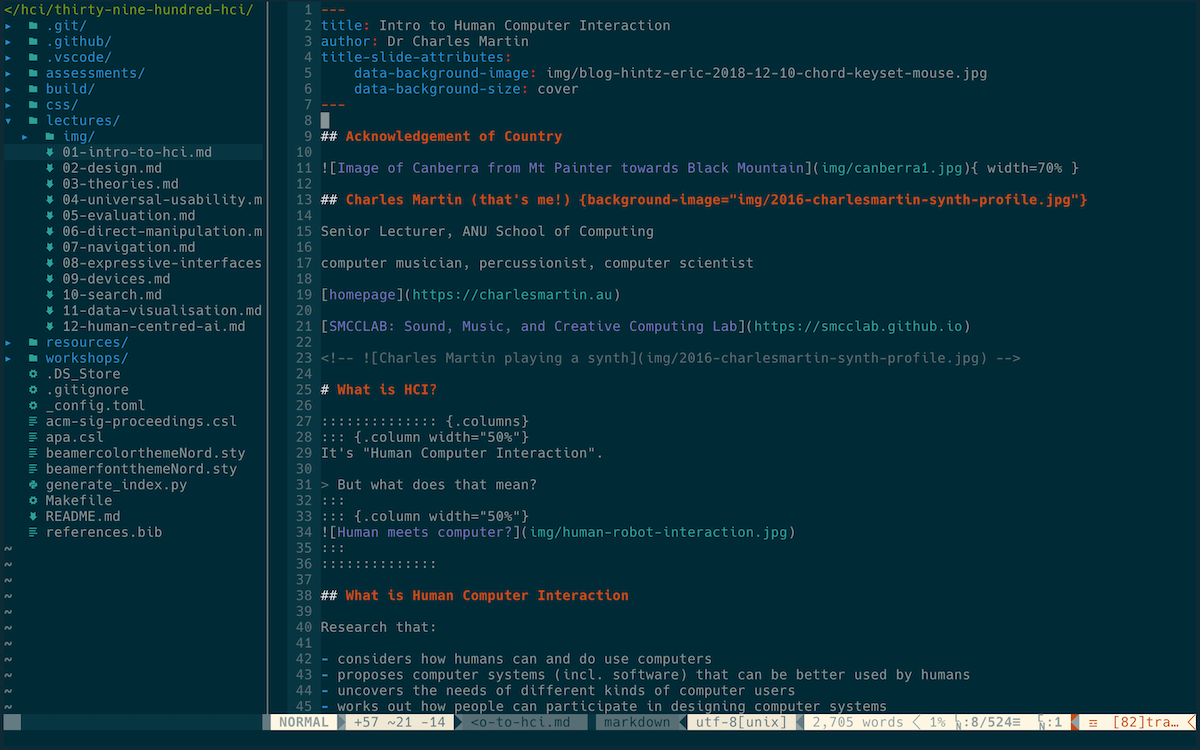
## Command Line Interfaces

<div class="columns">

<div class="column" width="50%">

- Type in commands (e.g., `ls`) or key combos (e.g., `:q!`)
- largely superseded, but useful for complex software (e.g., CAD), scripting, coding
- 1980s research on command form (abbreviations, familiar names), syntax and organisation found no universal optimum for naming ([Shneiderman, 1992](#ref-shneiderman-designing-ui:1992))

<div class="info-box">

**Design principle:** naming the commands should be as *consistent* as possible!

</div>

</div>

<div class="column" width="50%">

<figure>
<img src="img/charles-neovim.png" style="width:100.0%" alt="Charles editing a lecture in neovim (:w)" />
<figcaption aria-hidden="true">Charles editing a lecture in neovim (<code>:w</code>)</figcaption>
</figure>

</div>

</div>

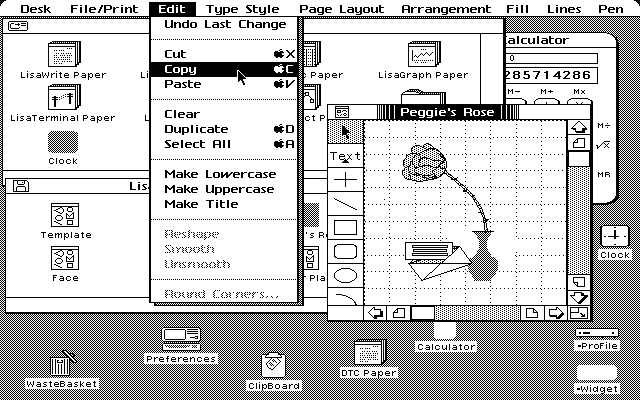
## Graphical User Interfaces

<div class="columns">

<div class="column" width="50%">

- Information represented within a graphical interface
- use of color, typography, and imagery ([Mullet & Sano, 1995](#ref-mullet1996designing))
- interface features abbreviated as WIMP (Windows, Icons, Menus, Pointer)
- window management
  - enabling movement between windows and displays without distraction
  - keyboard shortcuts and task bars design; auto-fill in online forms
- consistent menu design and icon libraries

</div>

<div class="column" width="50%">

<figure>
<img src="img/Lisa-desktop-screen.jpg" style="width:90.0%" alt="Apple’s first GUI: Lisa. Source: The Lisa: Apple’s Most Influential Failure, Computer History Museum." />
<figcaption aria-hidden="true">Apple’s first GUI: Lisa. Source: The Lisa: Apple’s Most Influential Failure, Computer History Museum.</figcaption>
</figure>

</div>

</div>

## Menus or buttons? The questions inside one GUI

GUIs often have multiple approaches to the same task in one app. E.g., how do you *delete an email*?

|  | **Swipe the message** | **Long-press menu** | **Toolbar button** |
|----|----|----|----|
| **Type** | manipulating | instructing | instructing |
| **Affords** | fast, one-handed | many actions in one place | one tap, always there |
| **Constrains** | one action per swipe | stop, read, tap again | screen space per action |
| **Hidden** | the gesture itself | that long-press does anything | little |
| **False** | swiping a header row | greyed-out items | live-looking, none selected |
| **Learning** | in the head: shown once | in the world: listed each time | in the world: none |

No general answer: a button for the one action everyone does, a menu for the many that few do, a gesture for whoever does it all day. Which is *better* for your users is a question for a study.

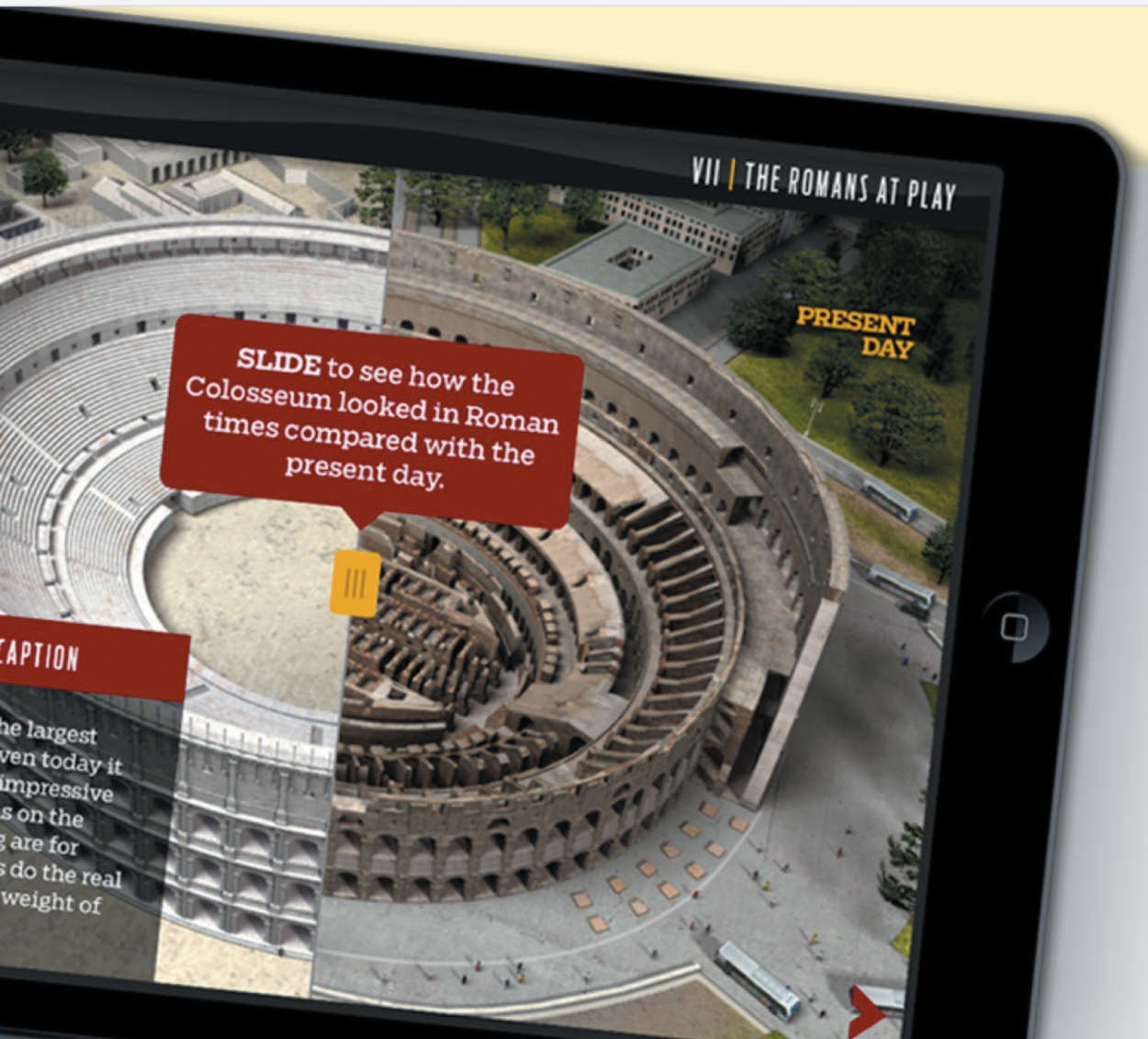
## Multimedia

<div class="columns">

<div class="column" width="50%">

One interface combines different media (graphics, text, video, sound…) linked via interactivity

- better information presentation; developed for training, education and entertainment
- *dynalinking*: changes in one window directly update another ([Rogers & Aldrich, 1996](#ref-rogers1996search))
- design question: how do you get people to interact with *all* of the media, not just the video?

</div>

<div class="column" width="50%">

<figure>
<img src="img/multimedia-learning-app-example.png" style="width:80.0%" alt="multimedia learning app for tablets. Source: KidsDiscover “Roman Empire for iPad”" />
<figcaption aria-hidden="true">multimedia learning app for tablets. Source: KidsDiscover “Roman Empire for iPad”</figcaption>
</figure>

</div>

</div>

## Augmented and Virtual Reality

<div class="columns">

<div class="column" width="60%">

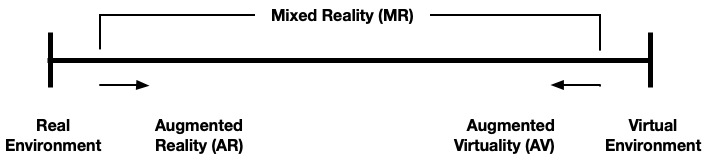
Interfaces can sit on a spectrum between fully virtual and fully real interaction ([Milgram & Kishino, 1994](#ref-milgram-mr:1994)).

- The big middle area includes “mixed reality” (MR) interfaces
- Augmented reality usually closer to “real” reality.
- eXtended reality (XR) is a more recent term.

### Early AR

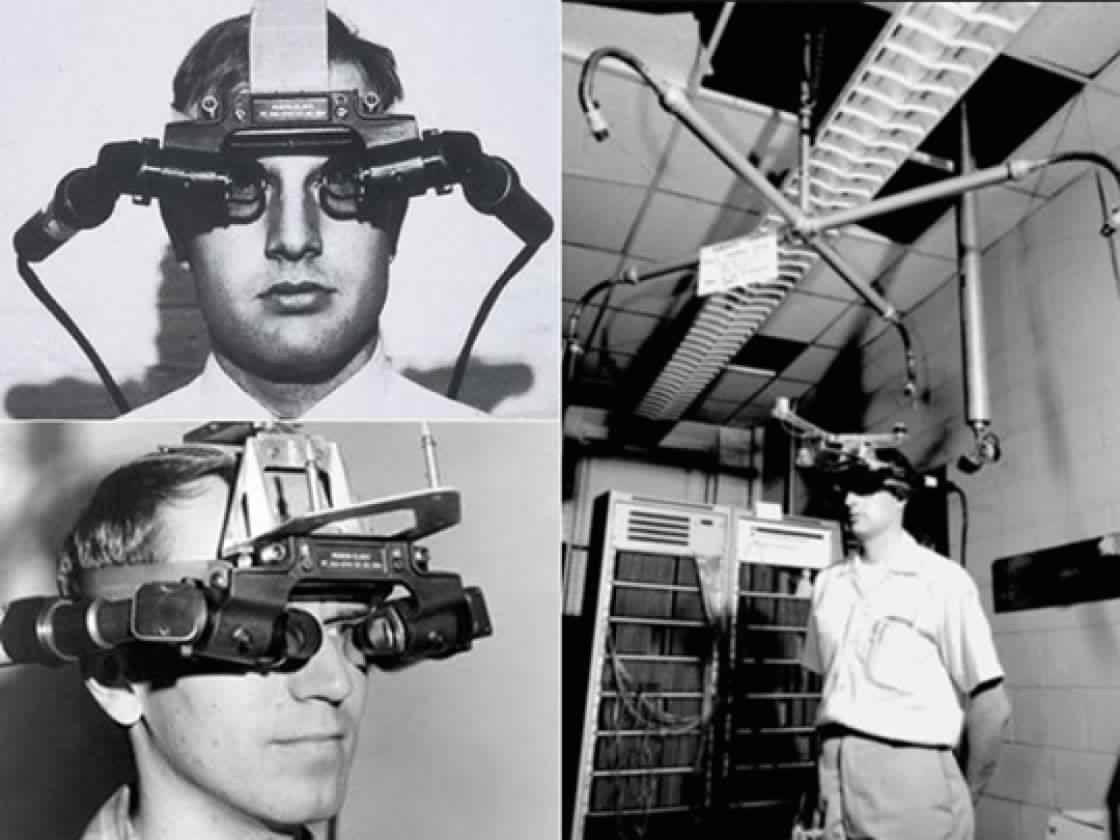
- blending of digital content with the physical world to create an enhanced real-world experience
- 1960s: Ivan Sutherland’s development of the first head-mounted three-dimensional display

</div>

<div class="column" width="40%">

<figure>
<img src="img/reallity-virtuality-continuum.jpg" alt="The reality-virtuality continuum" />
<figcaption aria-hidden="true">The reality-virtuality continuum</figcaption>
</figure>

<figure>
<img src="img/wk11-ivan-sutherland-headset.jpg" style="width:80.0%" alt="First augmented reality head-mounted display (Sutherland, 1968)." />
<figcaption aria-hidden="true">First augmented reality head-mounted display <span class="citation" data-cites="sutherland1967ar">(<a href="#ref-sutherland1967ar" role="doc-biblioref">Sutherland, 1968</a>)</span>.</figcaption>
</figure>

</div>

</div>

## Augmented Reality

<div class="columns">

<div class="column" width="60%">

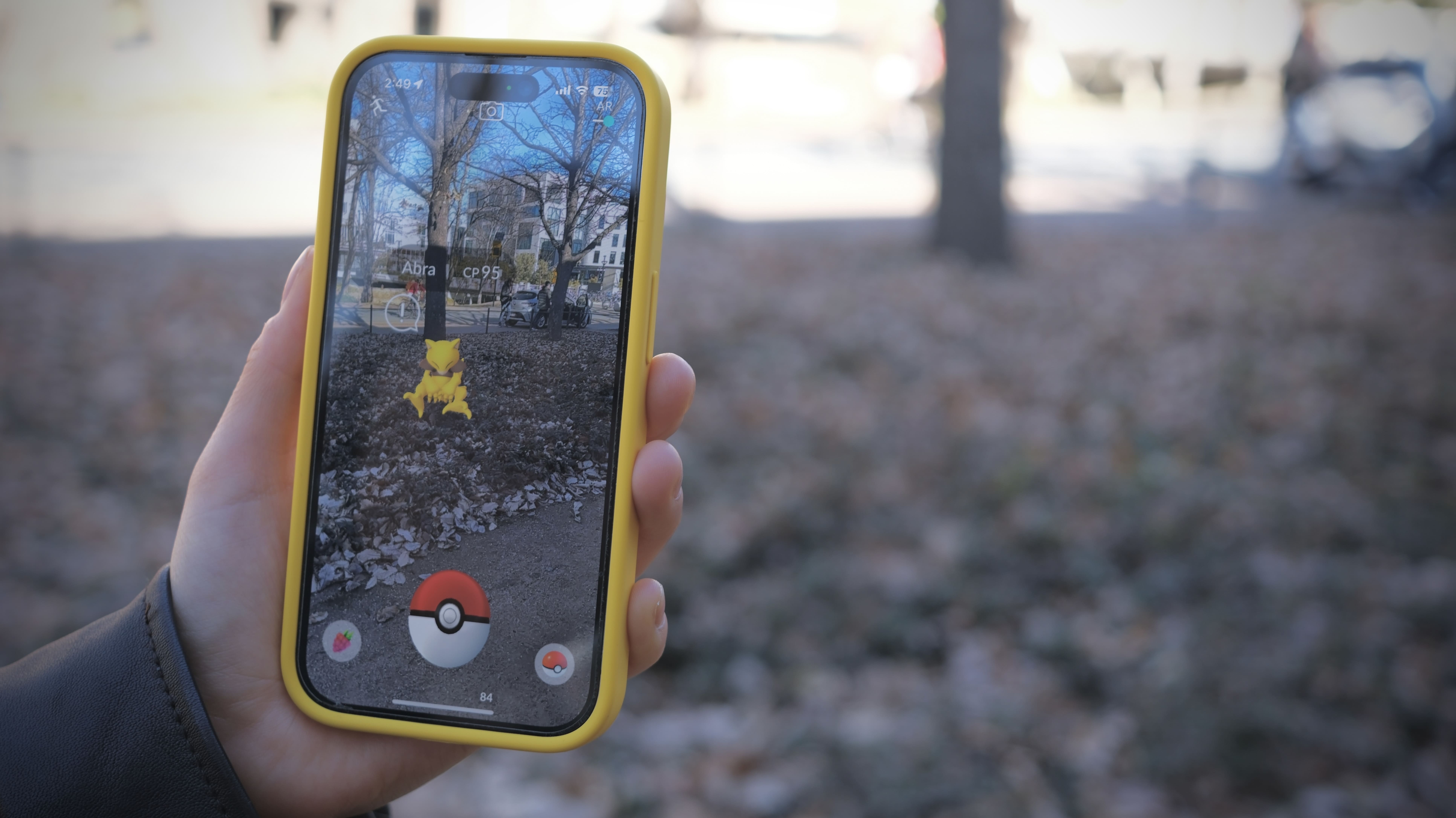
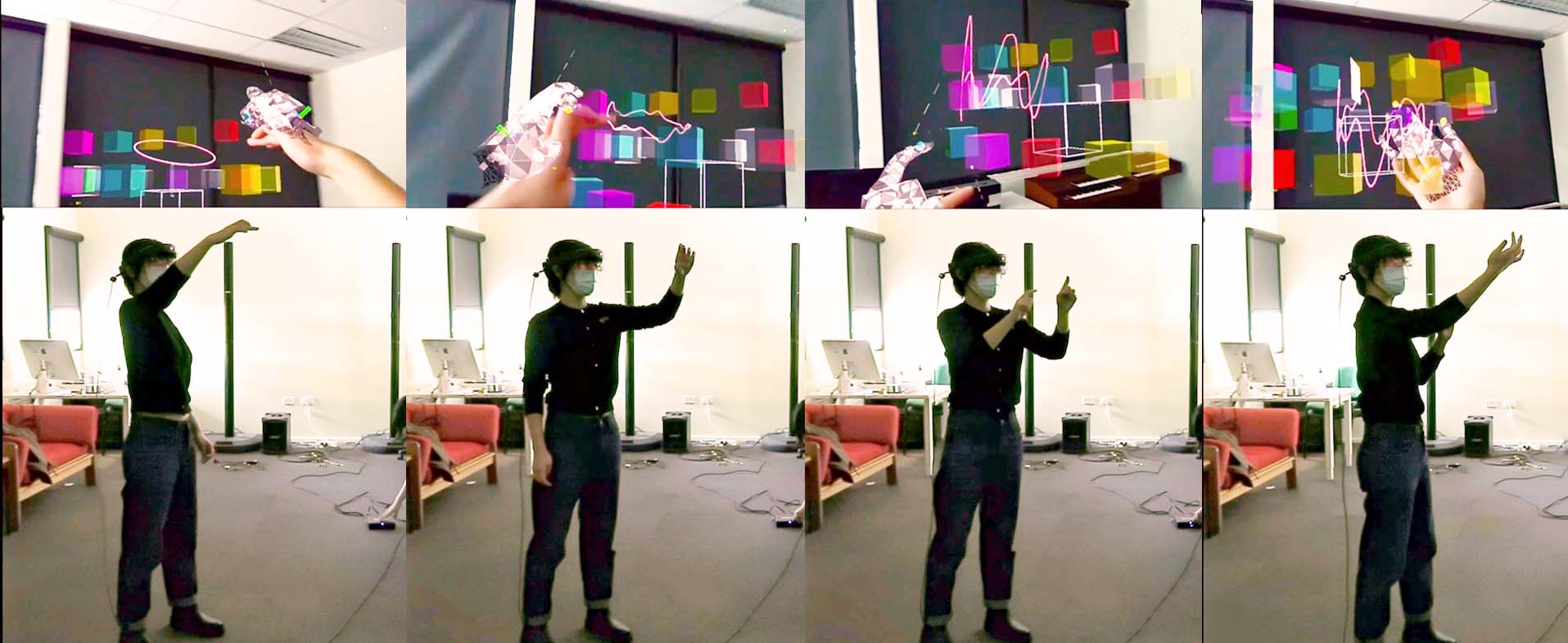
- AR systems have evolved significantly, particularly displays and interaction models ([Billinghurst et al., 2015](#ref-billinghurst-2015-ar-survey); [Speicher et al., 2019](#ref-speicher2019mixed))
- displays: see-through, screen-based, projection-based.
- “spatial Computing”, another way of thinking about it, defined by Greenwold ([2003](#ref-greenwold-2003-spatial-computing))
  - *“human interaction with a machine in which the machine retains and manipulates referents to real objects and spaces.”*
- emphasising not only the augmentation of reality but also the *meaningful* interaction between digital and physical elements.

</div>

<div class="column" width="40%">

<figure>
<img src="img/pokemon-go.jpg" style="width:80.0%" alt="AR smartphone game Pokémon Go." />
<figcaption aria-hidden="true">AR smartphone game Pokémon Go.</figcaption>
</figure>

<figure>
<img src="img/yichen-cube.jpg" style="width:80.0%" alt="AR musical instrument (Y. Wang et al., 2023)." />
<figcaption aria-hidden="true">AR musical instrument <span class="citation" data-cites="wang-mobility-space:2023">(<a href="#ref-wang-mobility-space:2023" role="doc-biblioref">Y. Wang et al., 2023</a>)</span>.</figcaption>
</figure>

</div>

</div>

## Virtual Reality

<div class="columns">

<div class="column" width="60%">

Emerged in 1970s with computer-generated graphical simulations.

**Goal**: to create user experiences that feel real when interacting with an artificial environment.

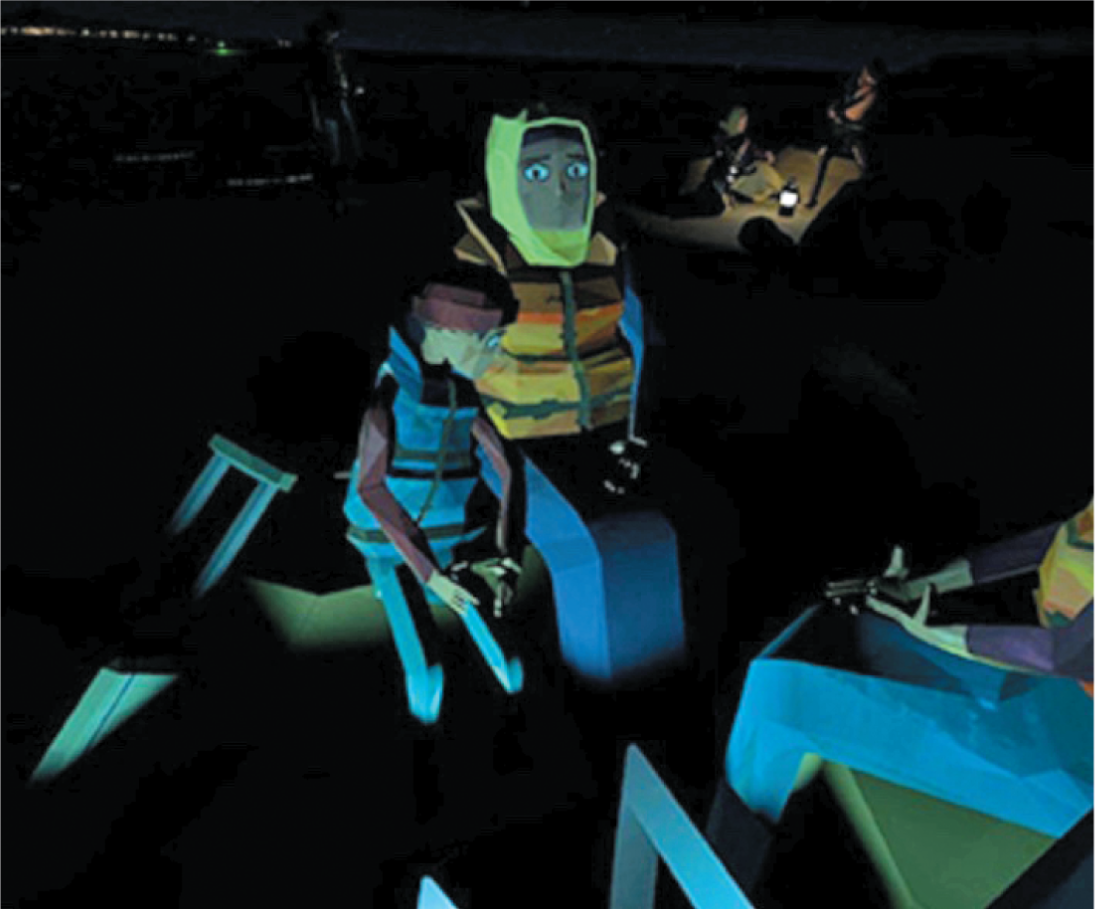
- stereoscopically displayed immersive image.
- variety of input devices
- used for:
  - training (e.g., pilots, medicine, first responders).
  - treatment (e.g, mental health)
  - **entertainment**.

</div>

<div class="column" width="40%">

<figure>
<img src="img/vr-example.png" style="width:60.0%" alt="Avatars for the “We Wait” VR experience (Steed et al., 2018)" />
<figcaption aria-hidden="true">Avatars for the “We Wait” VR experience <span class="citation" data-cites="steed-we-wait:2018">(<a href="#ref-steed-we-wait:2018" role="doc-biblioref">Steed et al., 2018</a>)</span></figcaption>
</figure>

<figure>
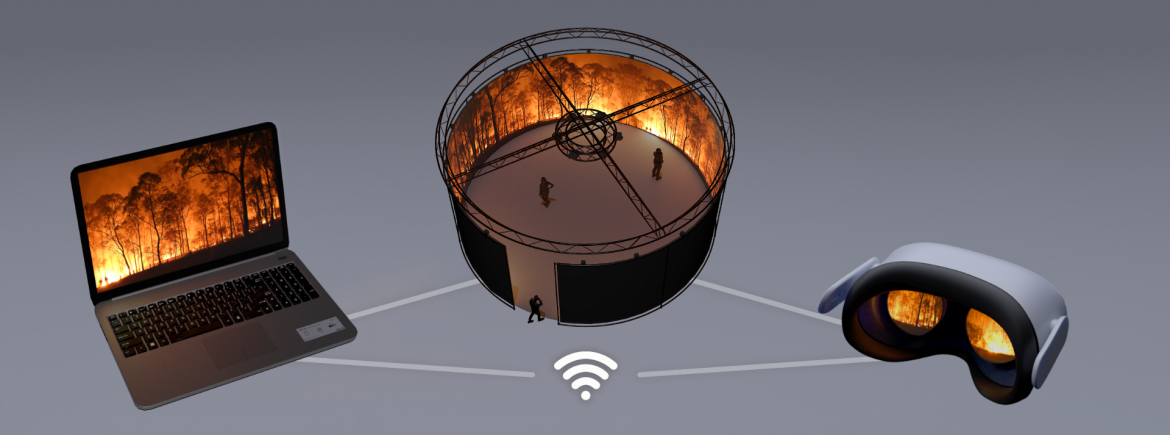
<img src="img/2024-06-ifire-networked-visualisation-system.png" style="width:55.0%" alt="iFire Networked Visualisation System. UNSW, 2025" />
<figcaption aria-hidden="true">iFire Networked Visualisation System. <a href="https://www.unsw.edu.au/research/icinema/our-research/projects/ifire">UNSW, 2025</a></figcaption>
</figure>

</div>

</div>

## Website Design

<div class="columns">

<div class="column" width="50%">

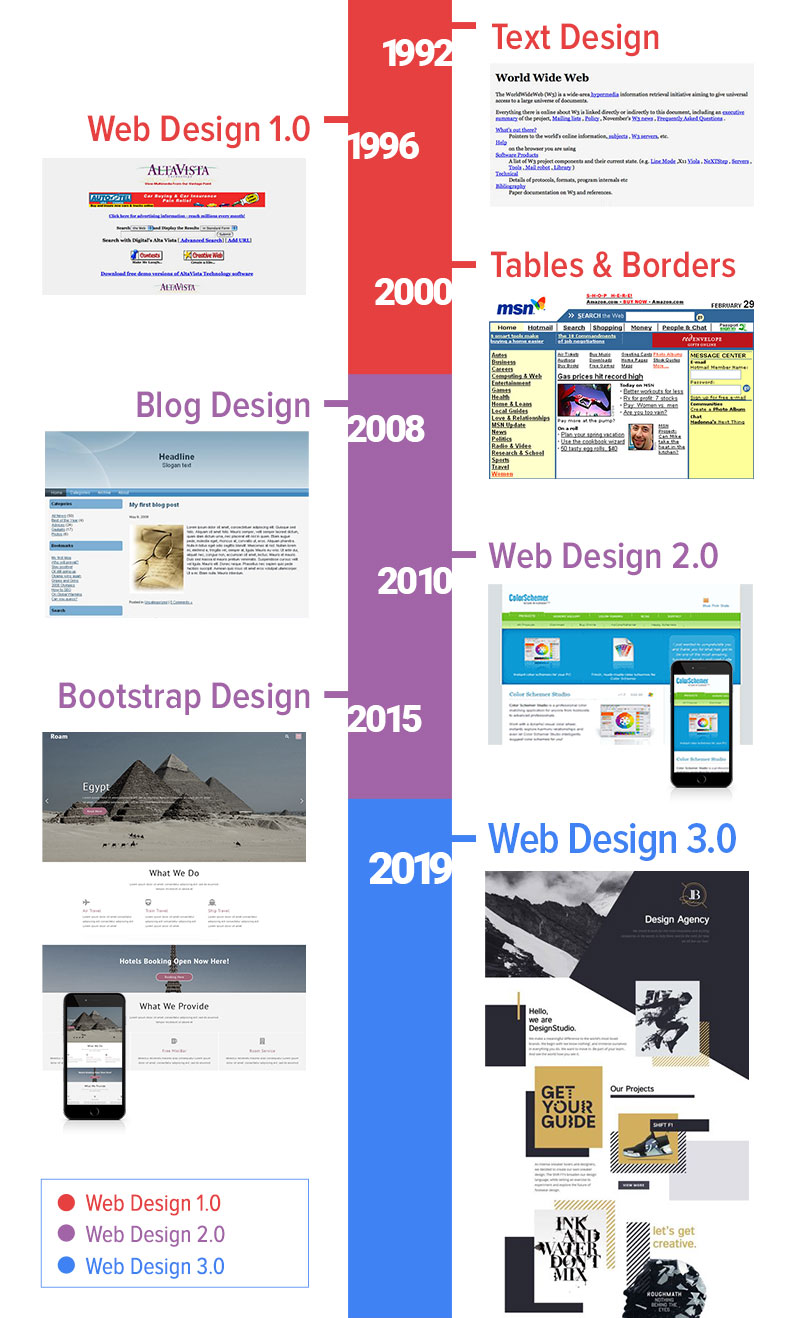
- early websites: text and hyperlinks; then a shift to aesthetics and visual design
- breadcrumb nav: navigate without losing track
- now designed for phones, touch and *infinite scrolling*
- Keith Instone’s core questions: *“Where am I? What’s here? Where can I go?”* ([Veen, 2000](#ref-veen2000art))
- most content is not read: *“a billboard going by at 60 miles an hour”* ([<span class="nocase">Krug et al.</span>, 2014](#ref-krug2014don))

</div>

<div class="column" width="50%">

<figure>
<img src="img/designhistory.jpg" style="width:30.0%" alt="Web Design history (source)" />
<figcaption aria-hidden="true"><a href="https://lionsheaddesigns.com/Web-Design.html">Web Design history (source)</a></figcaption>
</figure>

<figure>
<img src="img/bread-crummb.png" style="width:80.0%" alt="A breadcrumb trail" />
<figcaption aria-hidden="true">A breadcrumb trail</figcaption>
</figure>

</div>

</div>

## Mobile Device

<div class="columns">

<div class="column" width="60%">

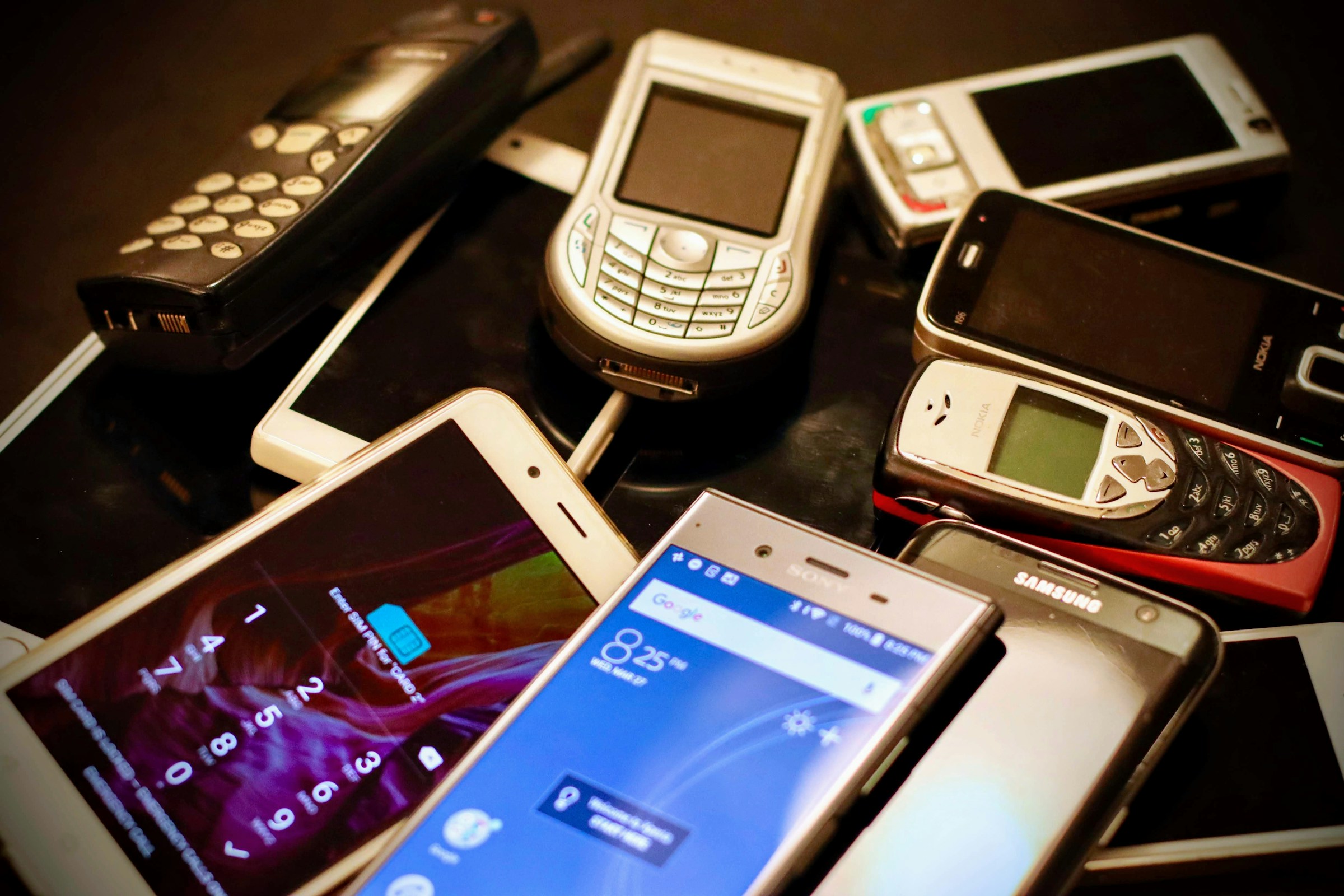
Smartphones, fitness trackers, smartwatches, large-sized tablets on the flight, educational tablets, etc.

- embedded sensors: movement, GPS, bio/fitness sensors.
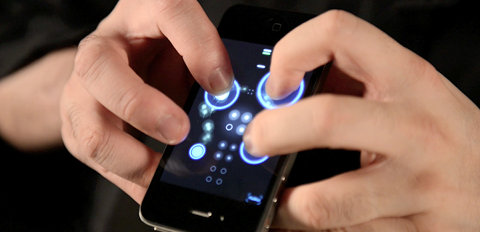
- affordances led to novel and creative apps e.g.,
  - [Ocarina](https://ccrma.stanford.edu/~ge/ocarina/) ([G. Wang, 2014](#ref-wang2014ocarina))
  - contextual information access: scanning QR codes
- careful design of limited screen and control space
- touch target size crucial for touch small touch screens
- guidelines exist mobile interface design, e.g., ([Babich, 2018](#ref-babich2018mobileux)).

</div>

<div class="column" width="40%">

<figure>
<img src="img/eirik-solheim-mWTOR3Rx8l8-unsplash.jpg" style="width:80.0%" alt="Photo: Eirik Solheim" />
<figcaption aria-hidden="true">Photo: <a href="https://unsplash.com/photos/assorted-color-phone-lot-mWTOR3Rx8l8">Eirik Solheim</a></figcaption>
</figure>

<figure>
<img src="img/o2-hands-480.png" style="width:80.0%" alt="Ocarina, Ge Wang. 2014." />
<figcaption aria-hidden="true">Ocarina, Ge Wang. 2014.</figcaption>
</figure>

</div>

</div>

## Appliances

<div class="columns">

<div class="column" width="60%">

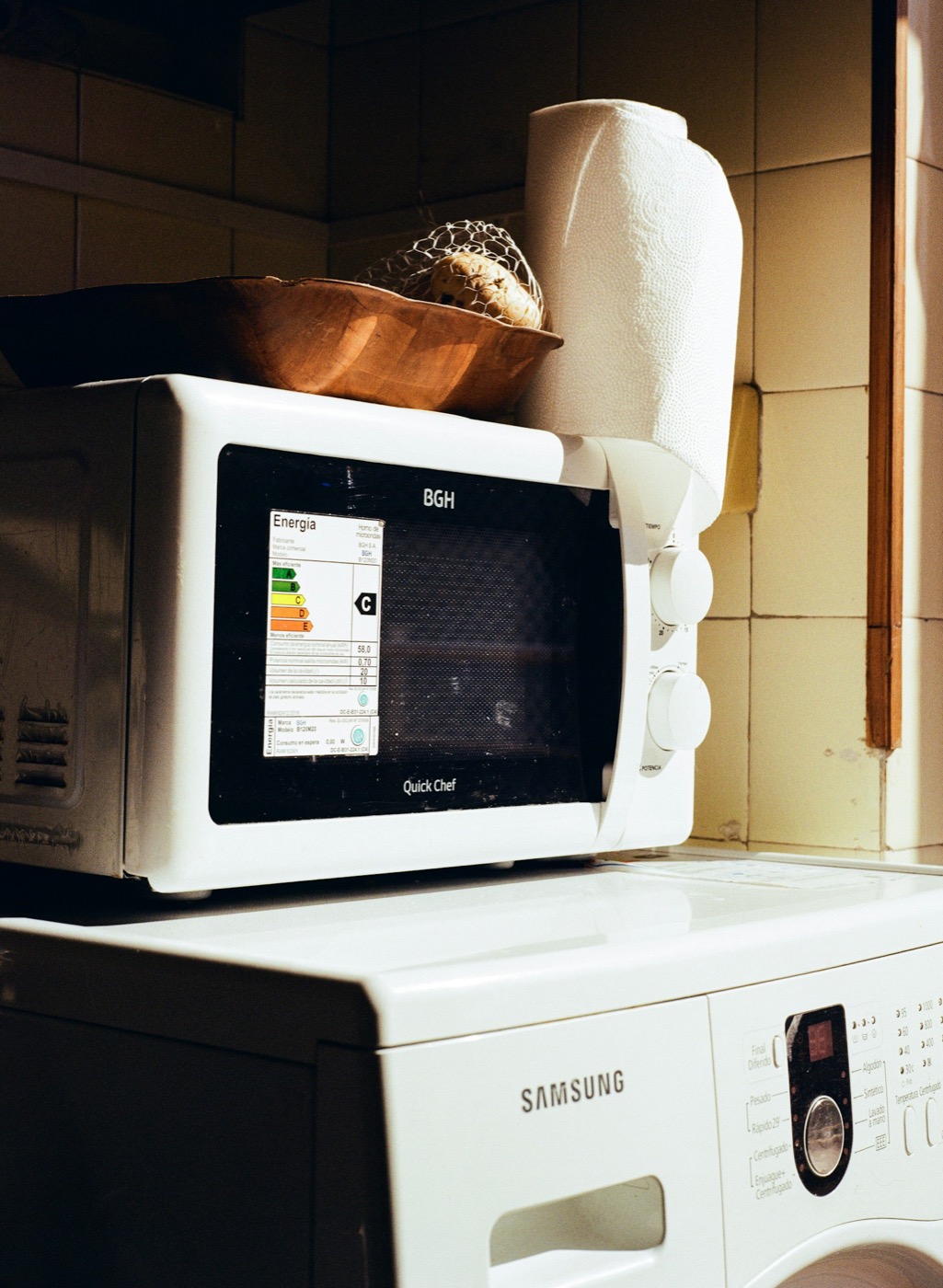
- machines for everyday use in the home: washing machines, microwaves, fridges, toasters, blenders
- Cooper et al. ([2014](#ref-cooper2014face)): appliance interfaces are *transient*; the interaction is short and infrequent, so nothing can depend on learning
- two design principles: **simplicity** and **visibility**
- compare the two knobs on the microwave with the twenty programs on the washing machine
- internet connections and remote apps: do they help the transient use case, or add a second, hidden interface?

</div>

<div class="column" width="40%">

<figure>
<img src="img/microwave-washing-machine-p9RU1DWwasQ-unsplash.jpg" style="width:52.0%" alt="A two-knob microwave on a washing machine with twenty programs. Photo by Ruben Mavarez on Unsplash" />
<figcaption aria-hidden="true">A two-knob microwave on a washing machine with twenty programs. <a href="https://unsplash.com/photos/microwave-oven-stacked-on-top-of-a-washing-machine-p9RU1DWwasQ">Photo by Ruben Mavarez on Unsplash</a></figcaption>
</figure>

</div>

</div>

## Smart Interfaces

- not the future: a robot vacuum, a video doorbell and a few smart speakers that (in theory) all talk to each other is an ordinary house in 2026
- context-aware, network-connected, often AI-driven, learning from behaviour (e.g., Nest thermostat)
- the aim is to automate and remove people from the loop (e.g., buildings that manage their own lighting and heating)
- over-automation frustrates: sealed windows, no manual override, an app for everything
- **design question:** should the system *amplify* what people do, or act *autonomously* ([Landay, 2019](#ref-landay2019smartinterfaces))? See also human-building interaction ([Alavi et al., 2019](#ref-alavi2019introduction)).
- affordance analysis is hard here: most of what a smart home can do is *hidden*

## Voice Interface

<div class="columns">

<div class="column" width="60%">

- interact through spoken language: request information (flight times, weather) or issue commands (play music, set a timer)
- command-based or conversation-based; the system decides how human-like to pretend to be
- design choices: natural conversation vs directed dialogue, can the user interrupt (“barge-in”), synthesised voice or actor, gender, dialect, pronunciation
- dialogue structure, error handling and etiquette are still the core problems ([Cohen et al., 2004](#ref-cohen2004voice))
- early systems earned a reputation for *mishearing* (still true?)
- almost no perceptible affordances: how do users learn what they can say?

</div>

<div class="column" width="40%">

<figure>
<img src="img/tea-earlgrey-hot.jpg" style="width:80.0%" alt="Tea. Earl grey. Hot. –Captain Picard" />
<figcaption aria-hidden="true">Tea. Earl grey. Hot. –Captain Picard</figcaption>
</figure>

</div>

</div>

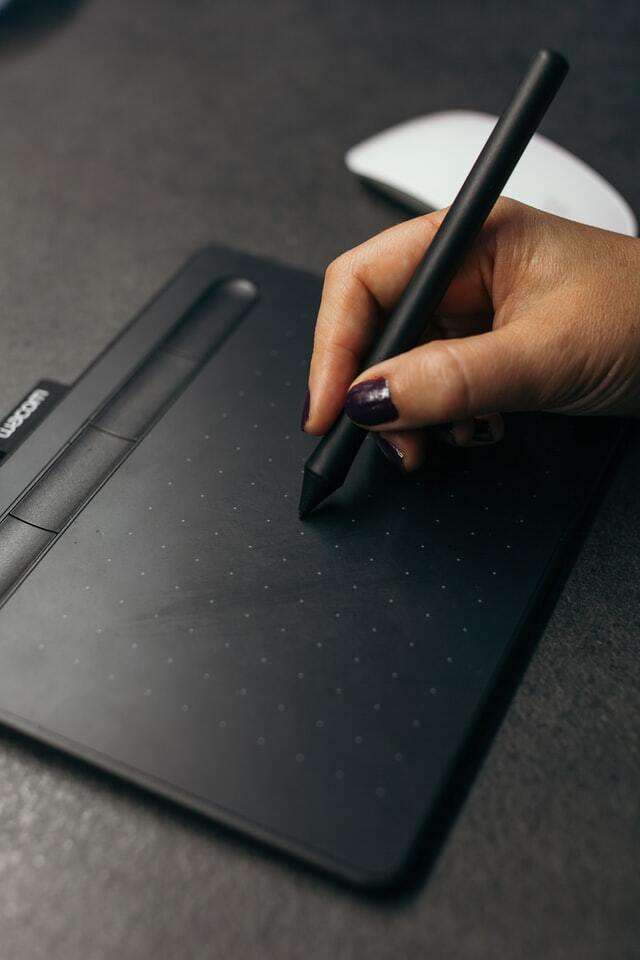
## Pen-Based

<div class="columns">

<div class="column" width="60%">

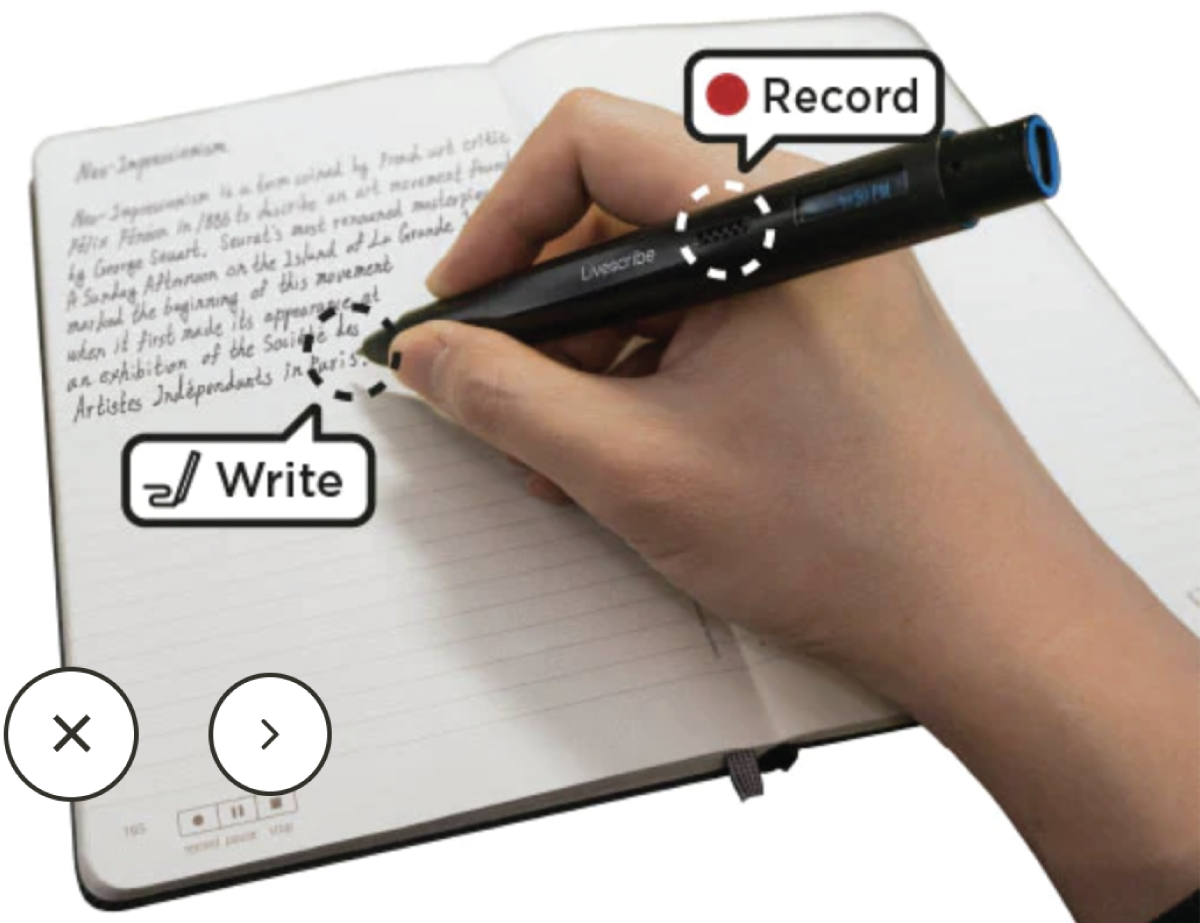
- light pens, styluses, or scanners for drawing and writing
- write, draw, select, and move objects on a page or tablet.
- very early use in [CRT displays with lightpen](https://en.wikipedia.org/wiki/Fairlight_CMI)!
- touchscreen versions most common now
- another option: *digital* paper that scans what you write (IR sensor, special dot pattern on the paper)

*Pens are great!* We should do more with them.

</div>

<div class="column" width="40%">

<figure>
<img src="img/pen-based-example.png" style="width:80.0%" alt="Livescribe Echo 2 Smartpen (source)." />
<figcaption aria-hidden="true">Livescribe Echo 2 Smartpen (<a href="https://uk.livescribe.com/collections/smartpens/products/echo-2">source</a>).</figcaption>
</figure>

</div>

</div>

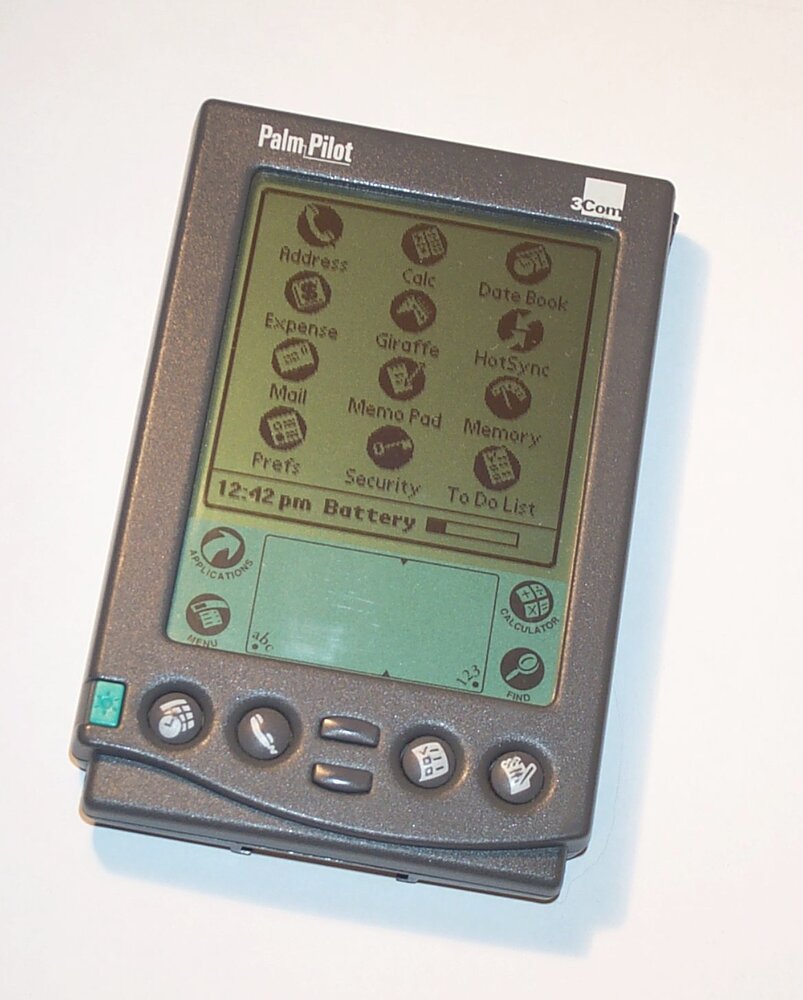
## Case Study: Newton vs Palm

<div class="columns">

<div class="column" width="60%">

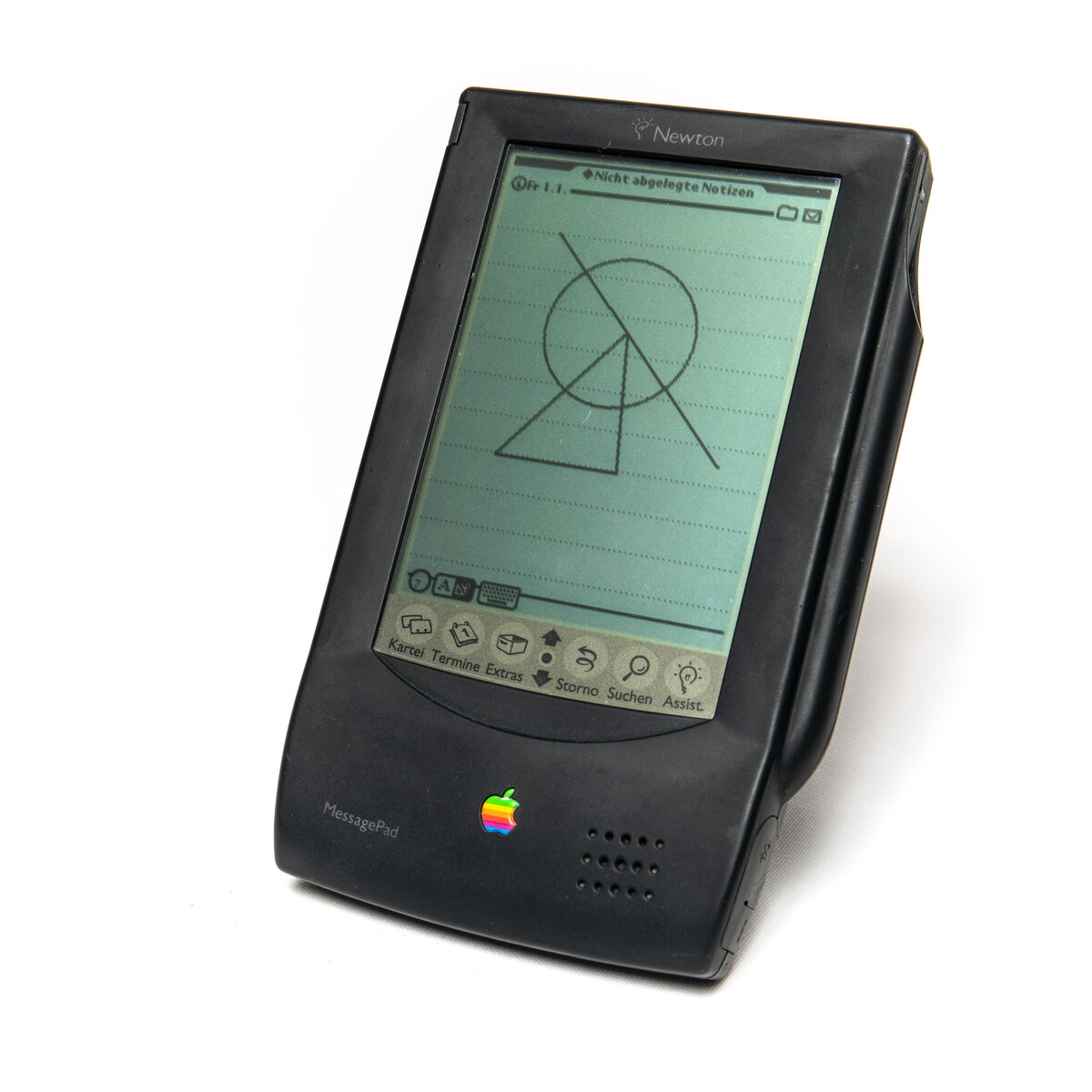
Two pen-input handhelds, three years apart, with opposite answers.

- **Newton MessagePad (1993):** recognises your ordinary handwriting. The machine learns your style.
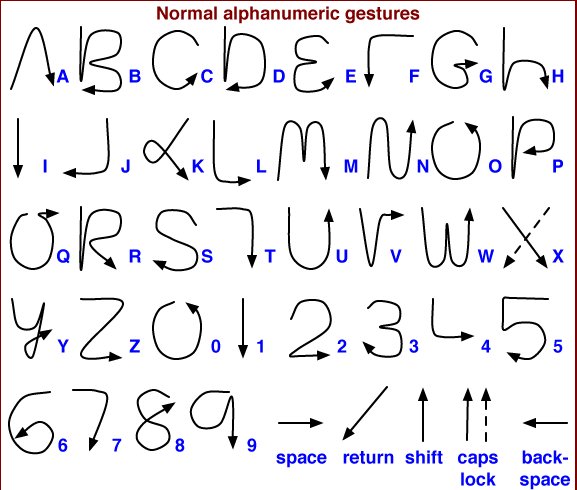
- **Palm Pilot (1996):** Graffiti, a one-stroke alphabet from Xerox PARC’s Unistrokes ([Goldberg & Richardson, 1993](#ref-goldberg-unistrokes:1993)). The user learns a new alphabet.

<div class="talk-box">

**Talk:** 🙋🏽‍♀️🤷💁🏻🗣️ It’s 1993. Which design would you go with? What would usability and user experience look like? (2 minutes).

</div>

</div>

<div class="column" width="40%">

<img src="img/newton-messagepad-100.jpg" style="width:46.0%" /> <img src="img/palmpilot-professional.jpg" style="width:40.0%" />

Newton MessagePad 100 and PalmPilot Professional. Photos: F. Winkelnkemper (CC BY-SA 4.0), Letdorf (CC BY-SA 3.0), Wikimedia Commons.

</div>

</div>

## Newton vs Palm: What Happened

<div class="columns">

<div class="column" width="60%">

Apple’s sounds like the better idea, but it’s considered a failure.

- Newton misread handwriting often enough to become a joke: a week of Doonesbury (“Catching on?” became “Egg freckles”) ([Trudeau, 1993](#ref-trudeau-doonesbury-newton:1993)) and the Simpsons’ “Eat up Martha”.
- Later models fixed the recognition, but the reputation didn’t recover and Apple killed the line in 1998.
- Graffiti: 86% after a minute with the chart, 97% after five minutes, still 97% a week later ([MacKenzie & Zhang, 1997](#ref-mackenzie-graffiti-usability:1997)).

<div class="warn-box">

**Careful:** technical cleverness doesn’t always win!

</div>

</div>

<div class="column" width="40%">

<figure>
<img src="img/palm-graffiti-alphabet.png" style="width:68.0%" alt="Graffiti: one stroke per letter. Image: IMeowbot, Wikimedia Commons, CC BY-SA 3.0." />
<figcaption aria-hidden="true">Graffiti: one stroke per letter. Image: IMeowbot, Wikimedia Commons, CC BY-SA 3.0.</figcaption>
</figure>

</div>

</div>

## Newton vs Palm: what analysis says, what a study says

<div class="info-box">

**Affordance analysis:** Newton affords your own handwriting, constrains nothing, and asks you to learn nothing. Palm constrains you to one alphabet and makes you learn it. On these six questions the Newton is the “natural” one, and it would win.

</div>

<div class="success-box">

**Evaluation:** MacKenzie & Zhang ([1997](#ref-mackenzie-graffiti-usability:1997)) measured Graffiti: accuracy after one minute, five minutes, and a week. Newton’s recognition was a public joke. A little learning that is quick and reliable beat no learning that is unreliable.

</div>

<div class="warn-box">

**The lesson for “which interface is best?”:** analysis tells you what each option offers and to whom. Only a study tells you which one is better. More next week!

</div>

## Touchscreens

<div class="columns">

<div class="column" width="60%">

- common in kiosks, ATMs, checkouts, phones, tablets, computers.
- Now weird to find a *non* touchscreen.
- **Single-touch** respond to single taps.
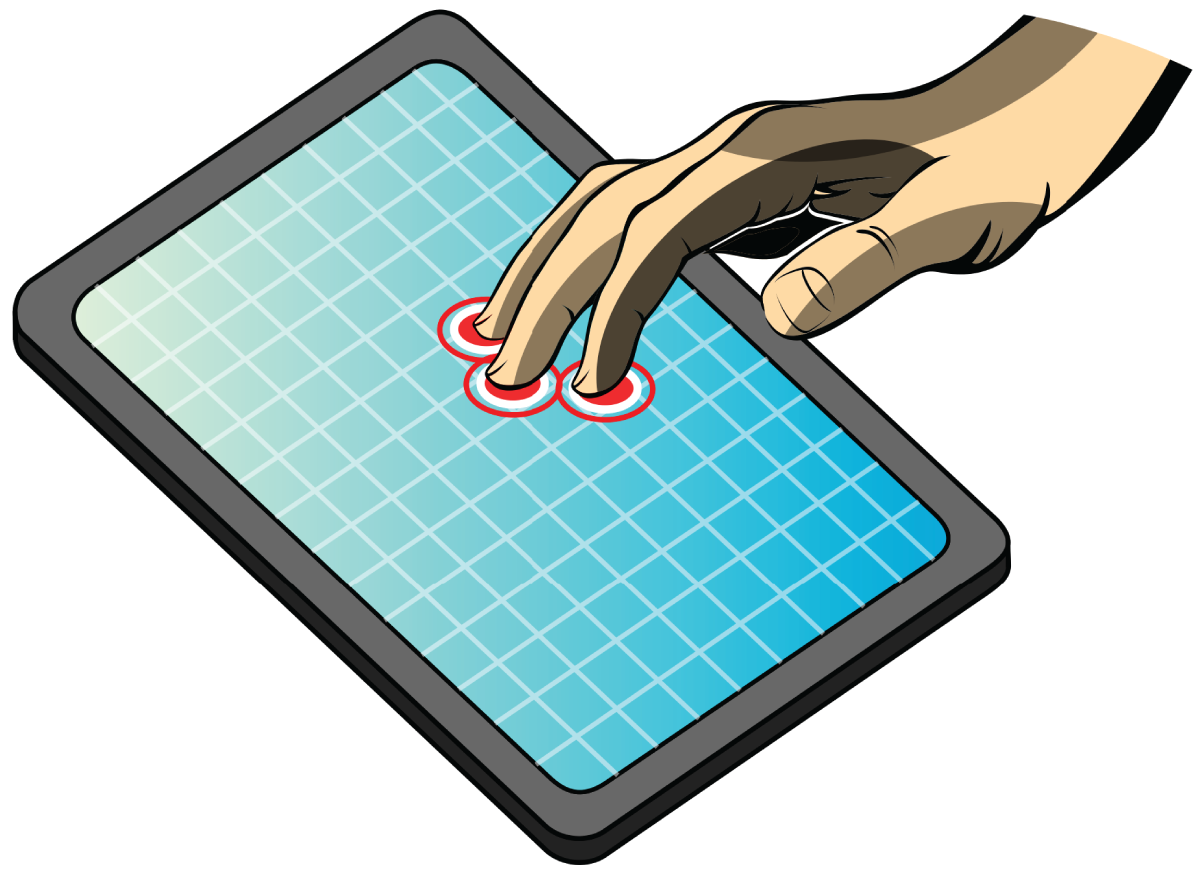
- **Multitouch** supports multiple simultaneous touches and gestures like pinching, rotating
- **Multitouch devices** (e.g., smartphones, tablets, tabletops) enable intuitive interactions using one or both hands.
- **Finger gestures** enhance how users interact
- *but* there are limitations. How do you “undo” on an iPhone?

</div>

<div class="column" width="40%">

<figure>
<img src="img/multitouch-interface.png" style="width:80.0%" alt="A schematic of a multitouch interface. Source: Willtron / CC BY 1.0" />
<figcaption aria-hidden="true">A schematic of a multitouch interface. Source: Willtron / CC BY 1.0</figcaption>
</figure>

</div>

</div>

## Touchless

- gestural interaction: moving arms, hands, position to communicate

- track and understand gestures using cameras, sensors and machine learning

- a webcam plus a trained mapping is an instrument: the Wekinator ([Fiebrink et al., 2009](#ref-fiebrink-wekinator-nime:2009)) made that a standard idea.

- Watch David Rose’s inspirations for gesture at [vimeo.com/224522900](https://vimeo.com/224522900)

- **the recognition challenge:** when does a gesture start and end, and was that a gesture or a wave to a friend? Almost every affordance is *hidden* until someone shows you.

## Haptic Interfaces

<div class="columns">

<div class="column" width="60%">

- vibration and forces (via actuators) give tactile feedback: phones, watches, game controllers, simulators, clothing
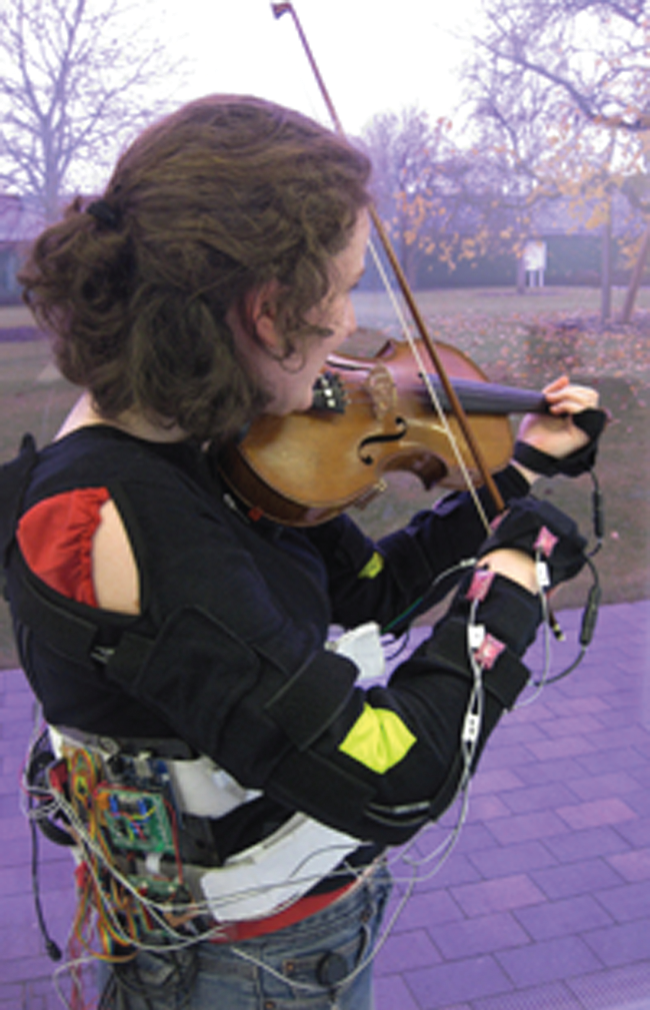
- skill training: the MusicJacket nudges a violinist’s bowing arm into position, and *“novice players responded well to vibrotactile cues, adjusting their actions accordingly.”*
- remote touch: actuators in clothing can simulate hugs or squeezes
- mid-air haptics: ultrasound creates buttons and sliders that can be felt but not seen (e.g., in-car controls)
- haptic exoskeletons: “Techno Trousers” ([Rossiter, 2018](#ref-rossiter2018past)) that stiffen or relax to assist movement
- perceptible to the hand, invisible to the eye: run the affordance questions on that!

</div>

<div class="column" width="40%">

<figure>
<img src="img/musicjacket.png" style="width:50.0%" alt="The MusicJacket with embedded actuators that nudge the player to move their arm up to be in the correct position. Source: Yvonne Rogers" />
<figcaption aria-hidden="true">The MusicJacket with embedded actuators that nudge the player to move their arm up to be in the correct position. Source: Yvonne Rogers</figcaption>
</figure>

</div>

</div>

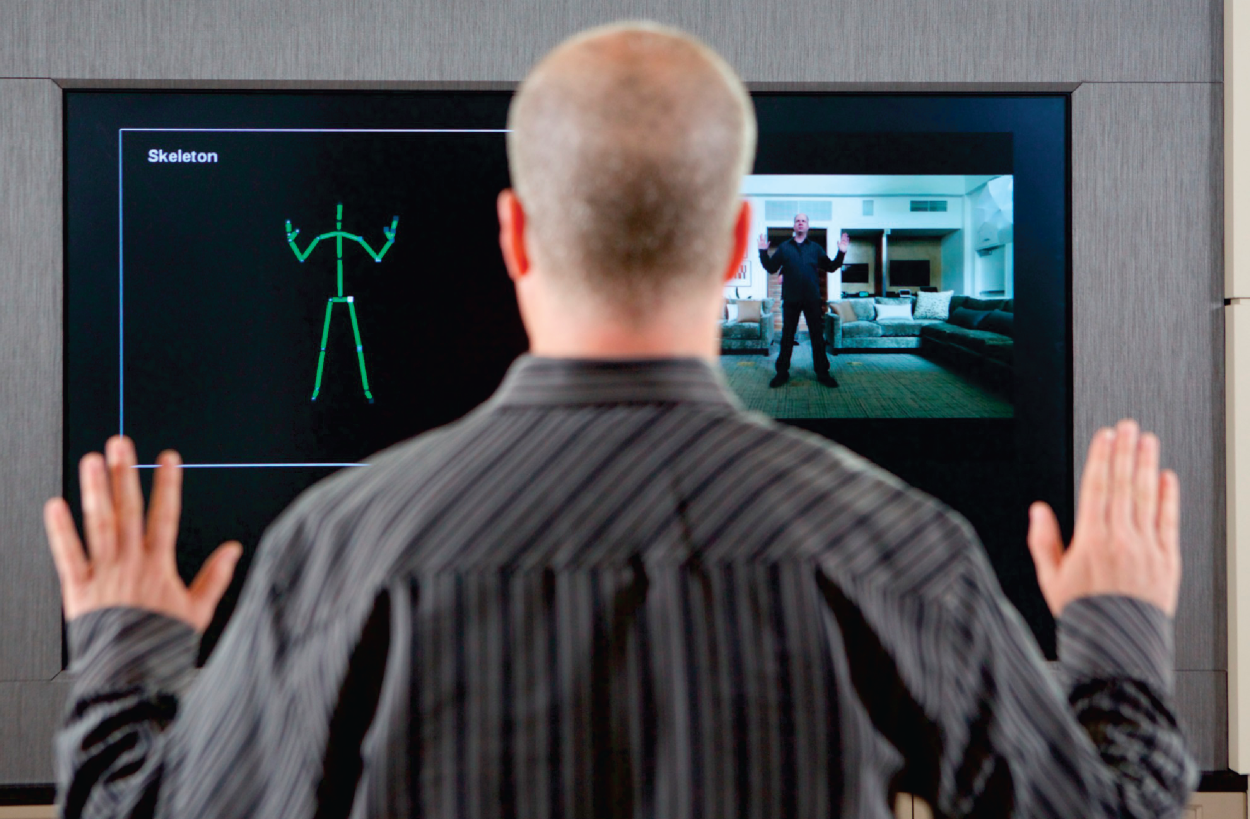
## Multimodal

<div class="columns">

<div class="column" width="60%">

- multiple input/output modalities (e.g., touch, sight, sound, speech) to enhance user interaction ([Bouchet & Nigay, 2004](#ref-bouchet2004icare));
- natural, flexible, and expressive interactions, similar the real world interaction experience ([Oviatt et al., 2017](#ref-oviatt2017handbook)).
- Common combinations: speech and gesture; eye-gaze and gesture; haptic and audio, pen input and speech ([Dumas et al., 2009](#ref-dumas2009multimodal)).
- Speech + vision processing is the most common ([Deng & Huang, 2004](#ref-deng2004challenges))!
- most researched interaction modes are: speech, gesture, eye-gaze tracking.

Design guidelines, see ([Oviatt et al., 2017](#ref-oviatt2017handbook)).

</div>

<div class="column" width="40%">

<figure>
<img src="img/xbox.png" style="width:90.0%" alt="Microsoft’s Xbox Kinect. Source: AP Images" />
<figcaption aria-hidden="true">Microsoft’s Xbox Kinect. Source: AP Images</figcaption>
</figure>

</div>

</div>

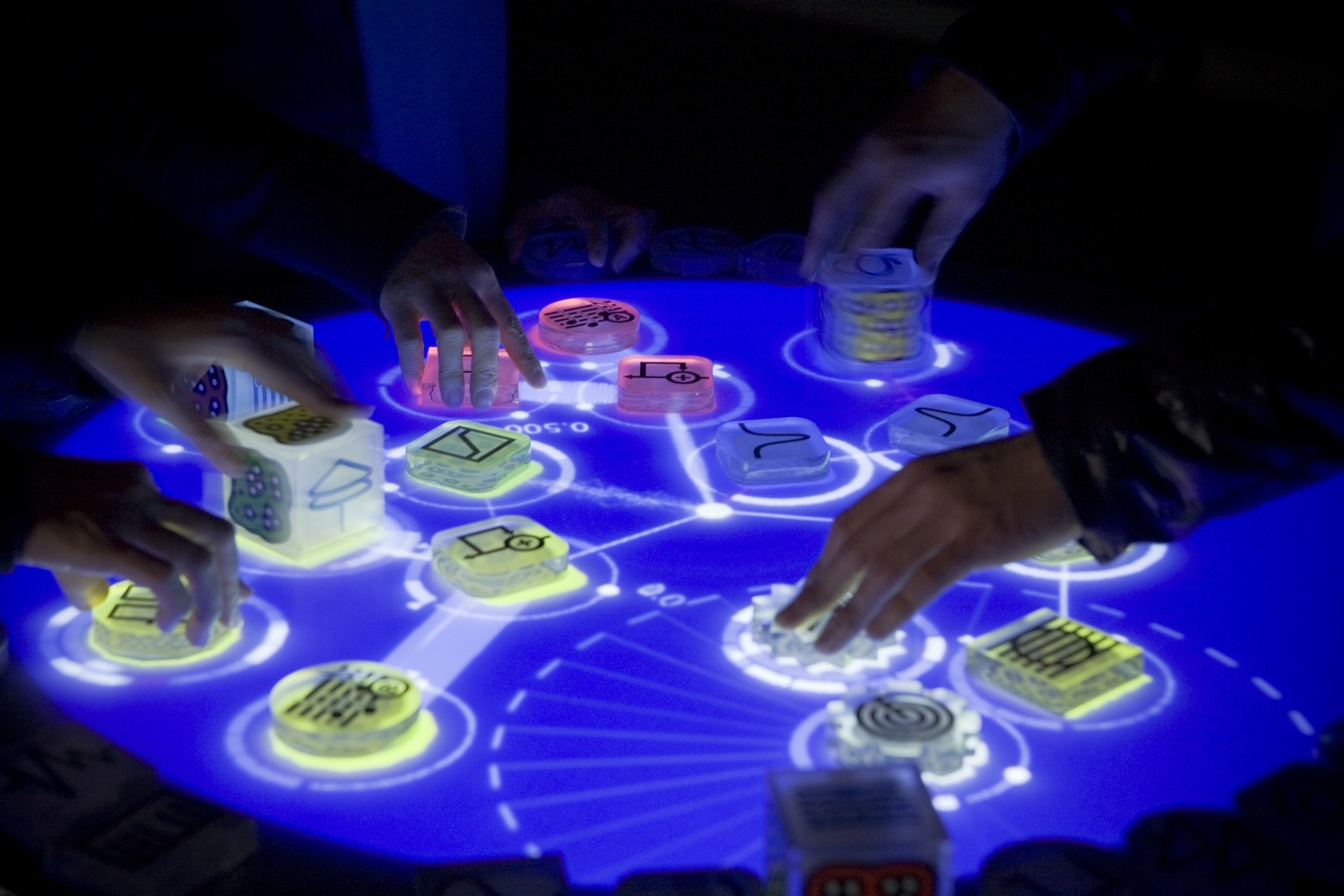
## Shareable

<div class="columns">

<div class="column" width="60%">

Designed for multi-user interaction by co-located groups, unlike single-user PCs, laptops and phones: large wall displays, interactive tabletops.

- everyone can point, touch, and see the same content
- a shared point of reference improves group coordination and participation ([Rogers et al., 2023](#ref-rogers-beyond-hci:2023))
- used in museums and galleries; supports group-based learning ([Clegg et al., 2020](#ref-clegg2020community))
- software shareables (Google Docs, Miro) move the same idea to remote collaboration
- **design issues:** display layout, balancing participation, and personal vs shared space

</div>

<div class="column" width="40%">

<figure>
<img src="img/reactable.jpg" style="width:80.0%" alt="Collaborative Musical Instrument Reactable (Jordà, 2010). (source)." />
<figcaption aria-hidden="true">Collaborative Musical Instrument Reactable <span class="citation" data-cites="jorda2010reactable">(<a href="#ref-jorda2010reactable" role="doc-biblioref">Jordà, 2010</a>)</span>. <a href="https://www.ycam.jp/en/archive/works/reactable/">(source)</a>.</figcaption>
</figure>

</div>

</div>

## Tangible

<div class="columns">

<div class="column" width="60%">

- physical objects (bricks, cubes, clay) linked to digital representations through embedded sensors ([Fishkin, 2004](#ref-fishkin2004taxonomy); [Ishii & Ullmer, 1997](#ref-ishii1997tangible))
- manipulating the object triggers sound, light or animation, on the object or around it; or objects on a tabletop drive a simulation (Urp for urban planning)
- artefacts can be lifted, rearranged and handled directly, unlike anything on a screen
- **the design problem is *coupling*:** how does a physical action map to a digital effect, and where does the feedback appear? ([<span class="nocase">Shaer et al.</span>, 2010](#ref-shaer2010tangible); [Ullmer et al., 2005](#ref-ullmer2005token))
- prototype with sticky notes and cardboard tokens first
- history and goals: Ullmer et al. ([2022](#ref-ullmer2022weaving))

</div>

<div class="column" width="40%">

<figure>
<img src="img/tangible-bits.jpg" style="width:100.0%" alt="Tangible Bits. (Ishii &amp; Ullmer, 1997)" />
<figcaption aria-hidden="true">Tangible Bits. <span class="citation" data-cites="ishii1997tangible">(<a href="#ref-ishii1997tangible" role="doc-biblioref">Ishii &amp; Ullmer, 1997</a>)</span></figcaption>
</figure>

</div>

</div>

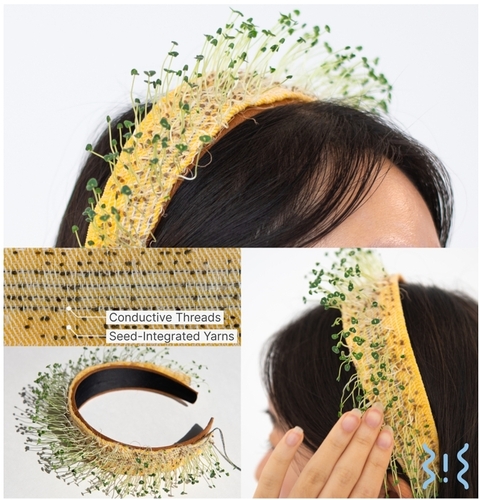
## Wearables

<div class="columns">

<div class="column" width="60%">

- Digital devices worn on the body – e.g., smartwatches, fitness trackers, smart glasses, and fashion tech.
- Early wearable computing enabled mobile recording and access to digital info.
- Advances in flexible displays, e-textiles, and physical computing (e.g., Arduino) have made wearables more practical and appealing.
- Items like jackets, jewelry, hats, and shoes have been designed to interact with digital info on the go.
- From convenience design focus to expressive and communicative functions.

</div>

<div class="column" width="40%">

<figure>
<img src="img/living-loom.jpg" style="width:80.0%" alt="LivingLoom (Zhu et al., 2025)." />
<figcaption aria-hidden="true">LivingLoom <span class="citation" data-cites="zhu2025livingloom">(<a href="#ref-zhu2025livingloom" role="doc-biblioref">Zhu et al., 2025</a>)</span>.</figcaption>
</figure>

</div>

</div>

<!-- ## Research and Design for Wearables
&#10;- Comfort: Must be light, small, hidden, and wearable without discomfort.
- Hygiene: Should be washable; electronics must be removable and batteries easy to manage.
- Control: Touch, voice, or physical controls need to be intuitive.
- Tech Integration: Combines LEDs, sensors, AR, and more for interactive experiences.
- Stigma Reduction: Fashionable designs help normalize assistive wearables.
- Feedback: Data (e.g., heart rate) must be presented in meaningful, actionable ways—visually, haptically, or multimodally. -->

## Robots and Drones

<div class="columns">

<div class="column" width="60%">

Robots assist in manufacturing, hazardous environments, rescue, and remote exploration with remote controls using cameras and sensors.

Domestic robots help with chores and support elderly or disabled people.

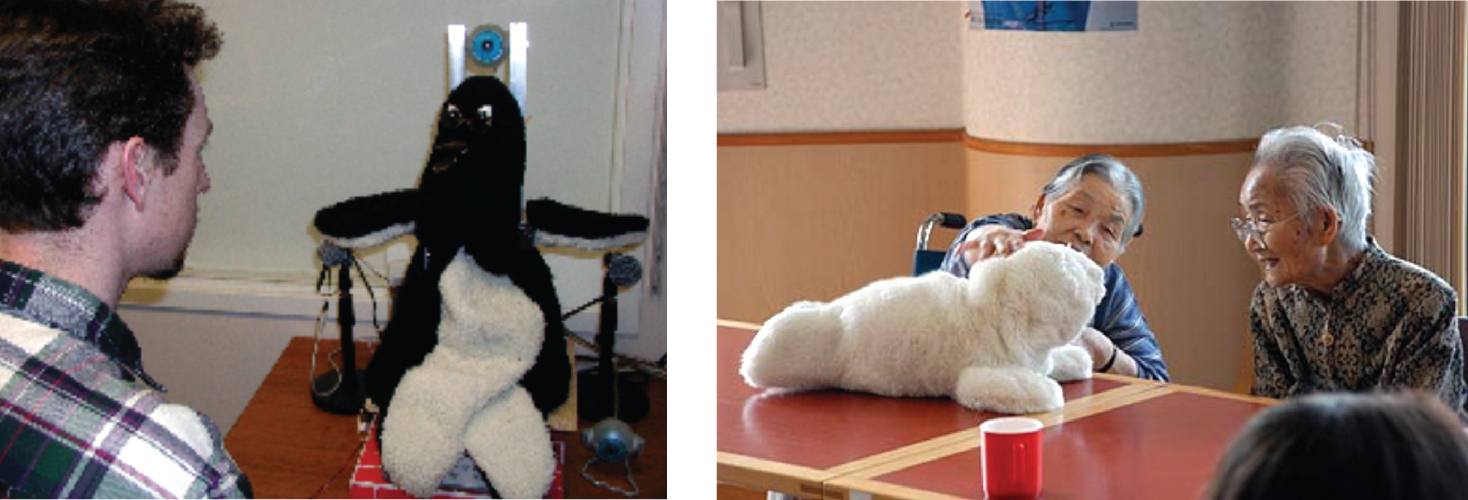
Pet robots like Paro provide companionship and reduce loneliness, especially for dementia patients.

Drones, once military and hobbyist tools, now serve in delivery, entertainment, agriculture, construction, and wildlife monitoring, offering real-time data and automated operations.

</div>

<div class="column" width="40%">

<figure>
<img src="img/robot-pet.png" style="width:100.0%" alt="(a) Mel, the penguin robot, designed to host activities; (b) Japan’s Paro, an interactive seal, designed as a companion, primarily for the elderly and sick children. Source: (a) Mitsubishi Electric Research Labs (b) Parorobots.com." />
<figcaption aria-hidden="true">(a) Mel, the penguin robot, designed to host activities; (b) Japan’s Paro, an interactive seal, designed as a companion, primarily for the elderly and sick children. Source: (a) Mitsubishi Electric Research Labs (b) Parorobots.com.</figcaption>
</figure>

</div>

</div>

<!-- ## Research and Design with Robots and Drones
&#10;- Robots: Ethical questions arise around designing robots with human- or animal-like traits.
- Should they mimic humans emotionally and physically, or clearly appear as machines with functional roles?
- Many prefer “cute pet” robots for their comforting and less unsettling nature. Interaction design also varies between human-like engagement (talking, gesturing) and traditional controls (buttons, dials).
- Drones: Ethical concerns include privacy violations (spying on people or property without consent) and the use of drones as autonomous lethal weapons. There is ongoing debate about banning killer drones to maintain meaningful human control. -->

## Frontier Interfaces

<div class="columns">

<div class="column" width="60%">

Three types where the design knowledge is still forming:

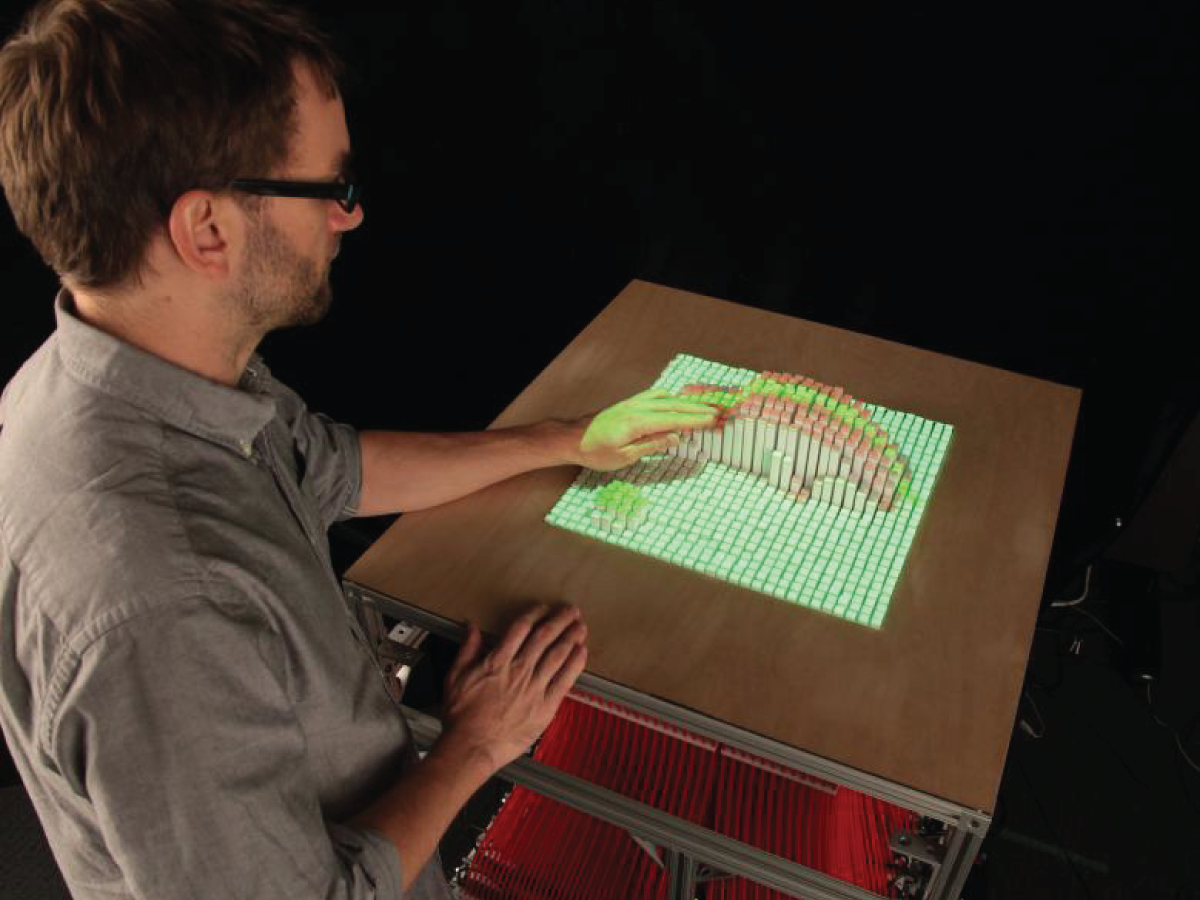
- **Shape-changing:** physical form as input and output ([Alexander et al., 2018](#ref-alexander2018grand)). Do moving rods beat a chart on a screen?
- **Holographic:** the illusion of a 3D person in the room (ABBA Voyage, 2022). How do you interact with a projection, and how do you keep it from being creepy?
- **Brain-computer:** electrodes on the scalp drive a cursor, robot or game; assistive uses (BrainGate) and playful ones (Brainball). Ethics of mind reading get sharper with implants (Neuralink).

More on each in the [interface considerations page](https://smcclab.au/thirty-nine-hundred-hci/resources/06-interface-considerations.html).

</div>

<div class="column" width="40%">

<figure>
<img src="img/inform-mit.png" style="width:80.0%" alt="inFORM: A shape-changing interface that uses a series of motor-controlled pins to render digital content in the form of 3D rods; developed by MIT Media Group. Source: http://trackr-media.tangiblemedia.org/publishedmedia/Projects/2013-inFORM/inFORM%20Collection/4676" />
<figcaption aria-hidden="true">inFORM: A shape-changing interface that uses a series of motor-controlled pins to render digital content in the form of 3D rods; developed by MIT Media Group. Source: <a href="http://trackr-media.tangiblemedia.org/publishedmedia/Projects/2013-inFORM/inFORM%20Collection/4676" class="uri">http://trackr-media.tangiblemedia.org/publishedmedia/Projects/2013-inFORM/inFORM%20Collection/4676</a></figcaption>
</figure>

</div>

</div>

# Coda

What makes these interfaces good or bad?

How would you choose what interface to use?

## Natural User Interfaces and Beyond

<div class="columns">

<div class="column" width="60%">

A natural user interface (NUI) is designed to allow people to interact with a computer in the same way that they interact with the physical world—using their voice, hands, and bodies.

- but how natural are NUIs? (the Newton was the “natural” one)

Don Norman ([Norman, 2013](#ref-Norman:2013)) argues “natural” depends on a number of factors:

- how much learning is required,
- the complexity of the app or device’s interface,
- and whether accuracy and speed are needed.

A gesture may be worth a thousand words; other times a word is worth a thousand gestures.

</div>

<div class="column" width="40%">

<figure>
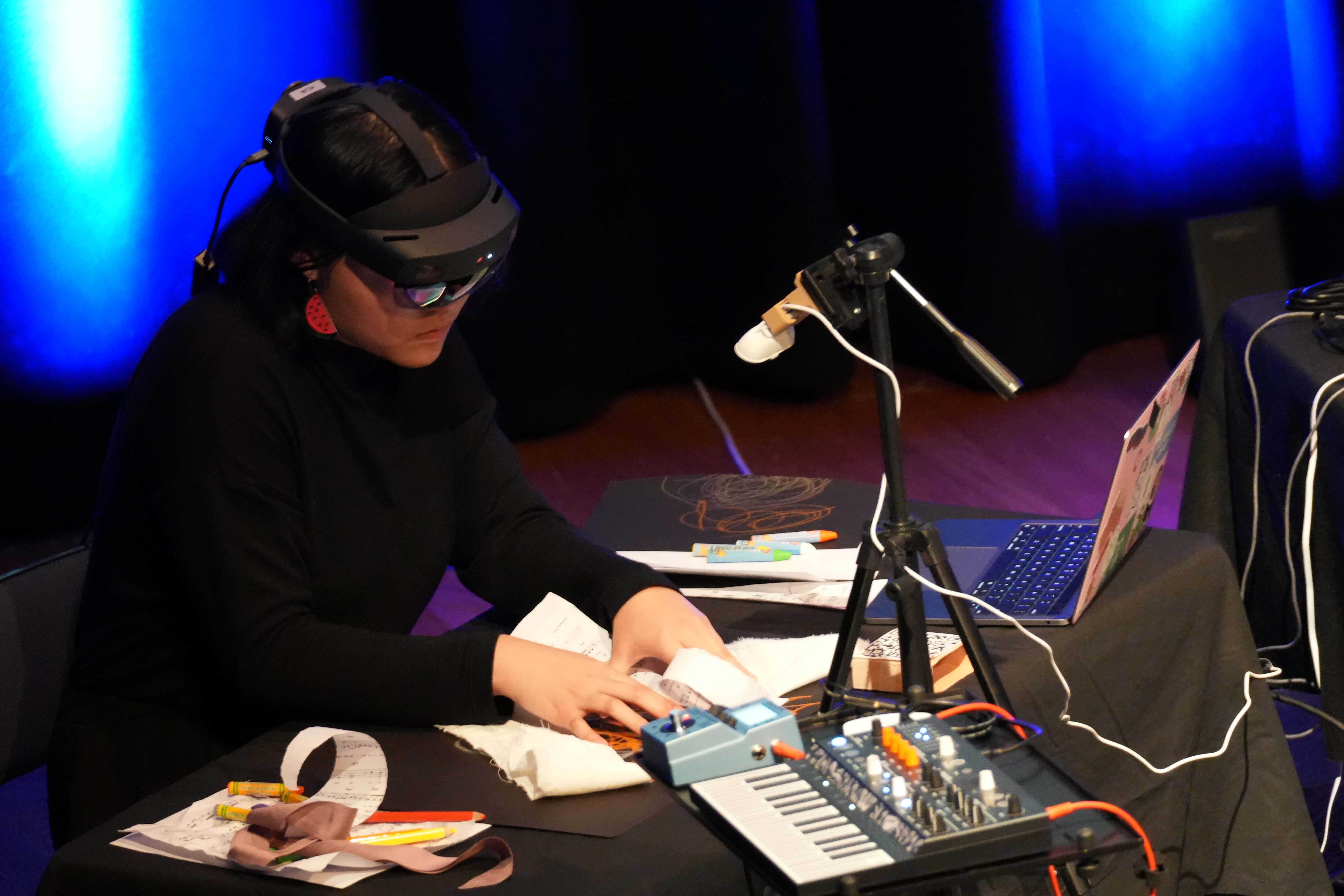
<img src="img/interfaces_2_ar-drawing.jpg" style="width:100.0%" alt="PhD student Sandy Ma drawing-based musical performance in AR environment, from Unspoken (Y. Wang &amp; Ma, 2024)." />
<figcaption aria-hidden="true">PhD student Sandy Ma drawing-based musical performance in AR environment, from <em>Unspoken</em> <span class="citation" data-cites="wang-ma-unspoken:2024">(<a href="#ref-wang-ma-unspoken:2024" role="doc-biblioref">Y. Wang &amp; Ma, 2024</a>)</span>.</figcaption>
</figure>

</div>

</div>

## Which Interface?

Is voice better than touch? Is tangible better than a screen? Is VR the ultimate interface for games?

**It depends!** Different approaches to *telling someone you’re running late* produce different answers.

- **task:** which one was fastest for you? Would the answer change for a longer message?
- **people:** who has to learn it, and what they already know
- **context:** in a lecture theatre, on a bike, in a hurry, in another language
- **plus** reliability, social acceptability, privacy, ethics, and location

Affordance analysis tells you what an interface *offers* and to whom. It does not tell you which one is *better*.

<div class="info-box">

**Next week:** which is the better one, and how would we know?

</div>

## Live demo: a music app with three interfaces

<figure>
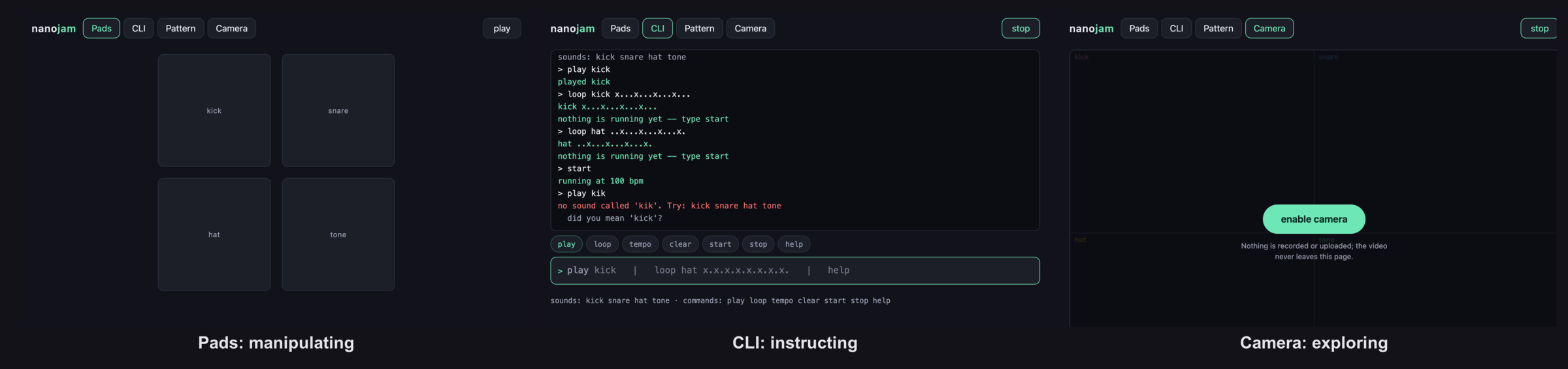
<img src="img/nanojam-interfaces.png" style="width:55.0%" alt="nanojam: the same sounds with pads, a command line, and a camera. https://charlesmartin.au/nanojam/" />
<figcaption aria-hidden="true">nanojam: the same sounds with pads, a command line, and a camera. <a href="https://charlesmartin.au/nanojam/" class="uri">https://charlesmartin.au/nanojam/</a></figcaption>
</figure>

<div class="columns">

<div class="column" width="55%">

Every interface sends one of six commands to the same engine, so the *only* thing that changes is the interaction.

- **Pads** (manipulating): tap a sound
- **CLI** (instructing): `loop kick x...x...`
- **Camera** (exploring): move a hand into a region

</div>

<div class="column" width="45%">

<div class="think-box">

**Think:** as each one runs, fill in the six questions. Which is fastest to a first sound? Which is fastest to a *pattern*? What is hidden, and what is false?

</div>

</div>

</div>

<!-- boilerplate ending -->

## Questions: Who has a question?

<div class="columns">

<div class="column" width="60%">

**Who has a question?**

- I can take *catchbox* question up until 2:55
- For after class questions: meet me outside the classroom at the bar (for 30 minutes)
- Feel free to ask about **any aspect of the course**
- Also feel free to ask about **any aspect of computing at ANU**! I may not be able to help, but I can listen.

</div>

<div class="column" width="40%">

<figure>
<img src="img/kambri-bar.jpg" alt="Meet you at the bar for questions. 🍸🥤🫖☕️ Unfortunately no drinks served! 🙃" />
<figcaption aria-hidden="true">Meet you <em>at the bar</em> for questions. 🍸🥤🫖☕️ Unfortunately no drinks served! 🙃</figcaption>
</figure>

</div>

</div>

# References

<div id="refs" class="references csl-bib-body hanging-indent" data-entry-spacing="0" data-line-spacing="2">

<div id="ref-adiwangsa-charades:2025" class="csl-entry">

Adiwangsa, M., Bransky, K., Wood, E., & Sweetser, P. (2025). A game of ChARades: Using role-playing and mimicry with and without tangible objects to ideate immersive augmented reality experiences. *Companion Publication of the 2025 ACM Designing Interactive Systems Conference*, 440–445. <https://doi.org/10.1145/3715668.3736382>

</div>

<div id="ref-alavi2019introduction" class="csl-entry">

Alavi, H. S., Churchill, E. F., Wiberg, M., Lalanne, D., Dalsgaard, P., Fatah gen Schieck, A., & Rogers, Y. (2019). Introduction to human-building interaction (hbi) interfacing hci with architecture and urban design. In *ACM Transactions on Computer-Human Interaction (TOCHI)* (No. 2; Vol. 26, pp. 1–10). ACM New York, NY, USA.

</div>

<div id="ref-alexander2018grand" class="csl-entry">

Alexander, J., Roudaut, A., Steimle, J., Hornbæk, K., Bruns Alonso, M., Follmer, S., & Merritt, T. (2018). Grand challenges in shape-changing interface research. *Proceedings of the 2018 CHI Conference on Human Factors in Computing Systems*, 1–14.

</div>

<div id="ref-babich2018mobileux" class="csl-entry">

Babich, N. (2018). *The do’s and don’ts of mobile UX design*. <https://theblog.adobe.com/10-dos-donts-mobile-ux-design>.

</div>

<div id="ref-billinghurst-2015-ar-survey" class="csl-entry">

Billinghurst, M., Clark, A., & Lee, G. (2015). *A survey of augmented reality*. now. <https://doi.org/10.1561/1100000049>

</div>

<div id="ref-bouchet2004icare" class="csl-entry">

Bouchet, J., & Nigay, L. (2004). ICARE: A component-based approach for the design and development of multimodal interfaces. *CHI’04 Extended Abstracts on Human Factors in Computing Systems*, 1325–1328. <https://doi.org/10.1145/985921.986055>

</div>

<div id="ref-clegg2020community" class="csl-entry">

Clegg, T., Boston, C., Preece, J., Warrick, E., Pauw, D., & Cameron, J. (2020). Community-driven informal adult environmental learning: Using theory as a lens to identify steps toward concientización. *The Journal of Environmental Education*, *51*(1), 55–71.

</div>

<div id="ref-cohen2004voice" class="csl-entry">

Cohen, M. H., Giangola, J. P., & Balogh, J. (2004). *Voice user interface design*. Addison-Wesley Professional.

</div>

<div id="ref-cooper2014face" class="csl-entry">

Cooper, A., Reimann, R., Cronin, D., & Noessel, C. (2014). *About face: The essentials of interaction design*. John Wiley & Sons.

</div>

<div id="ref-deng2004challenges" class="csl-entry">

Deng, L., & Huang, X. (2004). Challenges in adopting speech recognition. *Communications of the ACM*, *47*(1), 69–75.

</div>

<div id="ref-dumas2009multimodal" class="csl-entry">

Dumas, B., Lalanne, D., & Oviatt, S. (2009). Multimodal interfaces: A survey of principles, models and frameworks. In *Human machine interaction: Research results of the mmi program* (pp. 3–26). Springer.

</div>

<div id="ref-fiebrink-wekinator-nime:2009" class="csl-entry">

Fiebrink, R., Trueman, D., & Cook, P. R. (2009). A meta-instrument for interactive, on-the-fly machine learning. *Proceedings of the International Conference on New Interfaces for Musical Expression*. <https://doi.org/10.5281/zenodo.1177513>

</div>

<div id="ref-fishkin2004taxonomy" class="csl-entry">

Fishkin, K. P. (2004). A taxonomy for and analysis of tangible interfaces. *Personal and Ubiquitous Computing*, *8*(5), 347–358.

</div>

<div id="ref-gaver-technology-affordances:1991" class="csl-entry">

Gaver, W. W. (1991). Technology affordances. *Proceedings of the SIGCHI Conference on Human Factors in Computing Systems*, 79–84. <https://doi.org/10.1145/108844.108856>

</div>

<div id="ref-goldberg-unistrokes:1993" class="csl-entry">

Goldberg, D., & Richardson, C. (1993). Touch-typing with a stylus. *Proceedings of the SIGCHI Conference on Human Factors in Computing Systems (CHI ’93)*, 80–87. <https://doi.org/10.1145/169059.169093>

</div>

<div id="ref-greenwold-2003-spatial-computing" class="csl-entry">

Greenwold, S. (2003). *Spatial computing* \[Master’s thesis\]. School of Architecture; Planning, Massachusetts Institute of Technology.

</div>

<div id="ref-ishii1997tangible" class="csl-entry">

Ishii, H., & Ullmer, B. (1997). Tangible bits: Towards seamless interfaces between people, bits and atoms. *Proceedings of the ACM SIGCHI Conference on Human Factors in Computing Systems*, 234–241.

</div>

<div id="ref-jorda2010reactable" class="csl-entry">

Jordà, S. (2010). The reactable: Tangible and tabletop music performance. In *CHI’10 extended abstracts on human factors in computing systems* (pp. 2989–2994).

</div>

<div id="ref-krug2014don" class="csl-entry">

<span class="nocase">Krug, S. et al.</span> (2014). Don’t make me think, revisited. *A Common Sense Approach to Web and Mobile Usability*, *3*.

</div>

<div id="ref-landay2019smartinterfaces" class="csl-entry">

Landay, J. (2019). *Smart interfaces for human‐centered AI*. Stanford HAI News. <https://hai.stanford.edu/news/smart-interfaces-human-centered-ai>

</div>

<div id="ref-mackenzie-graffiti-usability:1997" class="csl-entry">

MacKenzie, I. S., & Zhang, S. X. (1997). The immediate usability of Graffiti. *Proceedings of the Graphics Interface 1997 Conference*, 129–137. <https://doi.org/10.20380/GI1997.15>

</div>

<div id="ref-magnusson2010designconstrain" class="csl-entry">

Magnusson, T. (2010). Designing constraints: Composing and performing with digital musical systems. *Computer Music Journal*, *34*(4), 62–73. <https://doi.org/10.1162/COMJ_a_00026>

</div>

<div id="ref-milgram-mr:1994" class="csl-entry">

Milgram, P., & Kishino, F. (1994). A taxonomy of mixed reality visual displays. *IEICE TRANSACTIONS on Information*, *E77-D*(12), 1321–1329.

</div>

<div id="ref-mullet1996designing" class="csl-entry">

Mullet, K., & Sano, D. (1995). *Designing visual interfaces: Communication oriented techniques*. Prentice Hall.

</div>

<div id="ref-Norman:2013" class="csl-entry">

Norman, D. A. (2013). *The design of everyday things: Revised and expanded edition*. Basic Books.

</div>

<div id="ref-oviatt2017handbook" class="csl-entry">

Oviatt, S., Schuller, B., Cohen, P., Sonntag, D., & Potamianos, G. (2017). *The handbook of multimodal-multisensor interfaces, volume 1: Foundations, user modeling, and common modality combinations*. Morgan & Claypool.

</div>

<div id="ref-rogers1996search" class="csl-entry">

Rogers, Y., & Aldrich, F. (1996). In search of clickable dons: Learning about HCI through interacting with norman’s CD-ROM. *ACM SIGCHI Bulletin*, *28*(3), 44–47.

</div>

<div id="ref-rogers-beyond-hci:2023" class="csl-entry">

Rogers, Y., Sharp, H., & Preece, J. (2023). *Interaction design: Beyond human-computer interaction, 6th edition*. John Wiley & Sons, Inc. <https://quicklink.anu.edu.au/kv9b>

</div>

<div id="ref-rossiter2018past" class="csl-entry">

Rossiter, D. G. (2018). Past, present & future of information technology in pedometrics. *Geoderma*, *324*, 131–137.

</div>

<div id="ref-shaer2010tangible" class="csl-entry">

<span class="nocase">Shaer, O., Hornecker, E., et al.</span> (2010). Tangible user interfaces: Past, present, and future directions. *Foundations and Trends® in Human–Computer Interaction*, *3*(1–2), 4–137.

</div>

<div id="ref-shneiderman-designing-ui:1992" class="csl-entry">

Shneiderman, B. (1992). *Designing the user interface: Strategies for effective human-computer interaction*. Addison-Wesley.

</div>

<div id="ref-speicher2019mixed" class="csl-entry">

Speicher, M., Hall, B. D., & Nebeling, M. (2019). What is mixed reality? *Proceedings of the 2019 CHI Conference on Human Factors in Computing Systems*, 1–15.

</div>

<div id="ref-steed-we-wait:2018" class="csl-entry">

Steed, A., Pan, Y., Watson, Z., & Slater, M. (2018). “We wait”—the impact of character responsiveness and self embodiment on presence and interest in an immersive news experience. *Frontiers in Robotics and AI*, *5*. <https://doi.org/10.3389/frobt.2018.00112>

</div>

<div id="ref-sutherland1967ar" class="csl-entry">

Sutherland, I. E. (1968). A head-mounted three dimensional display. *Proceedings of the December 9-11, 1968, Fall Joint Computer Conference, Part i*, 757–764. <https://doi.org/10.1145/1476589.1476686>

</div>

<div id="ref-trudeau-doonesbury-newton:1993" class="csl-entry">

Trudeau, G. (1993). *Doonesbury*. Comic strip, 27 August 1993, syndicated by Universal Press. <https://www.gocomics.com/doonesbury/1993/08/27>

</div>

<div id="ref-ullmer2005token" class="csl-entry">

Ullmer, B., Ishii, H., & Jacob, R. J. (2005). Token+ constraint systems for tangible interaction with digital information. *ACM Transactions on Computer-Human Interaction (TOCHI)*, *12*(1), 81–118.

</div>

<div id="ref-ullmer2022weaving" class="csl-entry">

Ullmer, B., Shaer, O., Mazalek, A., & Hummels, C. (2022). *Weaving fire into form: Aspirations for tangible and embodied interaction*. Morgan & Claypool.

</div>

<div id="ref-veen2000art" class="csl-entry">

Veen, J. (2000). *The art and science of web design*. Pearson Education.

</div>

<div id="ref-wang2014ocarina" class="csl-entry">

Wang, G. (2014). Ocarina: Designing the iPhone’s magic flute. *Computer Music Journal*, *38*(2), 8–21.

</div>

<div id="ref-wang-ma-unspoken:2024" class="csl-entry">

Wang, Y., & Ma, S. (2024). Unspoken. In L. S. Pardue & P. Dahlstedt (Eds.), *Proceedings of the international conference on new interfaces for musical expression* (pp. 76–77). <https://doi.org/10.5281/zenodo.17553285>

</div>

<div id="ref-wang-mobility-space:2023" class="csl-entry">

Wang, Y., Xi, M., Adcock, M., & Martin, C. P. (2023). Mobility, space and sound activate expressive musical experience in augmented reality. In M. Ortiz & A. Marquez-Borbon (Eds.), *Proceedings of the international conference on new interfaces for musical expression* (pp. 128–133). <https://doi.org/10.5281/zenodo.11189129>

</div>

<div id="ref-zhu2025livingloom" class="csl-entry">

Zhu, J., Chang, S., Zhao, R., & Kao, C. H.-L. (2025). LivingLoom: Investigating human-plant symbiosis through integrating living plants into (e-)textiles. *Proceedings of the 2025 CHI Conference on Human Factors in Computing Systems*. <https://doi.org/10.1145/3706598.3713156>
</div>

</div>