## Announcements
- **TODAY:** assignment 1 [due **Monday 24 August, 23:59 on GitLab**](https://canvas.anu.edu.au/courses/11488/assignments/43579) ([template](https://gitlab.comp.anu.edu.au/comp3900/2026/comp3900-2026-A1-prototyping))
- assignment 2 specification will be published soon, [you can see the “main idea” already on Canvas](https://canvas.anu.edu.au/courses/11488/assignments/43580)
- keep attending labs, if issues, apply for an [extension (see course policies on Canvas)](https://canvas.anu.edu.au/courses/11488/pages/policies)
- any questions, problems, [**use the forum**](https://edstem.org/au/courses/37143/discussion) - more questions allowed (no limits!), public questions preferred.
- lab marks come out weekly via Canvas
## Plan for the class
- Overview of analysis, interpretation, presentation
- Quantitative Analysis (demos!)
- Qualitative Analysis (coding, themes, affinity diagrams)
- (next week: analytical frameworks and a deep dive on reflexive thematic analysis)
## Before we start: answer a quick questionnaire
**Do:** Answer a short questionnaire about this class (2 minutes)
- go to or scan the QR code
- we’ll use *your* responses as the dataset for a live analysis demo later in the lecture
# Analysis, Interpretation, Presentation
- last week we talked about getting data
- once we have it, what can we do with it?
- quantitative approaches
- qualitative approaches
- or a combination (common in HCI!)
- this lecture follows chapter 9 of the course textbook ([Rogers et al., 2023](#ref-rogers-beyond-hci:2023))
## Processes
- (data gathering)
- data cleaning
- e.g., `age = 999`
- analysis and interpretation
- different tasks, but often parallel
- presentation
## Bias in Analysis and Interpretation
- **bias:** influence affecting objective judgement and decision making
- integrating new data with past experience (**bias is normal!**)
- **conscious:** we know about them and their effect on us
- **unconscious:** subtle effects that we don’t know about
## Specific Biases
- **familiarity bias:** do what we know best
- ignore unfamiliar methods
- ignore unfamiliar data sources
- **self-attribution bias:** giving ourselves too much credit
- falsely attribute improvements to our design and not external factors, user learning, etc
- overlook alternative explanations
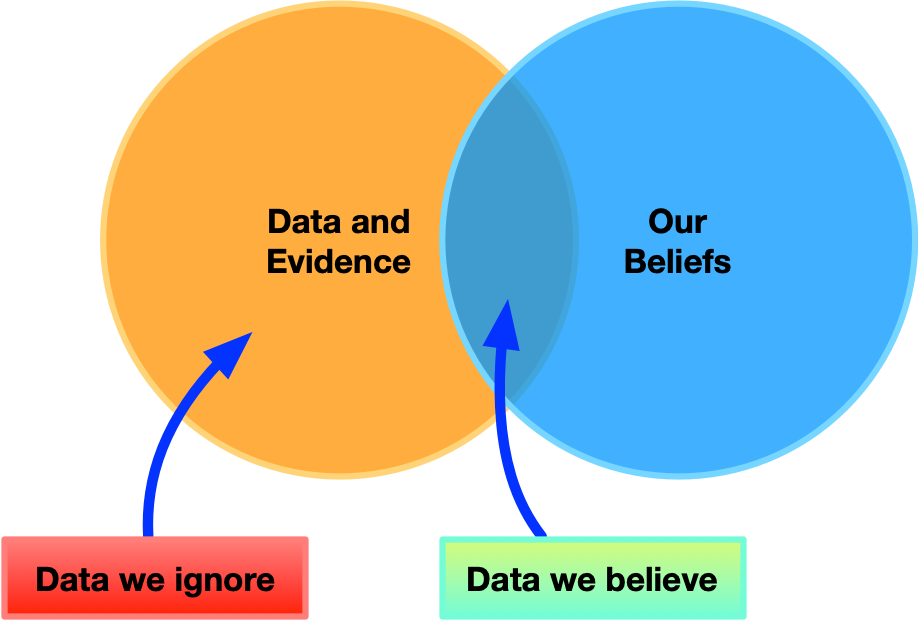
- **confirmation bias:** discarding information that contradicts existing belief
- more on [confirmation bias](https://www.nngroup.com/articles/confirmation-bias-ux/)
- ignore non-supporting evidence
- analyse for confirmation, not for discovery
- overlook alternative analyses and sources
Confirmation bias is problematic
## Quantitative and Qualitative
- typical categorisation of data
- **Quantitative data:** form of numbers or easily translated into numbers
- years experience
- number of minutes to perform a task
- **Qualitative data:** words, images, sound
- descriptions
- interview transcripts
- photos
- Some data can be represented as both
- e.g., digital text, sound, images can be represented and analysed numerically (is this useful?)
## Quantitative and Qualitative Methods
**Quantitative Analysis:** find magnitude, amounts or size of *something* and make rigorous comparisons
**Qualitative Analysis:** find the nature of things, themes, patterns, stories
## Use and Misuse of Data
- It’s easy to misuse numerical data and the results of analyses
- This can particularly happen when transforming the type of data (e.g., agreement ratings to a numerical code)
- Qualitative data can also be misused, e.g., content of questions reported as a finding.
**Talk:** What’s wrong with each of these claims? (2 minutes, discuss with your neighbour)
1. “50% of users took longer than 30 minutes to complete the task.”
2. “The mean agreement was 3.67.”
3. (In a study about mobile phone use with many questions about mobile phones) “Participants noted frequent use of mobile phones for many tasks.”
## Use and Misuse of Data: what was wrong?
**Careful:** here’s the problems
1. Percentages can hide a tiny sample: “50% of users” was really “2 out of 4 users…”
2. False precision: agreement ratings are ordinal, so a mean to two decimal places implies rigour the data doesn’t have (a median or distribution would be more honest)
3. The “finding” just echoes the questions that were asked — asking lots about mobile phones and then reporting that participants talked about mobile phones isn’t a discovery
## First Steps
- Interviews: transcribe (e.g., using [Aiko](https://sindresorhus.com/aiko)), expand notes, enter closed questions into spreadsheets (treated as quantitative)
- Questionnaires: enter into spreadsheets, clean up data, filter into datasets
- Observations: expand notes, transcribe recordings, edit videos, synchronise and clean up interaction data
# Basic Quantitative Analysis
What do we do with quantitative data once we have some?
## Centre of a set of data
*what’s the average* of a set of values?
- **Mean:** sum of the values divided by the number of entries.
- **Median:** order the set numerically and find the value in the middle (or if even number of entries, halfway between the two middle entries)
- **Mode:** the most common entry
Example: `[2, 2, 3, 4, 873]`
Example shows that outliers mess up *mean*, so *median* is often more useful.
## Spread of data
*how spread out* is a set of values?
- **Range:** `max - min`
- **Standard Deviation:** the *typical distance* of a value from the mean
- **Interquartile range:** range of the middle 50% of the data
Similarly to central measures, **interquartile range** is robust against weird outliers
## Normal vs non-normal distributions
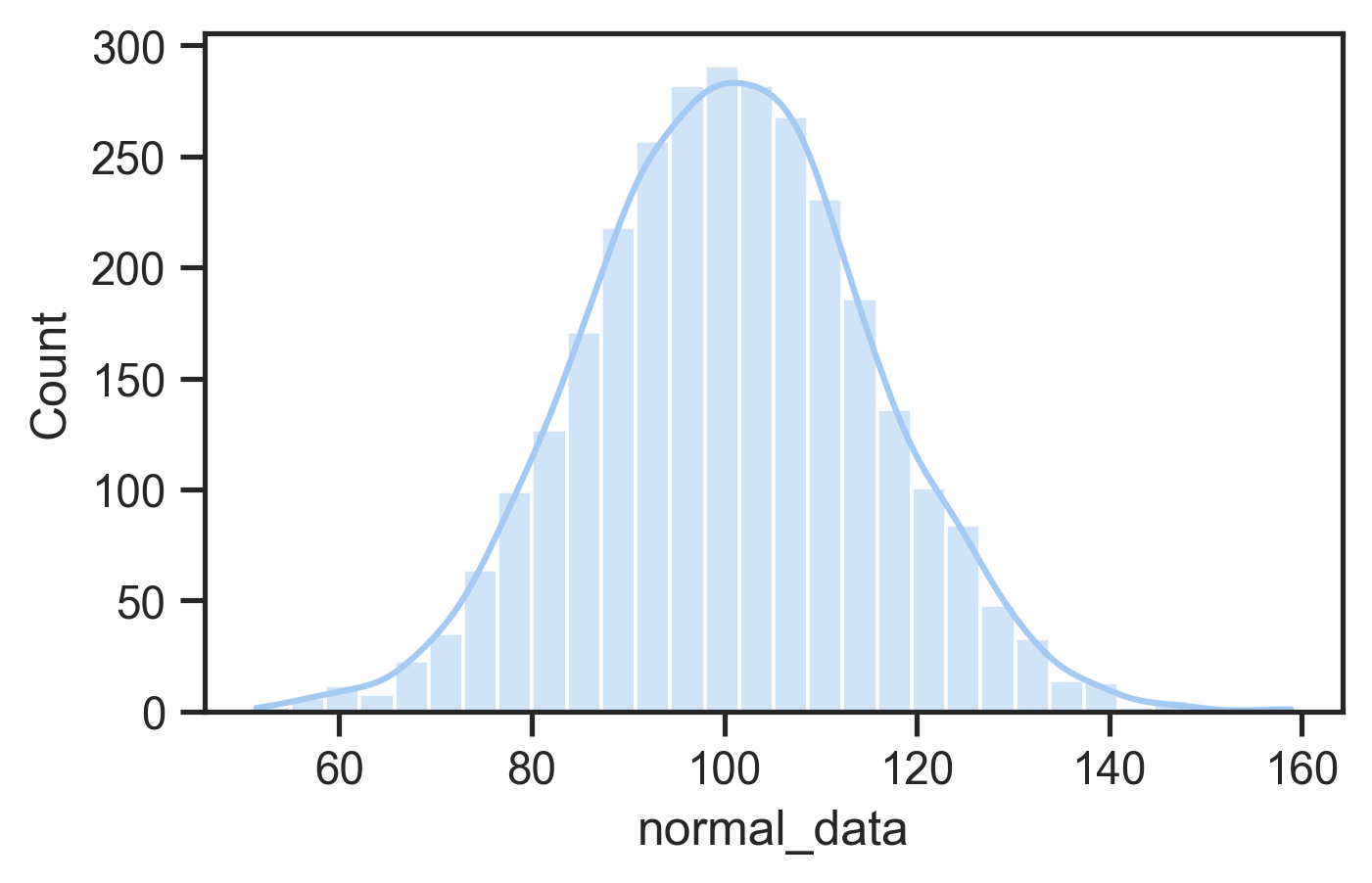
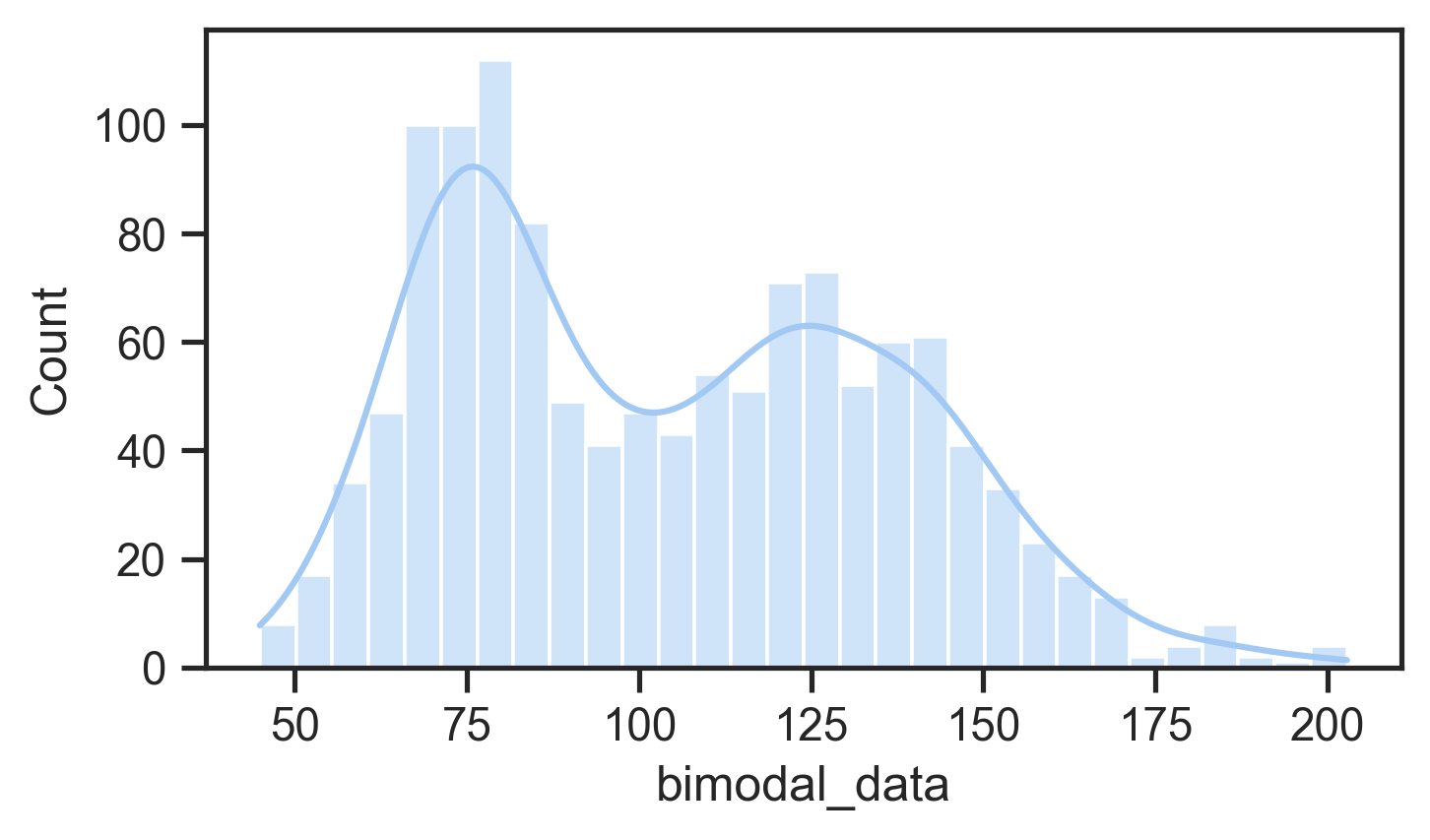
The distribution of the data is how it is spread out and where it is bunched up.
- **normal distribution:** a.k.a. bell curve, Gaussian distribution, mean, median, mode are the same, and the data evenly falls either side of the mean
- **skewed distributions:** data with a weirdly long tail in either direction
- **multi-modal distributions:** data that seems to have multiple bumps
This matters because statistical tests often assume data is *normal* so findings might be misleading.
Normal distributionBimodal distribution
## Looking at the data
First thing to do after loading it in. May not be the most helpful approach… but still important to check it’s not garbled and the columns make sense.
| interactive activities | attend in person | watch online | degree | time in CBR |
|----|----|----|----|----|
| 5 | 2 | 2 | undergraduate | 1-3 years |
| 3 | 5 | 1 | postgraduate | 3+ years |
| 4 | 5 | 1 | postgraduate | \<1 year |
| 5 | 2 | 4 | undergraduate | \<1 year |
| 4 | 3 | 1 | undergraduate | \<1 year |
## Descriptive Statistics
Second thing to do when loading up data for analysis, calculate:
- minimum, maximum
- lower and upper quartile
- median and mean
- number of data points (count)
**Think:** are these values what you expected? do they suggest any *interesting* points about your data?
Third thing to do when loading data
- Plot the data to see the distribution and compare data points
- **Scatter plot:** see all the data! good for checking outliers and comparing aspects of data
- **Histogram:** useful to check distribution
- **Boxplot:** useful to compare distributions clearly (more abstract) **charles approved plot!**
- **Bar plots:** really just show one value (mean), may not be useful (too abstract!)
- **Line plot:** useful for showing data over time, not distributions
If plots show something *interesting* then you can investigate.
A histogram of some dataBox plots of the same data
## More complex plots
You can get *more plots* into one plot. Good for surfacing contrasts or telling a story about the data graphically.
## Comparing data and tests
- You can compare two sets of data by finding the difference between their centres or other descriptive statistics but **is the difference meaningful?**
- We use statistical significance to help ascertain meaningful differences that might be a research finding.
- A classic test is the *t*-test which compares the *means* of two sets of data, the output of a *t*-test can tell us how likely differences are to be random or **significant** (meaningful)
### Significance test notes
- we will come back to this later…
- *t*-tests assume normality and can only compare simple situations
- other tests can be used on any non-normal data 📊 and complex datasets (e.g., multiple values from each participants, multiple experimental conditions)
## Quantitative Analysis with Python
Lots of ways to do data analysis:
- Excel/spreadsheets can do this a bit, but inferior to coding approaches
- Special programming languages exist: SPSS (1968–), S (1976–), R (1993–), Python (1991) + pandas (2008), julia (2012)
- R is where the statisticians, social scientists and psychologists live, Python and Julia are more where computer science folks hangout.
In this class we’ll use Python, numpy, pandas, scipy, seaborn, and matplotlib as a default stack for data analysis (yes, libraries are a problem in python…)
## Last chance: answer the questionnaire!
**Do:** Did you miss the questionnaire at the start of class? Answer it now! (1 minute)
- go to or scan the QR code
- your answers are about to become our live demo dataset…
## Demo time: analysing and plotting data in Python
**Do:** Let’s do some *data analysis* — on **your** answers from the start of class!
1. Load the PollEV export into Google Colab
2. Wrangle it into a **tidy** table (one row per participant)
3. Convert the Likert answers to numbers
4. Descriptive statistics and simple plots
5. **Facet** the plots to compare groups
6. A statistical test: is the difference *meaningful*?
**Follow along (or try at home):**
- [open the demo notebook in Google Colab](https://colab.research.google.com/github/smcclab/thirty-nine-hundred-hci/blob/main/notebooks/comp3900_hci_analysing_data_examples.ipynb) — one click, runs in your browser
- no live data? [download the 2025 lecture’s (deidentified) responses](https://raw.githubusercontent.com/smcclab/thirty-nine-hundred-hci/main/notebooks/hci_lecture_questionnaire_2025.csv) — the notebook can also fetch this itself as a fallback
## Real data is messy: the PollEverywhere export
- one `.csv` file, but **six tables stacked on top of each other**
- each question: a title line, a header line, then the responses
- questions separated by a lonely `""` line
- `pd.read_csv()` on the whole file will *not* do what we want!
**First rule of data analysis: look at the raw data before you load it.**
``` text
HCI Lecture Interaction Questionnaire
I enjoy interactive activities in lectures.
Response,Via,Screen name,...,Created At
Agree,...,User: Web_06529,"",2025-08-17 22:44:30
Strongly Agree,...,User: Web_aa2e2,"",...
""
I usually attend lectures in person
Response,Via,Screen name,...,Created At
...
```
## Step 0: set up Colab
``` python
import pandas as pd
import seaborn as sns
import matplotlib.pyplot as plt
import scipy.stats as stats
from google.colab import files
upload = files.upload() # choose the PollEV .csv export
data_file = list(upload.keys())[0]
```
- our default stack: `pandas` (tables), `seaborn` (plots), `matplotlib` (plot plumbing), `scipy.stats` (tests)
- `files.upload()` is Colab-only — no live data? the notebook has a fallback cell that downloads the 2025 responses instead
## Step 1: split the file into its six tables
``` python
from io import StringIO
raw = open(data_file).read()
blocks = raw.split('\n""\n') # split on the "" lines
blocks[0] = blocks[0].split("\n", 1)[1] # drop the report title
frames = []
for block in blocks:
question, table = block.split("\n", 1) # question, then CSV
df = pd.read_csv(StringIO(table))
df["question"] = question.strip()
frames.append(df)
# long format: one row per answer, tagged with its question
responses = pd.concat(frames, ignore_index=True)
```
## Step 2: keep what we need, name it sensibly
``` python
responses = responses[["Response", "Screen name", "question"]]
short_names = {
"I enjoy interactive activities in lectures.": "enjoy_interactive",
"I usually attend lectures in person": "attend_in_person",
"I usually watch lectures online": "watch_online",
"Select the interactive activities you prefer:": "preferred_activity",
"What kind of degree program are you in?": "degree_program",
"How long have you lived in Canberra?": "time_in_canberra",
}
responses["question"] = responses["question"].replace(short_names)
responses.describe() # count / unique / top --- does it look right?
```
## Step 3: pivot to a tidy table
``` python
survey_data = responses.pivot(index="Screen name",
columns="question",
values="Response").dropna()
```
**Tidy data:** one row per participant, one column per question.
- `pivot` turns the long “one row per answer” table into a wide one
- `.dropna()` keeps only participants who answered *everything* — careful, that’s an analysis **choice**, and you should report it
## Step 4: turn the Likert answers into numbers
``` python
likert = ["Strongly Disagree", "Disagree", "Neutral",
"Agree", "Strongly Agree"]
for col in ["enjoy_interactive", "attend_in_person", "watch_online"]:
survey_data[col] = pd.Categorical(survey_data[col],
categories=likert, ordered=True)
survey_data[col] = survey_data[col].cat.codes + 1
```
- as plain strings, the answers sort **alphabetically**: `Agree < Disagree < Neutral < ...` 🙃
- an **ordered categorical** knows the real order; `.cat.codes + 1` maps it to 1–5
- boxplots and stats need numeric data, not strings
- (should you take a *mean* of Likert data? statisticians argue about this — more in week 10)
## Step 5: explore, one variable at a time
``` python
survey_data["degree_program"].value_counts()
survey_data["time_in_canberra"].value_counts()
survey_data.describe()
# distribution of one question
sns.set_theme(style="ticks", palette="Set2")
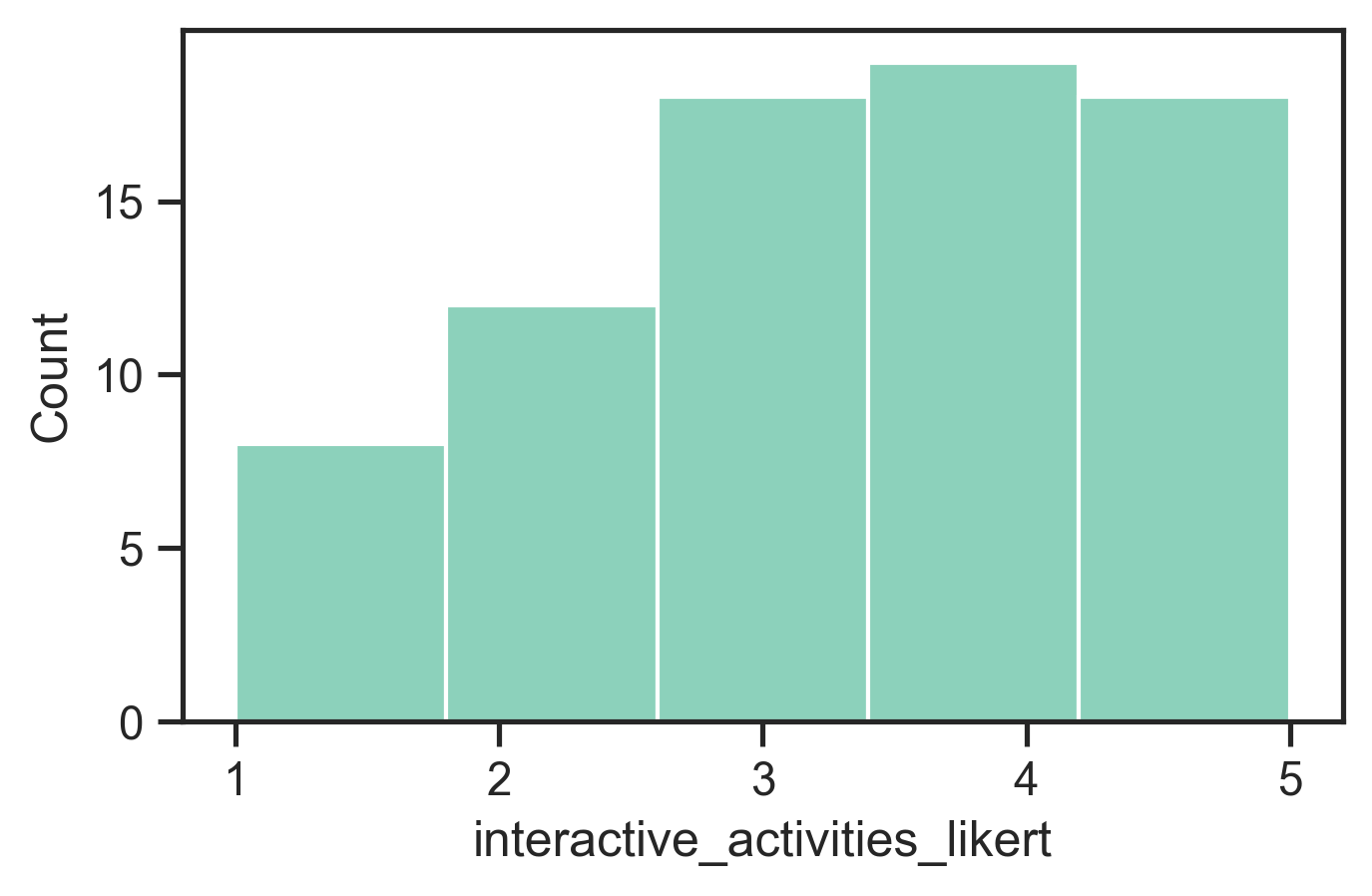
sns.histplot(data=survey_data,
x="enjoy_interactive", bins=5)
```
- start with **counts**: who actually answered? are the groups big enough to compare?
- `.describe()` now gives real descriptive statistics for the Likert columns (they’re numeric!)
- a **histogram** shows the distribution: normal-ish? skewed? bimodal?
- if something looks *interesting*, investigate — don’t stop at the first pretty picture
## Step 6: compare groups
``` python
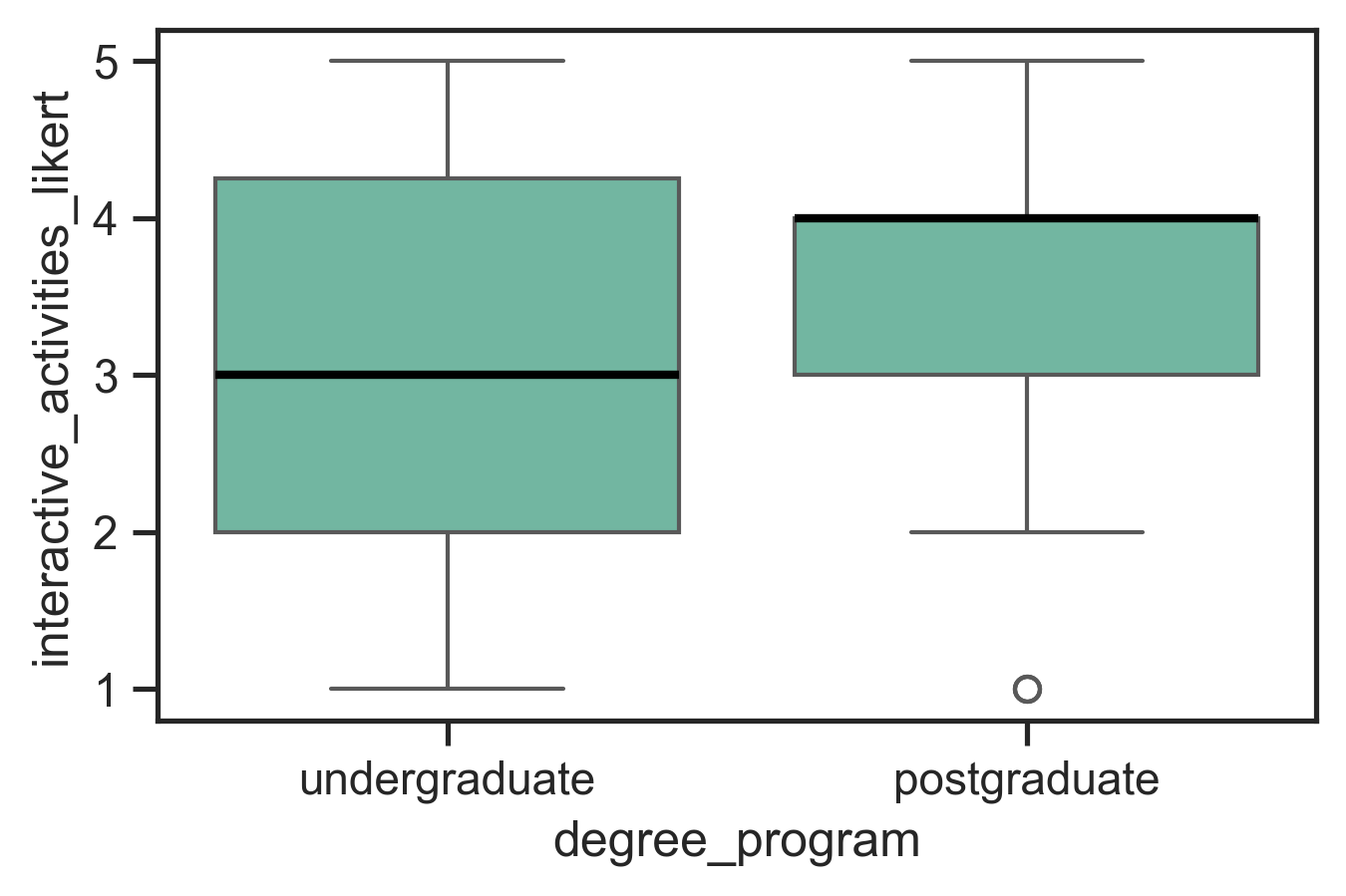
sns.boxplot(data=survey_data,
x="degree_program", y="enjoy_interactive",
medianprops={"linewidth": 2, "color": "black"})
# add a third variable with hue
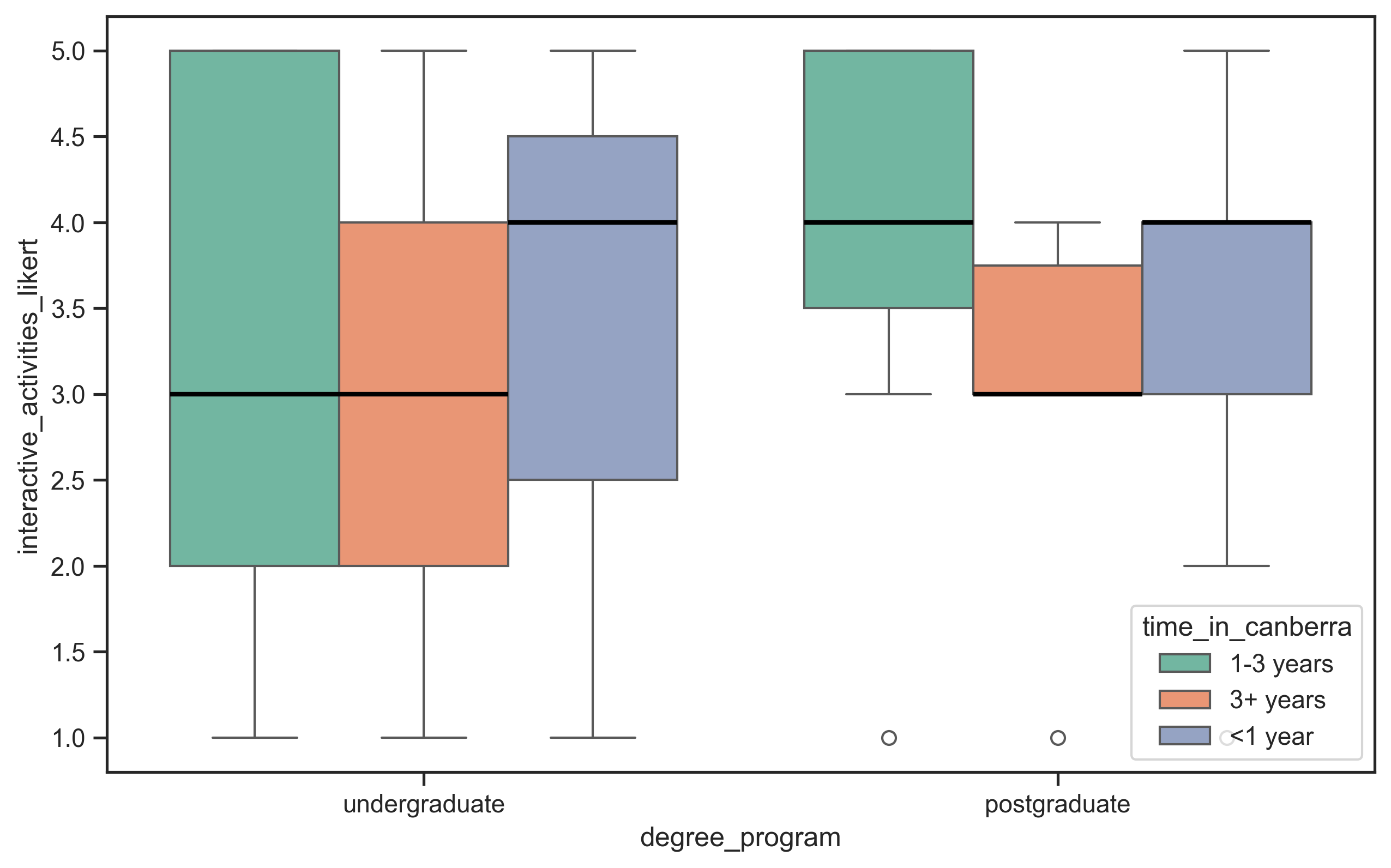
sns.boxplot(data=survey_data,
x="degree_program", y="enjoy_interactive",
hue="time_in_canberra",
medianprops={"linewidth": 2, "color": "black"})
```
- **boxplots** compare distributions between groups at a glance
- `hue=` splits each box again by a second grouping — but it gets crowded fast…
## Step 7: melt back to long format
``` python
survey_long = pd.melt(
survey_data,
id_vars=["degree_program", "time_in_canberra", "preferred_activity"],
value_vars=["enjoy_interactive", "attend_in_person", "watch_online"],
var_name="question", value_name="score")
sns.boxplot(data=survey_long, x="question", y="score",
hue="degree_program",
medianprops={"linewidth": 2, "color": "black"})
```
- `melt` is the inverse of the `pivot` in step 3: wide → long
- why bother? seaborn wants **one column of scores** to plot all three Likert questions side by side
## Step 8: facet to *really* see the groups
``` python
g = sns.FacetGrid(survey_long, col="time_in_canberra")
g.map_dataframe(sns.boxplot, x="question", y="score",
hue="degree_program",
medianprops={"linewidth": 2, "color": "black"})
g.add_legend(title="Degree")
```
- **faceting:** one small plot per group, with **shared axes** — differences between groups jump out
- swap `col=` and `hue=` to ask a *different question* of the same data
- “small multiples” is a classic visualisation idea — every plotting library has a version of it
## Step 9: is the difference meaningful?
``` python
undergrad = survey_data[survey_data["degree_program"] ==
"Undergraduate student (Bachelor degree)"]["enjoy_interactive"]
postgrad = survey_data[survey_data["degree_program"] ==
"Postgraduate student (Master degree)"]["enjoy_interactive"]
t_stat, p_value = stats.ttest_ind(undergrad, postgrad)
```
- the boxplots *suggested* a difference between groups — the *t*-test asks how likely that gap is under pure chance
- convention: `p < 0.05` counts as **significant**
- caveats: small samples, Likert data isn’t really interval, *t*-tests assume normality — much more on this in week 10
# Basic Qualitative Analysis
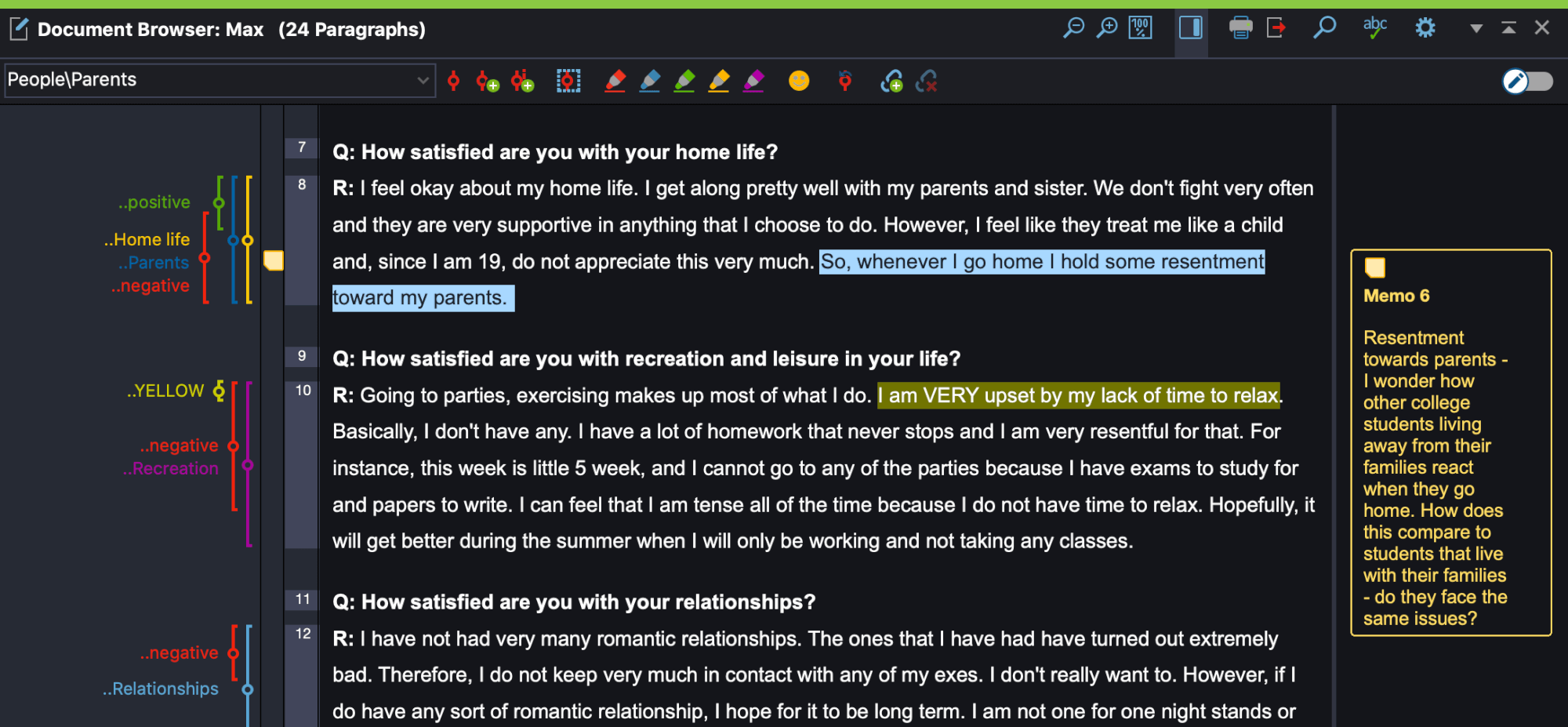
## Coding in Qualitative Analysis
- in **qualitative research** the word *coding* has nothing to do with programming
- **coding:** annotating data with key words or phrases that provide a means for analysis over a large corpus
- codes can be inductive (bottom up, from the data) or deductive (top-down start with a framework of codes) ([Braun & Clarke, 2006](#ref-braun-thematic-analysis:2006))
- challenges: creating meaningful, non-overlapping codes that are clearly defined and determining granularity
- inter-rater reliability measures the clarity and reliability of the coding scheme rather than correctness of analysis ([McDonald et al., 2019](#ref-mcdonald-interrater-reliability:2019))
- can be done with a text editor or dedicated software (NVivo, MAXQDA)
- initial viewing involves watching entire recording while writing high-level narrative and noting timestamps of interesting events
- chronological and video times used to index events
- data augmentation: video plus screen captures, interaction logs, transcriptions
- coding schemes applied systematically to ensure reliability and consistency
- team-based coding can address subjectivity, ambiguity, and potential errors
- expert knowledge can help with unclear codes and supports interpretation
Analysing some performance videos in 2012 (Charles)
## Identifying Themes
- Many qualitative research approaches distill *themes* from collected data.
- code the data (apply labels) and then create higher level themes from codes.
- (Reflexive) Thematic Analysis (RTA) ([Braun & Clarke, 2022](#ref-braun-thematic-analysis:2022)) is a well-known and accessible methodology.
### Typical process
1. Familiarise with the data
2. Coding (short labels, multiple rounds)
3. Generating initial themes
4. Developing, reviewing, and refining themes
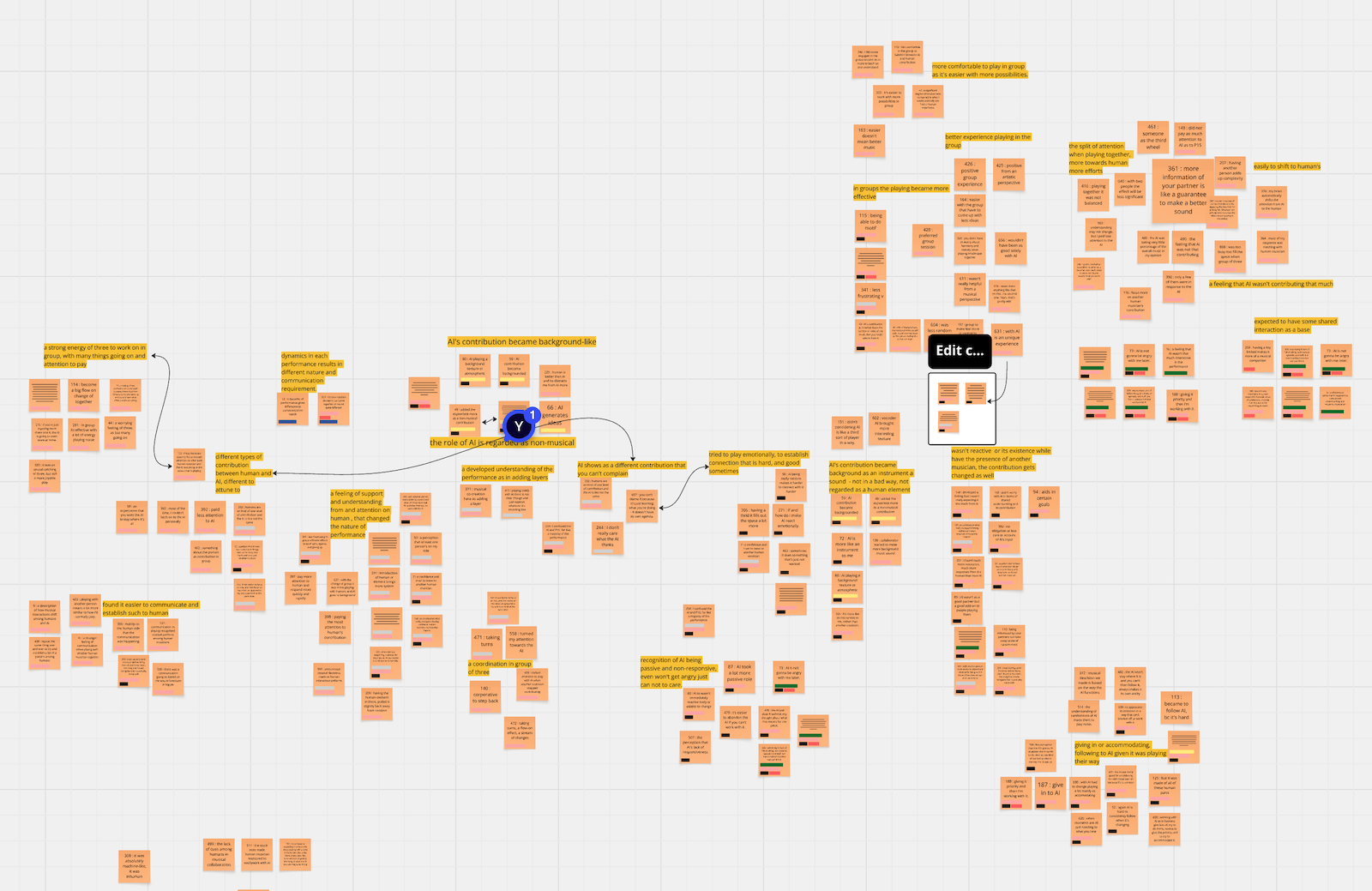
A Miro board from Yichen Wang’s thematic analysis (2025)
## What is a theme, and why does it matter?
A theme is a high level finding from qualitative analysis, but what that means can differ.
- **Two kinds of theme:** patterns of meaning (uncovering implicit meaning behind words) versus data summaries (summarising responses across participants) ([Braun & Clarke, 2019](#ref-braun-reflexive-thematic-analysis:2019))
- themes can be created organically from the data through interpretation, or follow predetermined frameworks and categories
- no one way is correct, but need to be deliberate in methodology in particular to be careful about:
- whether themes are a summary or reflect hidden or implicit meaning
- whether themes arise from data or come from a pre-determined framework
- whether we want “correct” codes, or to ensure that codes are clearly defined and interpreted consistently (can use multiple researchers to help)
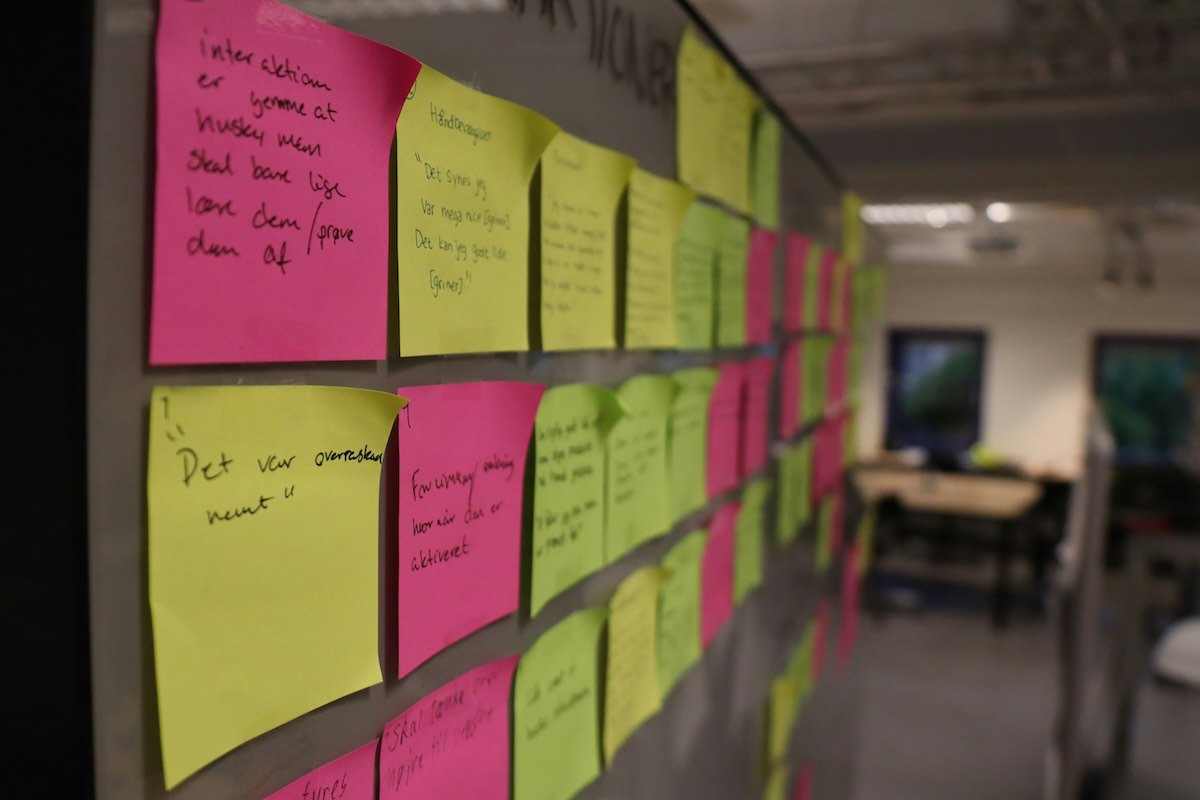
## Affinity Diagram
- **affinity diagrams** used for organising large amounts of data and identifying themes and overall narratives, a core part of contextual design ([Beyer & Holtzblatt, 1997](#ref-contextual-design:1997))
- both digital (e.g., Miro) and physical (e.g., sticky notes) diagramming approaches
- not necessarily a lot to this: summarise the data on notes, and arrange to find relationships between them.
- my PhD/master/Honours students tend to do this with Miro
- See [this resource](https://www.interaction-design.org/literature/article/affinity-diagrams-learn-how-to-cluster-and-bundle-ideas-and-facts) for a guide.
Analogue affinity diagrams often use sticky notes. (Photo by Christian Brok on Unsplash)
## Categorising Data
- deductive analysis applies pre-existing theoretical frameworks or categories to analyse data
- data is systematically coded to segment and categorise specific elements, allowing for pattern identification and quantitative analysis
- e.g.: take a specific categorisation scheme from previous research (interface problems, or design recommendations), apply to new situation
- taking a quantitative approach: counting occurrences of categories per participant, identifying specific situations or issues
## Critical Incident Analysis ([Flanagan, 1954](#ref-flanagan-critical-incident:1954))
- focus on significant behavioral incidents rather than general impressions
- identifying specific moments that are pivotal in either positive or negative ways
- makes data analysis more manageable and focused
- can be identified by
- participants during retrospective discussions,
- observers through real-time monitoring
- through video analysis of recorded sessions
- more info: [nngroup](https://www.nngroup.com/articles/critical-incident-technique/), [usability bok](https://www.usabilitybok.org/critical-incident-technique)
## Questions: Who has a question?
**Who has a question?**
- I can take *catchbox* questions up until 2:55
- For after class questions: meet me outside the classroom at the bar (for 30 minutes)
- Feel free to ask about **any aspect of the course**
- Also feel free to ask about **any aspect of computing at ANU**! I may not be able to help, but I can listen.
Meet you at the bar for questions. 🍸🥤🫖☕️ Unfortunately no drinks served! 🙃
# References
Beyer, H., & Holtzblatt, K. (1997). *Contextual design: Defining customer-centered systems*. Morgan Kaufmann Publishers Inc.
Braun, V., & Clarke, V. (2006). Using thematic analysis in psychology. *Qualitative Research in Psychology*, *3*(2), 77–101.
Braun, V., & Clarke, V. (2019). Reflecting on reflexive thematic analysis. *Qualitative Research in Sport, Exercise and Health*, *11*(4), 589–597.
Braun, V., & Clarke, V. (2022). *Thematic analysis: A practical guide*. Sage Publications.
Flanagan, J. C. (1954). The critical incident technique. *Psychological Bulletin*, *51*(4), 327–358.
McDonald, N., Schoenebeck, S., & Forte, A. (2019). Reliability and inter-rater reliability in qualitative research: Norms and guidelines for CSCW and HCI practice. *Proceedings of the ACM on Human-Computer Interaction*, *3*(CSCW), 72:1–72:23.
Rogers, Y., Sharp, H., & Preece, J. (2023). *Interaction design: Beyond human-computer interaction, 6th edition*. John Wiley & Sons, Inc.