## Announcements

- **Class reps!** Needed now! (need at least 2 in total, ~1-2 UG and ~1-2 PG)
  - If you would like to nominate as a class rep, please make a private post on the class forum.
- **Tutorial 1**: Making, this week make a zine!
- **Big class!**
  - keep showing up,
  - keep asking questions,
  - stay constructive and positive (especially with your tutors!)

## Plan for the class

- Design Processes
- Discovering Requirements
- Ideation

# The Interaction Design Process

How do you get from a problem to something people can actually use?

## Creating systems that work for people

<div class="columns">

<div class="column" width="40%">

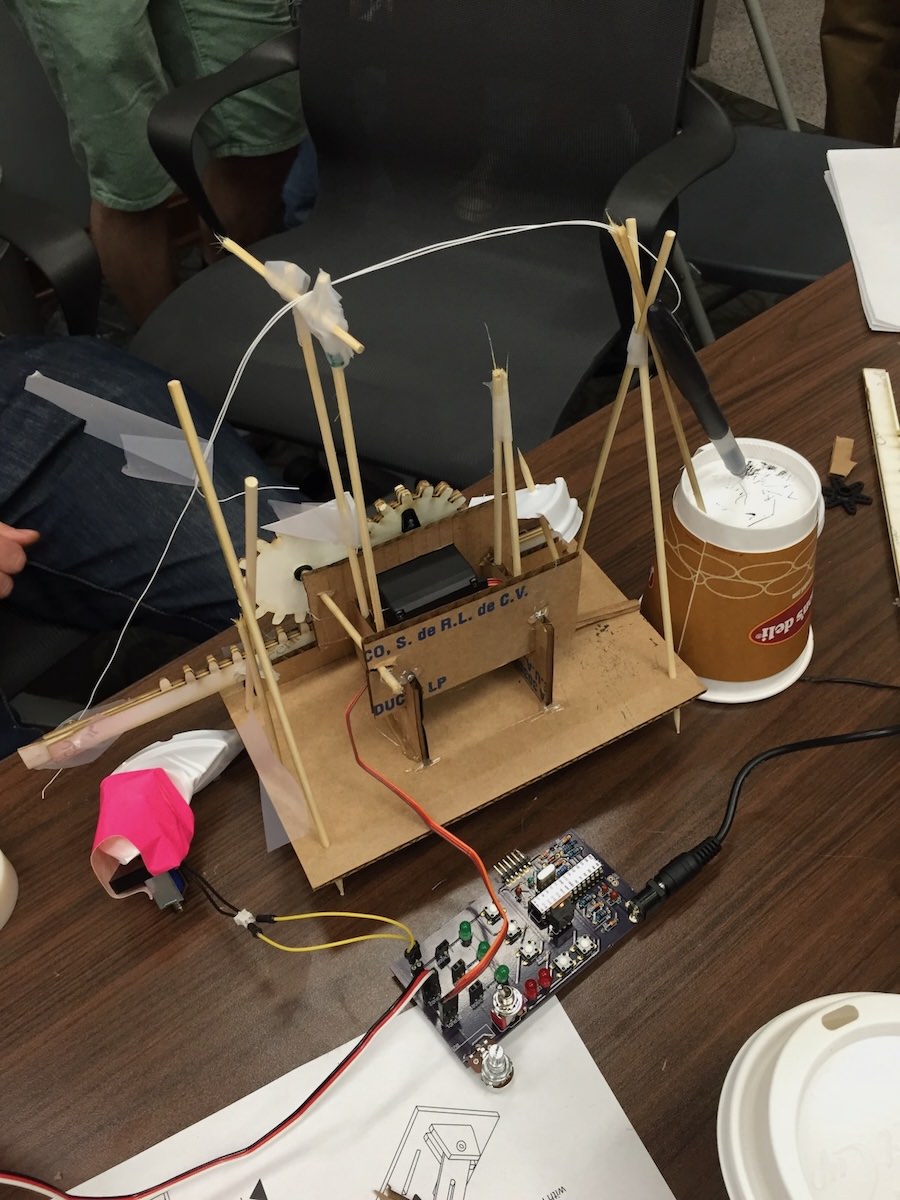
Interaction design involves creating systems that work for people.

- discovering requirements
- defining needs
- ideating possible solutions
- producing prototypes
- evaluating systems

</div>

<div class="column" width="60%">

<figure>
<img src="img/nime2015-cardboard-prototypes.jpg" style="width:50.0%" alt="Prototyping some solutions (to what?)" />
<figcaption aria-hidden="true">Prototyping some solutions (to what?)</figcaption>
</figure>

</div>

</div>

## Double Diamond Model

<figure>
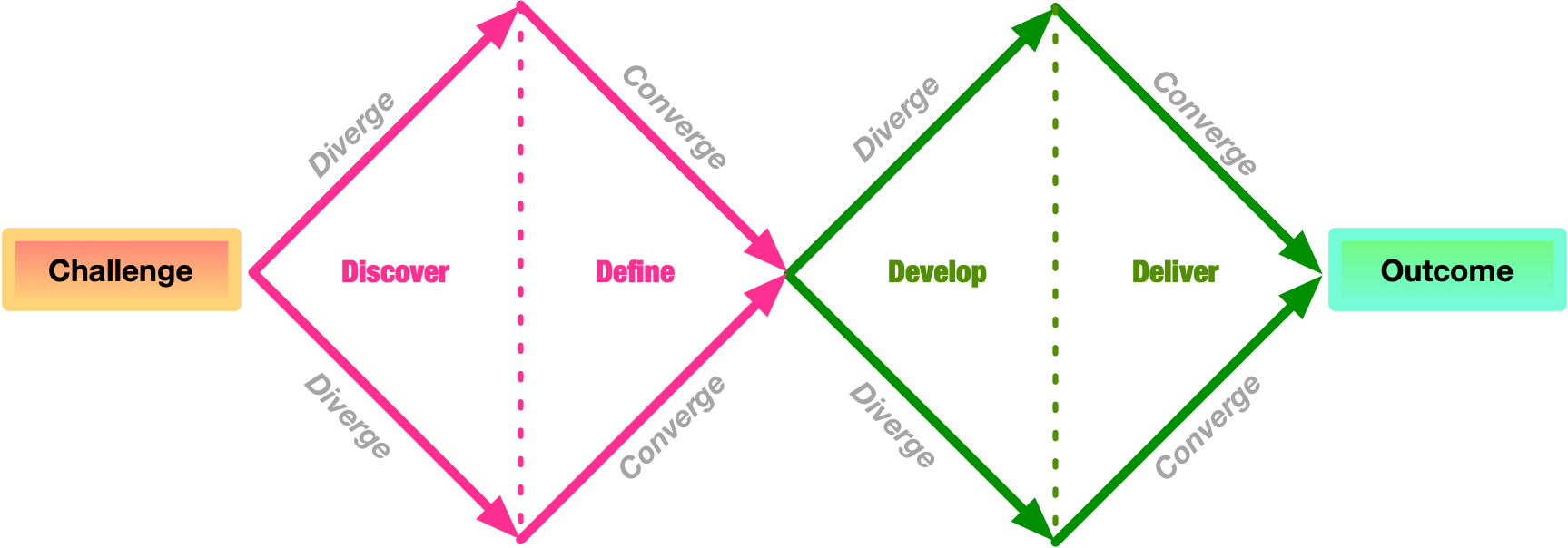
<img src="img/hci-design-double-diamond.png" style="width:80.0%" alt="The double diamond model of design (adapted from Design Council, 2025)" />
<figcaption aria-hidden="true">The double diamond model of design <span class="citation" data-cites="double-diamond-model">(adapted from <a href="#ref-double-diamond-model" role="doc-biblioref">Design Council, 2025</a>)</span></figcaption>
</figure>

## Design Stages

<div class="columns">

<div class="column" width="40%">

1.  *Discover*: understand the problem and the people affected
2.  *Define*: define the problem clearly so that it can be addressed
3.  *Develop*: create ideas, prototypes, sketches, etc, that might address the problem
4.  *Deliver*: test potential solutions to find promising directions, and iterate

</div>

<div class="column" width="60%">

<figure>
<img src="img/hci-design-double-diamond.png" style="width:100.0%" alt="The double diamond model of design (adapted from Design Council, 2025)" />
<figcaption aria-hidden="true">The double diamond model of design <span class="citation" data-cites="double-diamond-model">(adapted from <a href="#ref-double-diamond-model" role="doc-biblioref">Design Council, 2025</a>)</span></figcaption>
</figure>

</div>

</div>

## Who is involved in design?

Usually a wide range of people are involved or affected by a design process. We call them *stakeholders*. Stakeholders includes not just the potential users of a system, but others who are not.

For example:

- **users**
- customers
- developers
- researchers
- managers / product owners
- government bodies
- non-government organisations (NGOs)

## Degrees of Involvement

<div class="columns">

<div class="column" width="55%">

- *Personas*: limited/no real users, “fake” user personas to help frame design
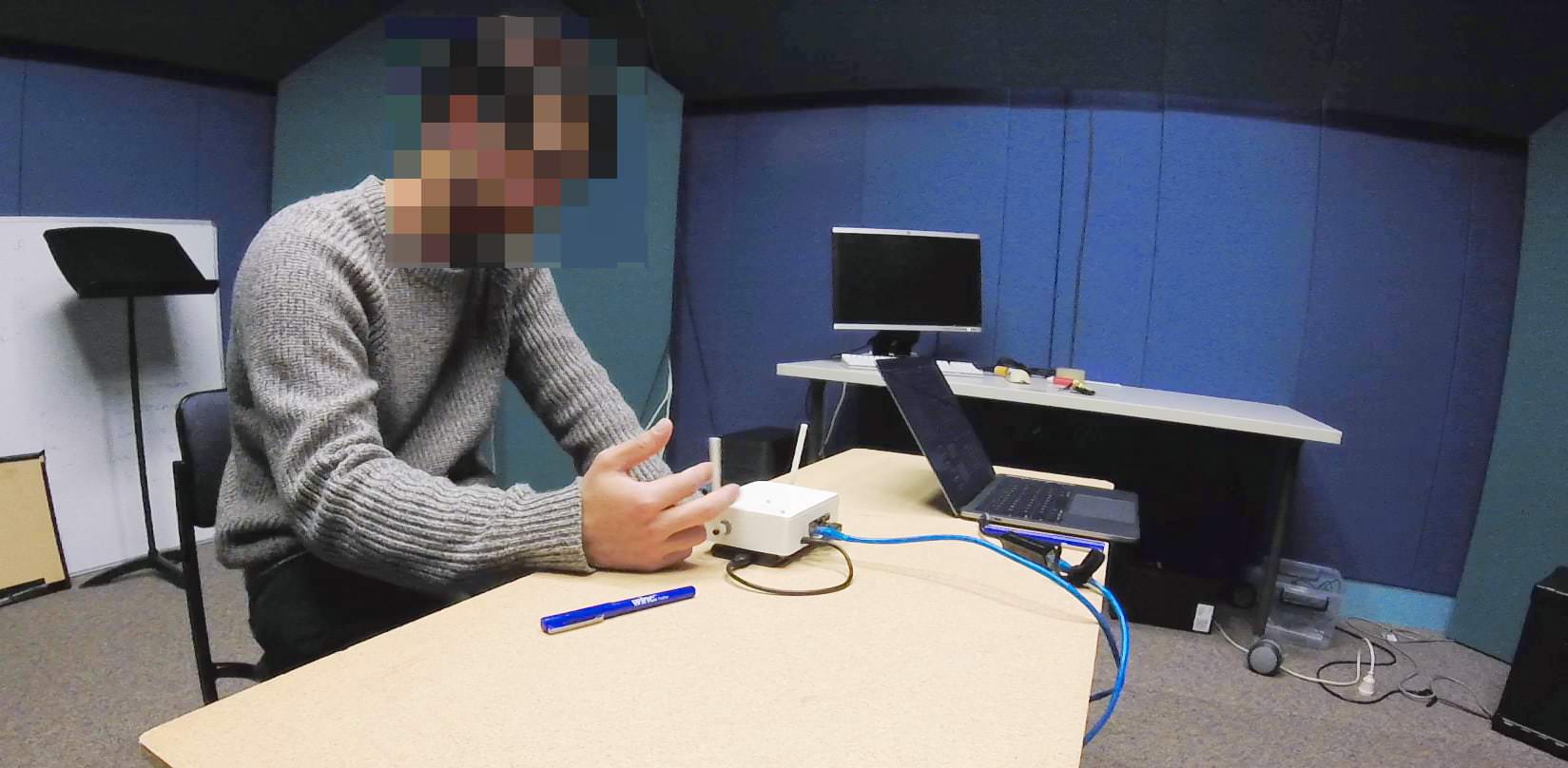
- *Face-to-face:* small groups or individuals in information-gathering or evaluation settings[^1]
- *Crowd-sourced:* large surveys, crowd-sourcing, community engagement
- *Participatory:* users central to planning, ideating, prototyping (co-design, co-creation)

</div>

<div class="column" width="45%">

<figure>
<img src="img/impsy-study-image-2019.jpg" style="width:100.0%" alt="A user participating in face-to-face evaluation at ANU." />
<figcaption aria-hidden="true">A user participating in face-to-face evaluation at ANU.</figcaption>
</figure>

</div>

</div>

## User-centred design principles

From *Designing for Usability: Key Principles and What Designers Think* ([Gould & Lewis, 1985](#ref-gould-usability:1985))

- *Early focus on users and tasks*: who are the users? what are they like? what are the tasks?

- *Empirical measurement*: users should **use** simulations and prototypes to carry out work. observe, record, and analyse.

- *Iterative design*: when problems are found in testing, they must be fixed. design, test, measure, repeat.

## People-centred design

<div class="columns">

<div class="column" width="60%">

Expanding from “users” to “people” with more details ([Rogers et al., 2023](#ref-rogers-beyond-hci:2023))

- tasks and goals drive development
- behaviour and context of use are studied
- people’s characteristics included
- stakeholders are consulted throughout development
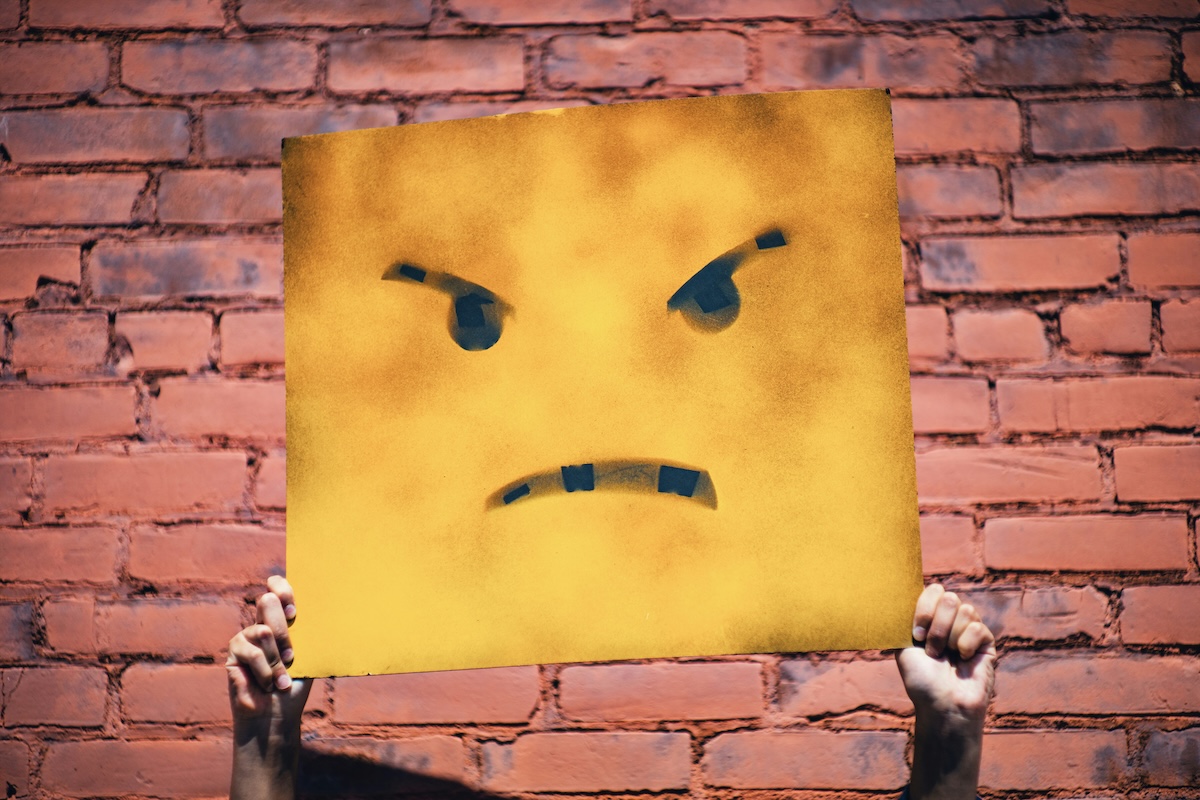
- design decisions consider context of use, people’s activities, and their environment

</div>

<div class="column" width="40%">

<figure>
<img src="img/timon-studler-ABGaVhJxwDQ-unsplash.jpg" alt="Photo by Timon Studler on Unsplash" />
<figcaption aria-hidden="true">Photo by Timon Studler on Unsplash</figcaption>
</figure>

</div>

</div>

## Activity: People vs Users

<div class="talk-box">

**Talk:** 🙋🏽‍♀️🤷💁🏻🧠🗣️ Find someone near you, ask who they are, and discuss:

1.  Who is the most important stakeholder? Users? Managers? People? And why?
2.  How would you get information from this stakeholder?

Chat for 3 minutes and we’ll hear a few responses.

</div>

## Interaction Design Lifecycle

<figure>
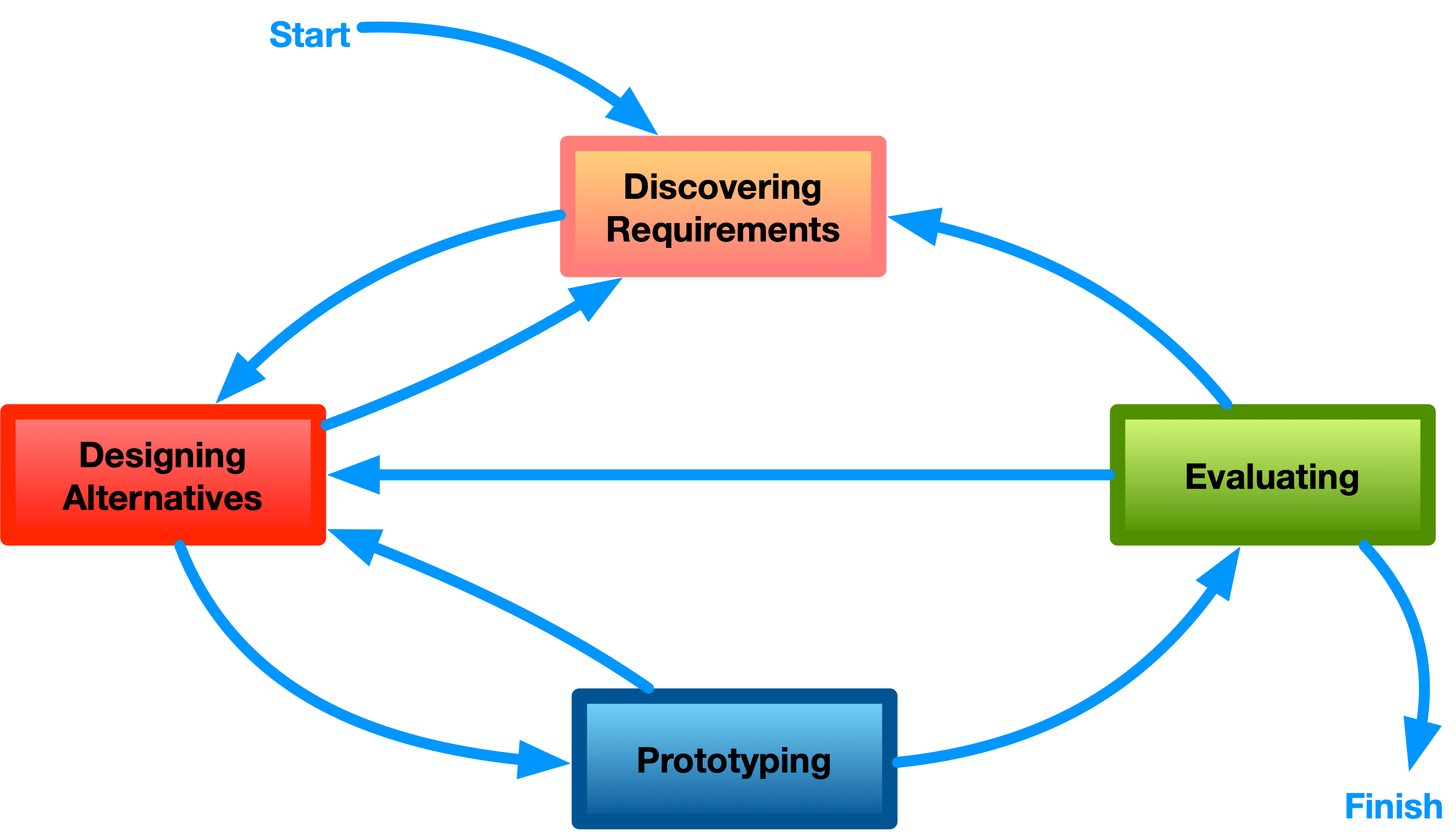
<img src="img/hci-design-lifecycle.png" style="width:60.0%" alt="An interaction design lifecycle (adapted from Rogers et al., 2023)" />
<figcaption aria-hidden="true">An interaction design lifecycle <span class="citation" data-cites="rogers-beyond-hci:2023">(adapted from <a href="#ref-rogers-beyond-hci:2023" role="doc-biblioref">Rogers et al., 2023</a>)</span></figcaption>
</figure>

## Connecting to HCI

<div class="columns">

<div class="column" width="50%">

Design and HCI *related* but *not the same*:

- *Discover* and *Define* stages are highly related to “uncovers the needs of different kinds of computer users” (from week 1)
- *Develop* and *Deliver* are more related to “proposes computer systems (incl. software) that can be better used by humans”

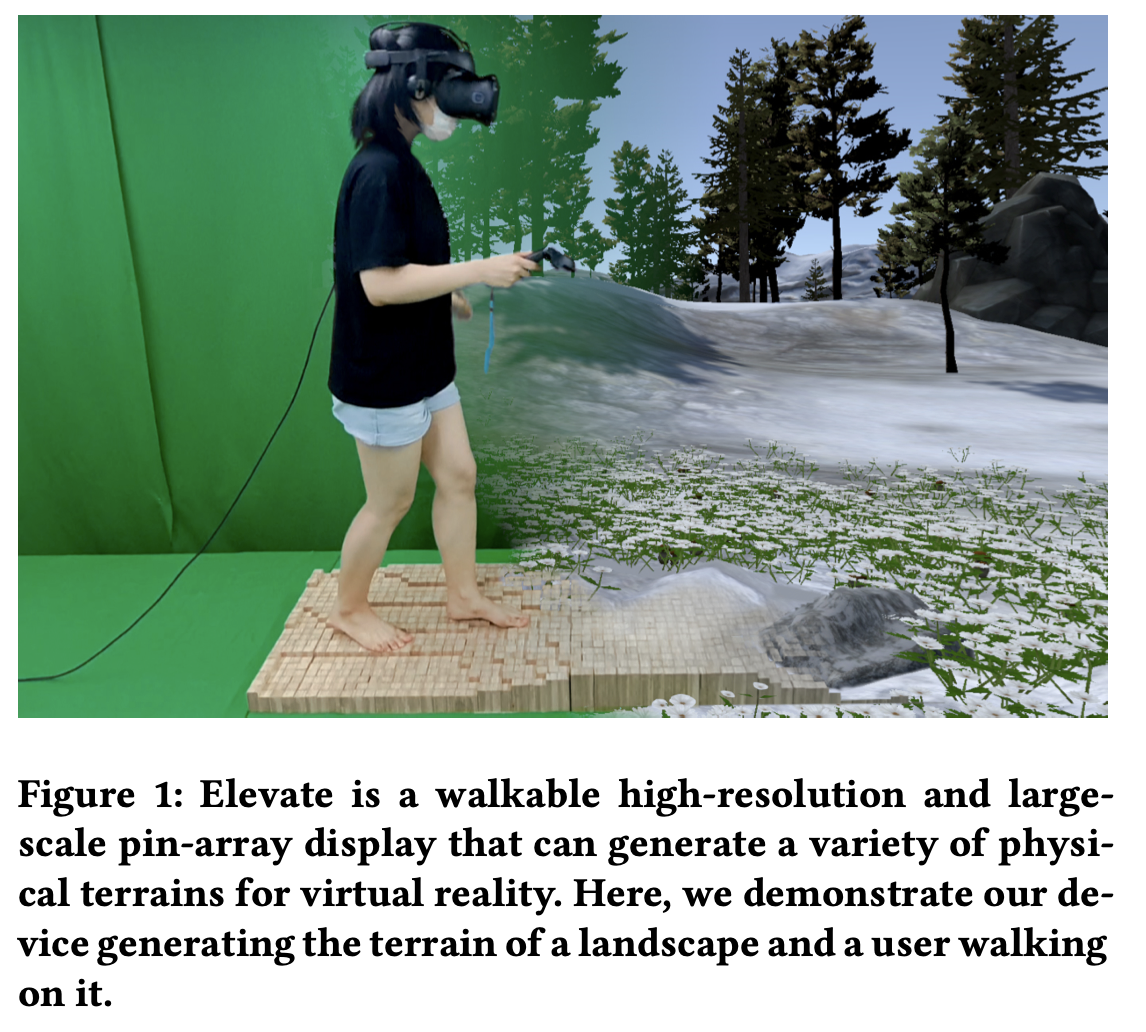
Some HCI research is technical or speculative, inventing technologies that are *not yet common or popular*

</div>

<div class="column" width="50%">

<figure>
<img src="img/elevate_je2021.png" style="width:80.0%" alt="An uncommon technology: a VR walkable interface (Je et al., 2021)" />
<figcaption aria-hidden="true">An uncommon technology: a VR walkable interface <span class="citation" data-cites="je-elevate:2021">(<a href="#ref-je-elevate:2021" role="doc-biblioref">Je et al., 2021</a>)</span></figcaption>
</figure>

</div>

</div>

## Research through Design

Design isn’t only the thing we *study*, it can be the *way the research is done* ([Frayling, 1993](#ref-frayling-research-art-design:1993)):

*In research **through** design: **making** the artefact *is* the enquiry*

- Zimmerman et al. argued this counts as a method for HCI
- build something that **reframes** a messy problem and embodies a preferred future
- then judge it on *process, invention, relevance* and *extensibility* ([Zimmerman et al., 2007](#ref-zimmerman-research-through-design:2007)).
- the formality of this process is still argued ([Zimmerman et al., 2010](#ref-zimmerman-rtd-critique:2010)).

Gaver’s caution: what RtD produces is **provisional, contingent and aspirational;** a portfolio of artefacts and annotations, not one tidy truth ([W. Gaver, 2012](#ref-gaver-expectations-rtd:2012)).

# Design Rationales

The assignment asks you to write a *design rationale*, but what is that?

## What is a Design Rationale?

- A design rationale is the **argument** behind your design: why **this** design and not other options ([MacLean et al., 1989](#ref-maclean-argument-behind-artifact:1989))
- Contrast with a *description* of what you made.

A design is one point in a *space* of possibilities. The rationale is what maps the space ([MacLean et al., 1991](#ref-maclean-qoc:1991)).

> “A Design Rationale is **not a record of the design process** — it is a co-product of design along with the artifact and itself has to be designed.” ([MacLean et al., 1989](#ref-maclean-argument-behind-artifact:1989))

## A quick unit test

*could a reader disagree with you?*

- **Not a rationale:** “the button is paw-sized, because dogs have paws” (nothing here to argue with)
- **A rationale:** “I chose paw contact over nose contact because *…*, accepting that *…*” (now we can argue)

## Sketches as argument

Bill Gaver and John Bowers argued that an **annotated** portfolio of design work carries knowledge that *doesn’t* reduce to a list of findings ([B. Gaver & Bowers, 2012](#ref-gaver-annotated-portfolios:2012)).

- annotations capture the **family resemblances** between designs — “a mesh of similarities and differences”
- a *set* of artefacts with commentary supports an argument that one might be a better choice than another.
- three sketches with commentary is evidence of a design space you actually explored ([Buxton, 2007](#ref-buxton-sketching:2007))

Your sketches are the **evidence** that your writing interprets, not just decoration.

## Components of a rationale

1.  **Questions:** what did you actually have to decide? (not “how do I design for cows”, but “how does a cow select from a list?”)
2.  **Options:** what *could* you have done? At least two per question.
3.  **Criteria:** what did you judge them on? *This is where HCI concepts earn their place.*
4.  **Trade-offs:** what did you give up? Every choice has limitations.

Questions/options/criteria come from design space analysis ([MacLean et al., 1991](#ref-maclean-qoc:1991)). The insistence on writing the **downside** of every feature alongside its upside comes from claims analysis ([Carroll & Rosson, 1992](#ref-carroll-task-artifact:1992)).

## You’re allowed to tidy up

Real design is messy. You double back, change your mind, and often discover the real problem while solving the wrong one. Our tidy lifecycle diagram is a *tidied-up* version of a scruffy reality.

Your rationale does **not** have to reproduce that mess chronologically. Parnas and Clements: we will never design in a perfectly rational way, but we can *present* the work as though we had ([Parnas & Clements, 1986](#ref-parnas-fake-it:1986)).

- **Do** reconstruct your reasoning clearly, so a reader can follow it and challenge it
- **Do** report dead ends that taught you something — they are evidence of a space explored
- **Don’t** invent a process you didn’t follow, tidying is not the same as fabrication

In **Assignment 1**: your *portfolio* (sketches, prototype photos) shows the process. Your *rationale* makes the argument.

# Discovering Requirements

Where do requirements come from?

## What is a requirement?

<div class="columns">

<div class="column" width="50%">

> “A statement about an intended product that specifies what it is expected to do and how it will perform” ([Rogers et al., 2023, p. 387](#ref-rogers-beyond-hci:2023))

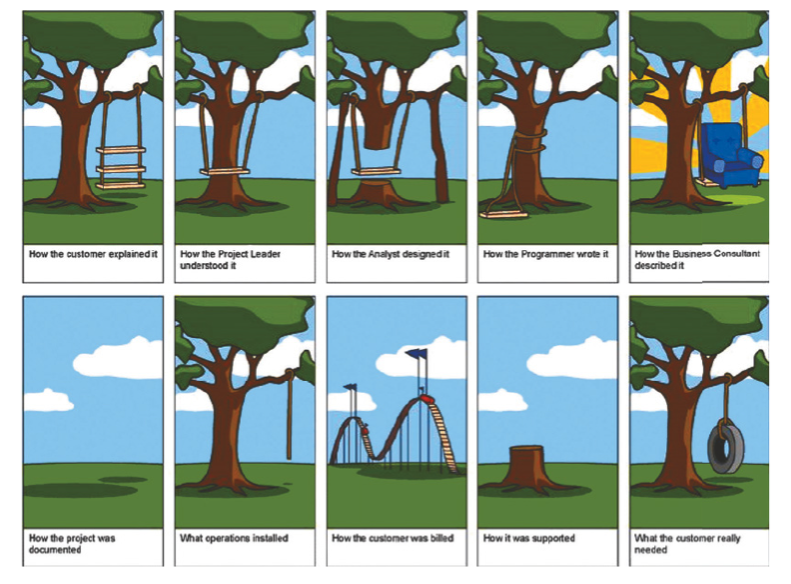
- Discovered through targeted activities or tangentially throughout the design process
- Evolve during design
- Different levels of abstraction and detail
- Needed to avoid misunderstanding and miscommunication

</div>

<div class="column" width="40%">

<figure>
<img src="img/design_1_requirements.png" alt="Image: (Rogers et al., 2023, p. s11.2)" />
<figcaption aria-hidden="true">Image: <span class="citation" data-cites="rogers-beyond-hci:2023">(<a href="#ref-rogers-beyond-hci:2023" role="doc-biblioref">Rogers et al., 2023, p. s11.2</a>)</span></figcaption>
</figure>

</div>

</div>

## Defining a requirement

<div class="columns">

<div class="column" width="50%">

- Requirements can be captured casually, e.g., “app needs to be fast”
- Can be useful to have more details, precision about the requirements, who needs them, and why.
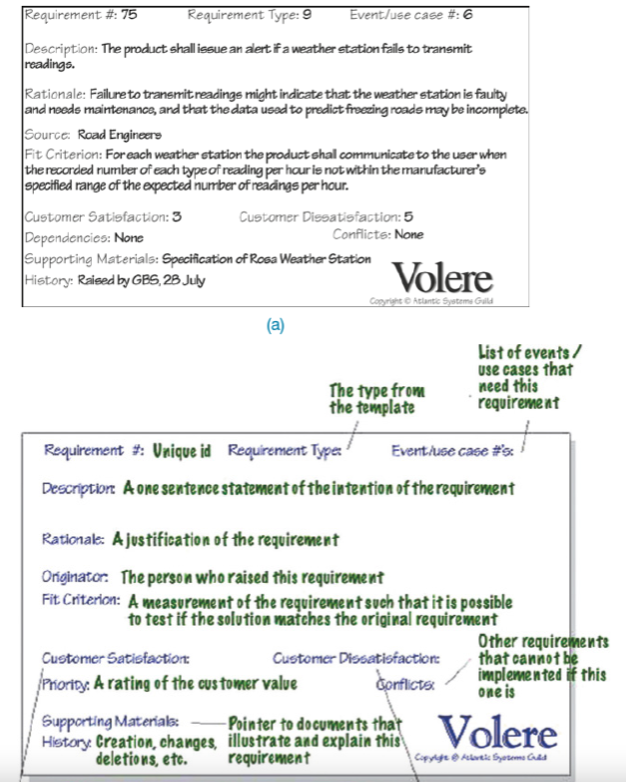
- Formal methods exist for capturing requirements in complex projects
- Epics, user stories in Agile methodologies
- Volere “Atomic Requirements Shell” (see figure)
- *“Description, Rationale, Source, Fit criterion, Customer satisfaction…”*

</div>

<div class="column" width="50%">

<figure>
<img src="img/design_2_volere.png" style="width:60.0%" alt="(Rogers et al., 2023, p. s11.3)" />
<figcaption aria-hidden="true"><span class="citation" data-cites="rogers-beyond-hci:2023">(<a href="#ref-rogers-beyond-hci:2023" role="doc-biblioref">Rogers et al., 2023, p. s11.3</a>)</span></figcaption>
</figure>

</div>

</div>

## User stories

Communicates a requirements between stakeholders. Have the generic form:

`As a <role>, I want <behaviour> so that I can <benefit>`

e.g.,:

- “As a student, I want to choose a tutorial time that doesn’t clash with other activities, so that I can attend all my classes in a week.”
- “As a lecturer, I want to adjust the number of students in tutorials, so that I can provide a good learning experience.”

A user story is a simple way to connect a requirement to a particular type of user in a particular situation. In agile, user stories can be grouped into larger arrangements called “epics” and even bigger groups called “initiatives”.

## Types of requirements

- *Functional requirements*: What the product will do

- *Data requirements*: type, properties of data involved in an interactive system

- *Environmental requirements*: context of use, what are the circumstances in which interaction happens?

  - *Phsyical environment*: noise, lighting, movement, etc
  - *Social environment*: sharing data, collaboration
  - *Support environment*: assistance, training or help available or integrated
  - *Technical environment*: technologies available for the system (phone, watch, laptop, supercomputer?) or technical limitations

- *User characteristics*: abilities, skills, attributes of users

- *Usability and user experience goals*: what goals (see last week) prioritised and tracked?

## Activity: Requirements

<div class="think-box">

**Think:** Come up with a design requirement for **one** of the following products:

- 🗣️ A voice-activated smart home assistant that helps individuals control lighting and temperature.

- 📲 A phone-based ordering system for a restaurant.

- 🤖 A humanoid robot for assisting computer science students in computer labs.

Spend 2-3 minutes developing one requirement and then let’s hear a few. 🎤🎤🎤

</div>

## Data Gathering

There are lots of ways to discover requirements, some examples are below:

- **Observation and Ethnography**: observing people in real situations
- **Diaries and interviews**: (aka, asking), talk to people about their requirements, or ask them to record information
- **Focus Group, User Study**: talking with one or multiple people
- **Questionnaires**: asking people to answer specific questions
- **Cultural Probes**: sending arts & crafts materials to users to find out about their life/needs ([B. Gaver et al., 1999](#ref-gaver-cultural-probes))
- **Contextual Inquiry**: researcher immersed in context of use, visits the participant and interviews them in context ([Beyer & Holtzblatt, 1997](#ref-contextual-design:1997))

In this course we focus on *interviews* and *user studies* as methods for data gathering. Our focus is on the evaluation stage of design, but these methods can work at the discovery stage as well.

## Personas and Scenarios

<div class="columns">

<div class="column" width="50%">

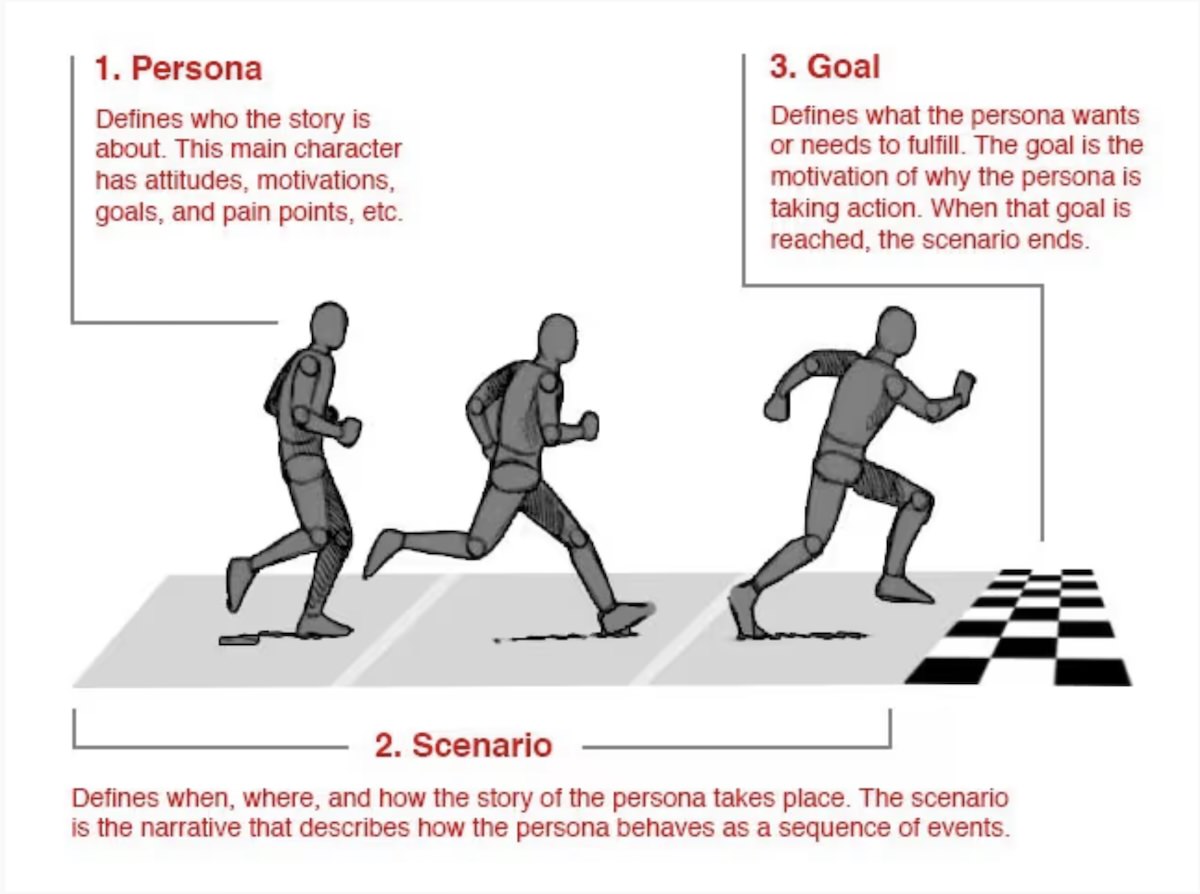
More detailed than a user story, includes:

- the person, their characteristics, motivations, etc (**persona**)
- their story, when, where, how, as a sequence of events (**scenario**)
- the goal, needs to fulfil, reason to interact with a system (**goal**)

</div>

<div class="column" width="50%">

<figure>
<img src="img/persona-scenario.jpg" style="width:100.0%" alt="A persona, a scenario, and a goal (© Smashing Magazine)" />
<figcaption aria-hidden="true"><a href="https://www.interaction-design.org/literature/article/personas-why-and-how-you-should-use-them">A persona, a scenario, and a goal</a> (© Smashing Magazine)</figcaption>
</figure>

</div>

</div>

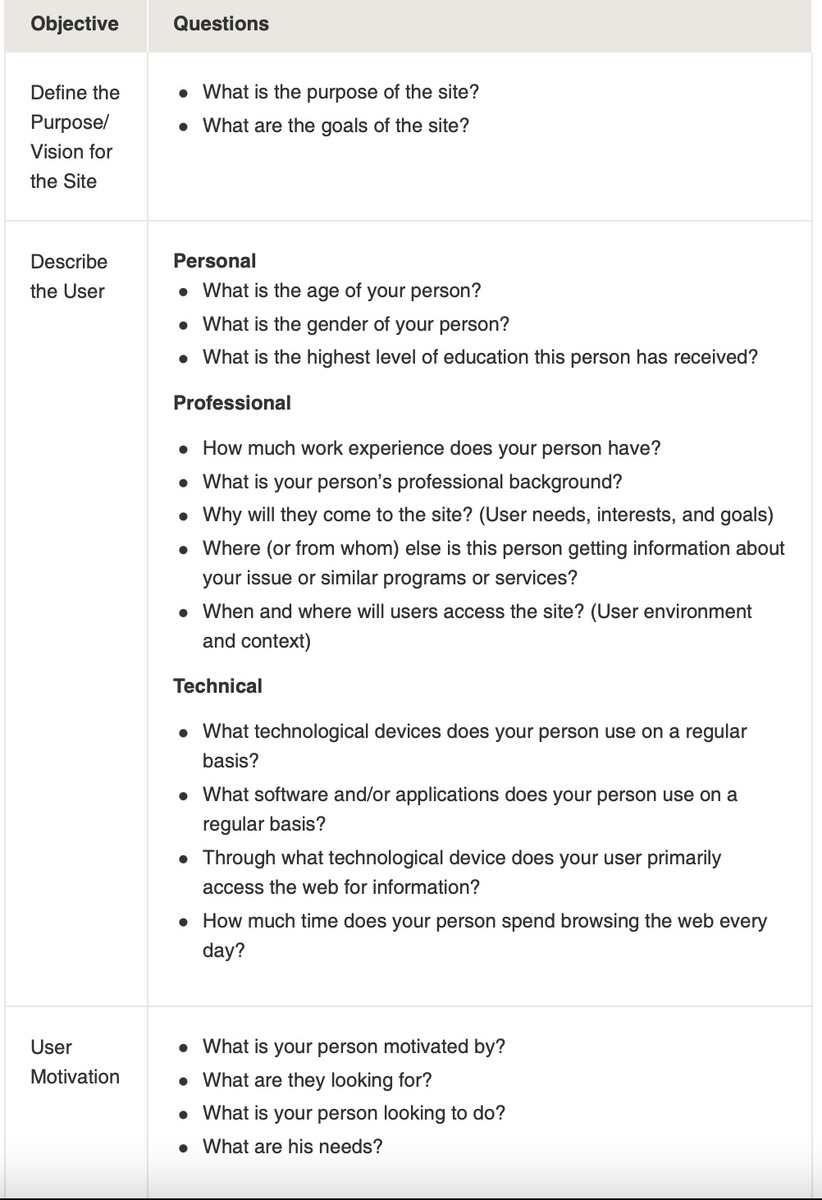
## Personas

<div class="columns">

<div class="column" width="50%">

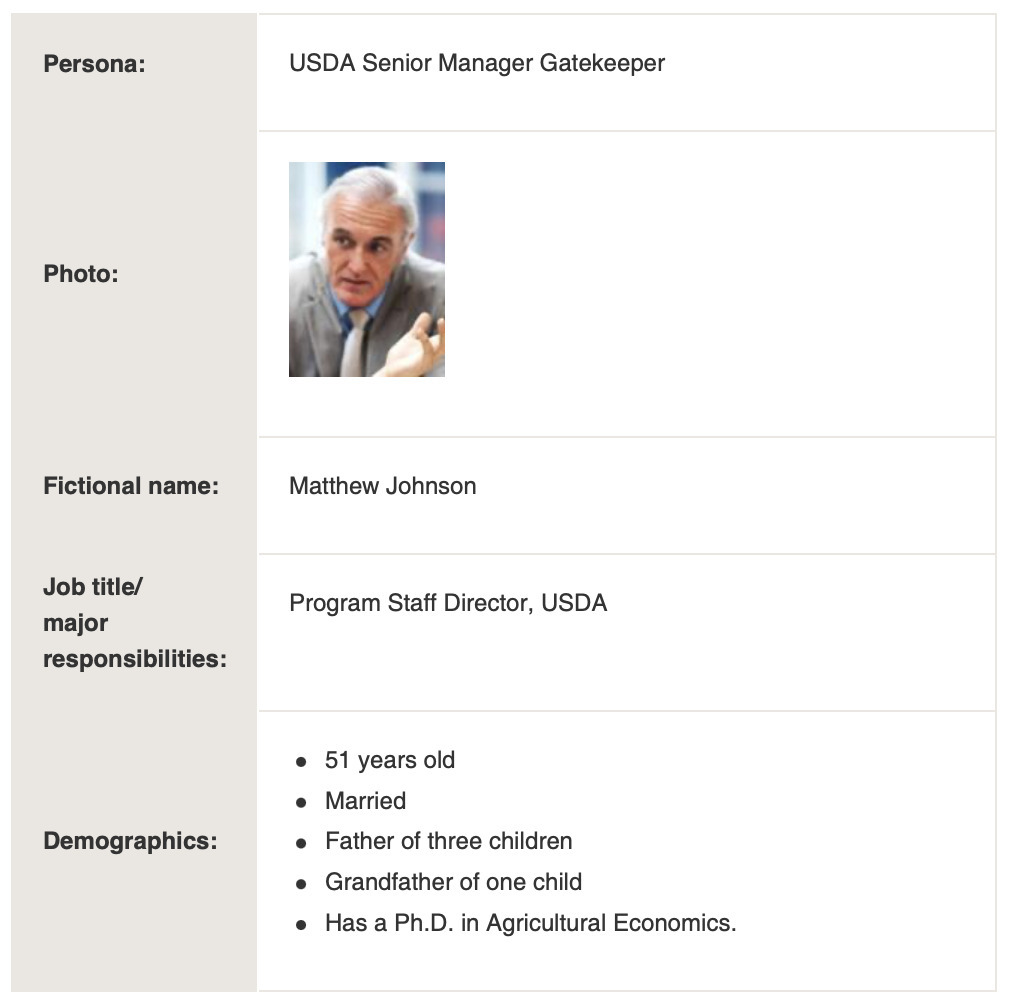
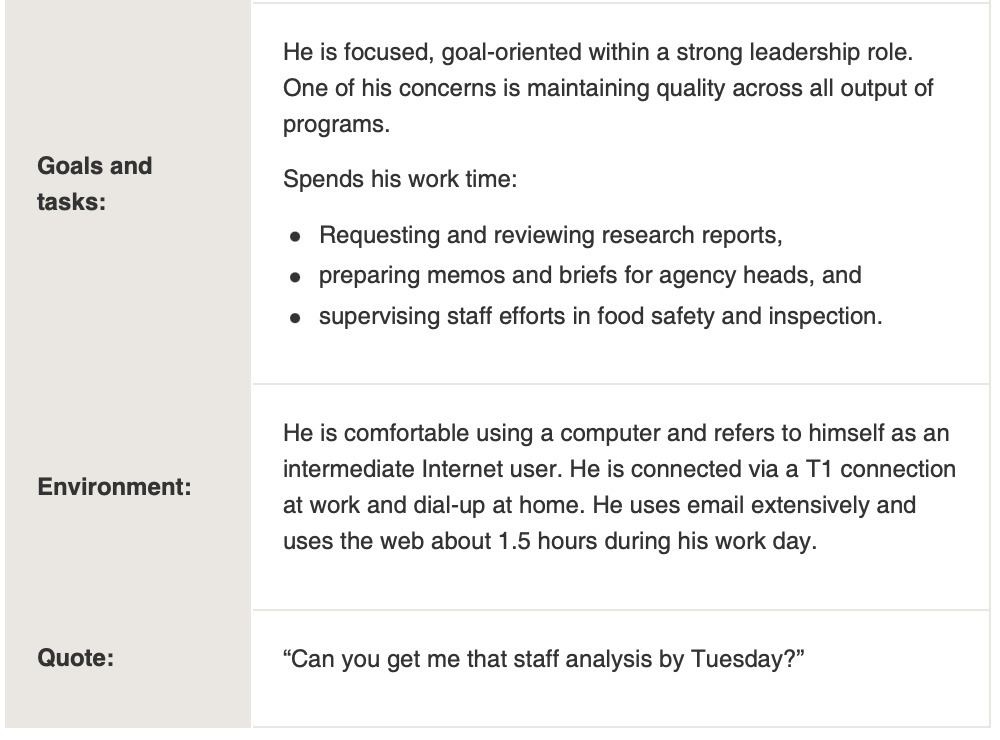
- Rich descriptions of typical users
- Don’t describe specific people but realistic
- Describe goals, behaviours, activities, environment
- How would this person use this product?

Examples on [Usability.gov](https://www.usability.gov/how-to-and-tools/methods/personas.html)

</div>

<div class="column" width="50%">

<figure>
<img src="img/05_03_discovering_requirements_6.jpg" style="width:60.0%" alt="Image source" />
<figcaption aria-hidden="true">Image <a href="https://www.usability.gov/how-to-and-tools/methods/personas.html">source</a></figcaption>
</figure>

</div>

</div>

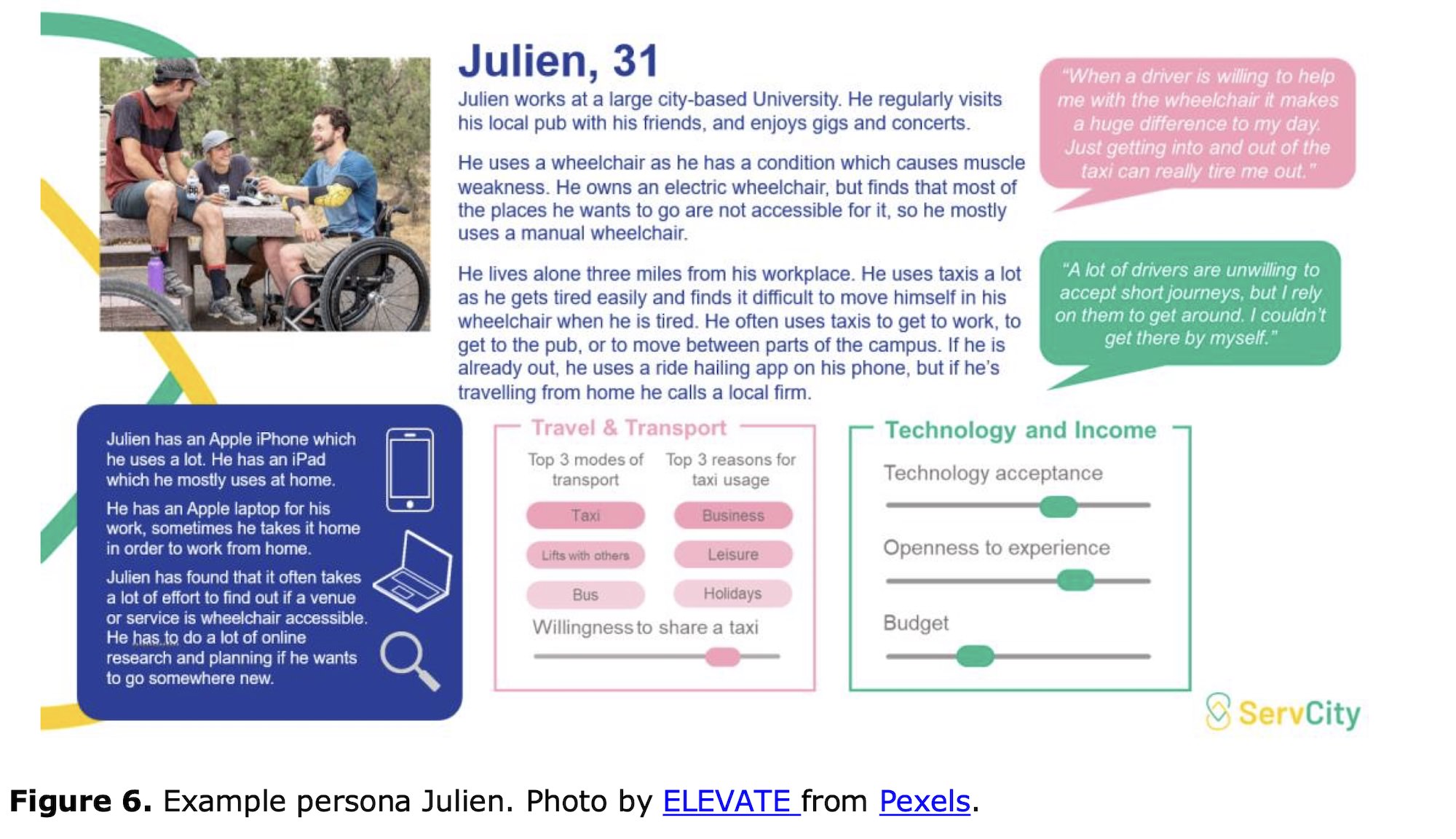
## Personas: example, Julien the university worker

<figure>
<img src="img/persona-hallewell-example.jpg" style="width:65.0%" alt="Example of a persona from research into autonomous taxi services (Hallewell et al., 2022)" />
<figcaption aria-hidden="true">Example of a persona from research into autonomous taxi services <span class="citation" data-cites="hallewell2022deriving">(<a href="#ref-hallewell2022deriving" role="doc-biblioref">Hallewell et al., 2022</a>)</span></figcaption>
</figure>

## Personas: examples

<div class="columns">

<div class="column" width="50%">

<img src="img/design_3_persona_a.jpg" style="width:80.0%" />

</div>

<div class="column" width="50%">

<img src="img/design_4_persona_b.jpg" style="width:80.0%" />

</div>

</div>

## Scenarios

<div class="columns">

<div class="column" width="40%">

- A narrative describing human activities or tasks.
- Allows exploration and discussion of contexts, needs, and requirements.
- Doesn’t necessarily describe the software/technology used
- Core: goal, steps to reach the goal, who the user is (persona)
- Extra: other details that might be useful.

</div>

<div class="column" width="60%">

- “Nia is a sound designer working in the automotive industry.”
- “When tasked with creating sound signals for automotive applications, Nia needs to consider the cognitive flow of users, particularly how different chords interact and influence user attention. To support this logic-making process, Nia uses an AI-powered tool that helps her design a storyboard, select suitable chords, and assign them to the relevant phases.”
- “After establishing the storyboard, Nia transitions to another MIDI software via the tool’s connected API for sound creation and refinement.”

Example scenario excerpt from Minsik Choi’s ANU research ([Choi et al., 2025](#ref-choi2024scenario)).

</div>

</div>

<!-- ## Journey Map
&#10;![Image: [Journey Mapping 101](https://www.nngroup.com/articles/journey-mapping-101/)](img/05_03_discovering_requirements_11.png)
&#10;> “A journey map is a visualization of the process that a person goes through in order to accomplish a goal.” [@gibbons-journey-mapping-101]
&#10;Components:
&#10;- Actor
- Scenario/Expectations
- Journey Phases
- Actions, Mindsets, Emotions
- Opportunities -->

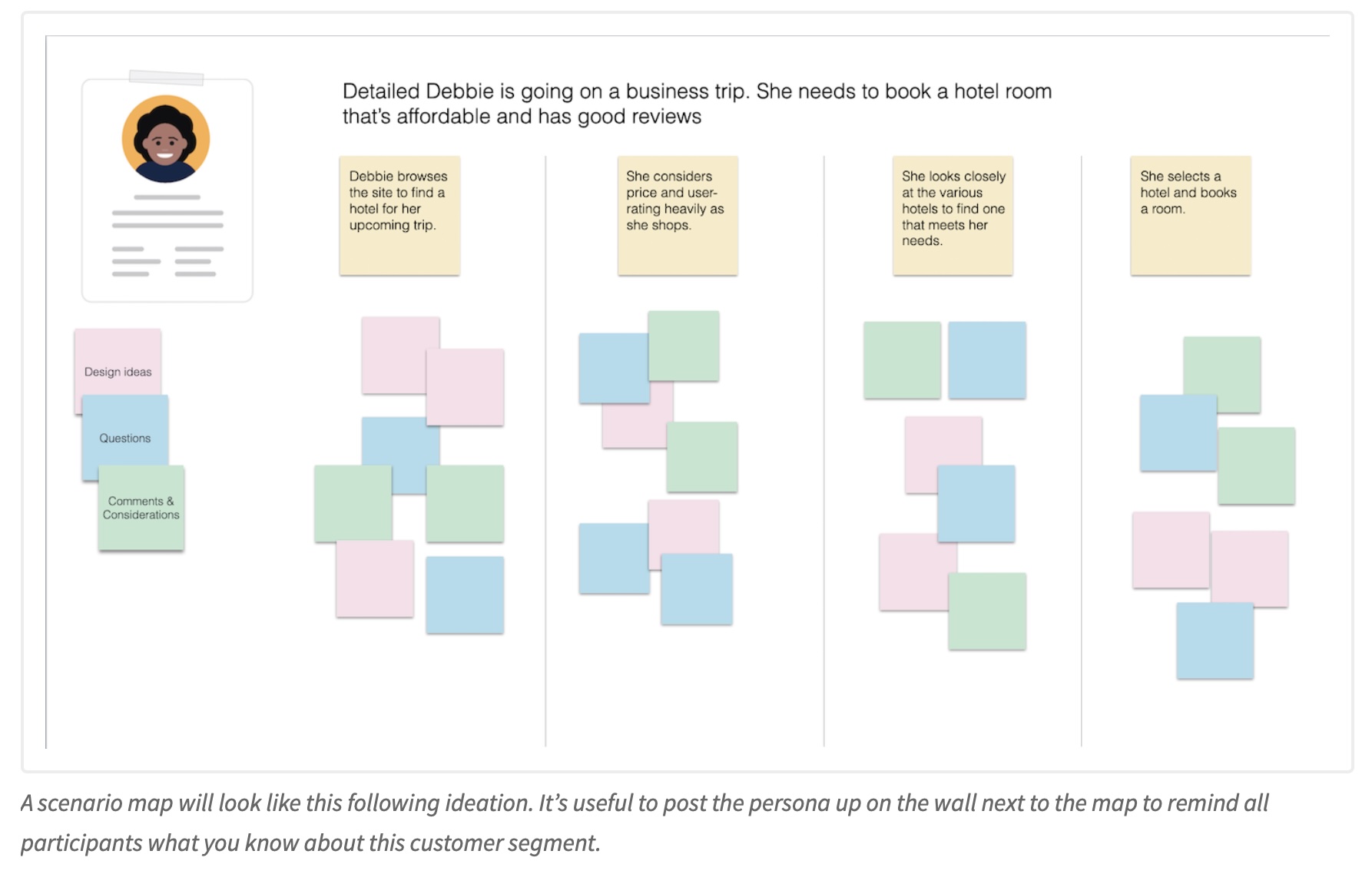
## Scenario Mapping: Design Ideation Using Personas

<div class="columns">

<div class="column" width="60%">

[Scenario mapping](https://www.nngroup.com/articles/scenario-mapping-personas/) is a group activity for generating ideas for a product or system using personas and a specific scenario. (PS: you’ll do a similar activity in next week’s tutorial).

- choose a scenario and persona,
- split a scenario up into steps (use sticky notes)
- choose categories for ideas, e.g.: design ideas, questions, problems, friction points, comments
- brainstorm ideas under specific categories

</div>

<div class="column" width="40%">

<figure>
<img src="img/scenario-mapping.jpg" alt="Scenario mapping example. Source: nngroup" />
<figcaption aria-hidden="true">Scenario mapping example. <a href="https://www.nngroup.com/articles/scenario-mapping-personas/">Source: nngroup</a></figcaption>
</figure>

</div>

</div>

## Activity: Scenario Mapping Example

<div class="columns">

<div class="column" width="50%">

<div class="activity">

**Activity:** Let’s scenario map 🗺️💁🏻🎤

- Have a look at the following miro board and add a post it. (how many students are here? can we break miro?)

- <https://miro.com/app/board/uXjVJa-m2gU=/?share_link_id=689171092569>

</div>

</div>

<div class="column" width="50%">

<figure>
<img src="img/scenario-map-miro.png" style="width:80.0%" alt="The miro board" />
<figcaption aria-hidden="true">The miro board</figcaption>
</figure>

</div>

</div>

# Ideation

How do you get from one idea to many?

## What is Ideation?

We’ve already done some ideation today! But what do I mean by that?

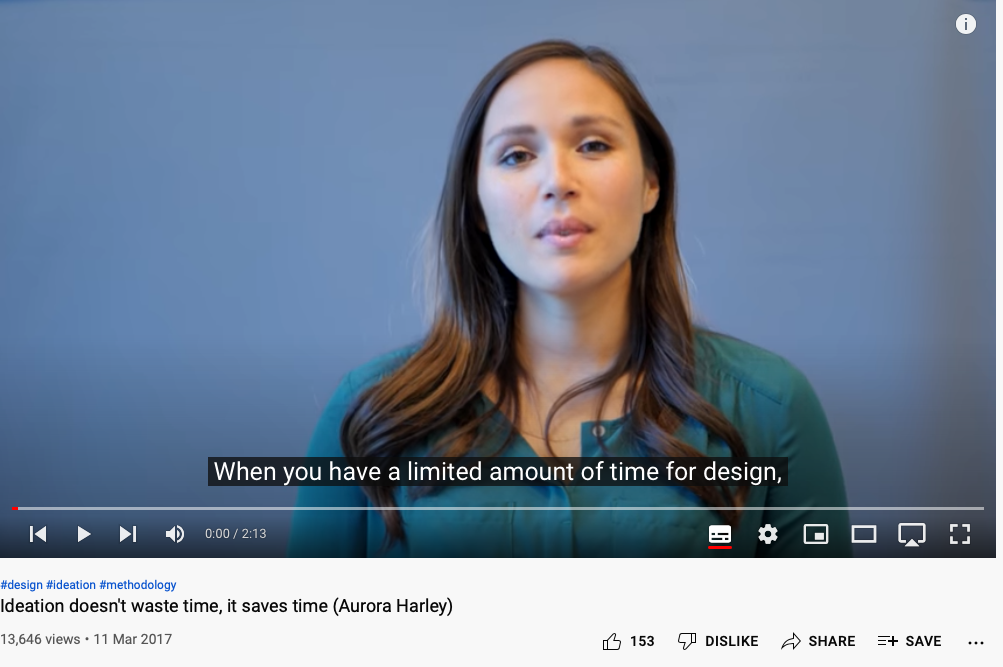
> **Ideation** is the process of **generating a broad set of ideas on a given topic**, with no attempt to judge or evaluate them. ([Aurora Harley, nngroup](https://www.nngroup.com/articles/ux-ideation/))

## Fundamentals of Ideation

<div class="columns">

<div class="column" width="40%">

- ideas are *not* evaluated
- ideas are recorded and documented
- collaboration leads to diverse ideas

Generating **many** ideas: high probability that *at least one* is close to ideal.

[Ideation for Everyday Design Challenges, nngroup](https://www.nngroup.com/articles/ux-ideation/)

</div>

<div class="column" width="60%">

<figure>
<img src="img/06_ideation_1.png" style="width:100.0%" alt="Ideation doesn’t waste time, it saves time (Aurora Harley)" />
<figcaption aria-hidden="true"><a href="https://www.youtube.com/watch?v=k3q0Zry7H2o&amp;list=PLJOFJ3Ok_idsd431mj7czplN1PNEaJbHE">Ideation doesn’t waste time, it saves time (Aurora Harley)</a></figcaption>
</figure>

</div>

</div>

## Choosing a Technique

<div class="columns">

<div class="column" width="50%">

**Eight most used by professional designers** ([Hornbæk et al., 2025, Section 31.2](#ref-hornbaek-intro-hci:2025)):

1.  Brainstorming
2.  Morphological analysis
3.  Scenarios
4.  Conceptual maps
5.  Checklists
6.  Analogies
7.  Metaphors
8.  Storyboards

</div>

<div class="column" width="50%">

**Variants:**

Braindump, brainwrite, brainwalk, **worst possible idea**, challenge assumptions, mindmap, sketchstorm, **bodystorm**, provocation, SCAMPER, movement, gamestorming, cheatstorm, crowdstorm, co-creation, prototyping, creative pause

</div>

</div>

## Three ways ideation methods differ

Three dials to turn ([Hornbæk et al., 2025, Section 31.2](#ref-hornbaek-intro-hci:2025)):

1.  **How far you reach for associations.** The further out, the more novel the ideas, but the value might decrease
2.  **How other people are involved.** Groups can generate more ideas but very large groups are difficult to manage.
3.  **What representation you use.** Brainstorming is mostly **verbal**; sketching and storyboarding are **visuospatial**; bodystorming is **physical**.

## Brainstorming and its variants

<div class="columns">

<div class="column" width="55%">

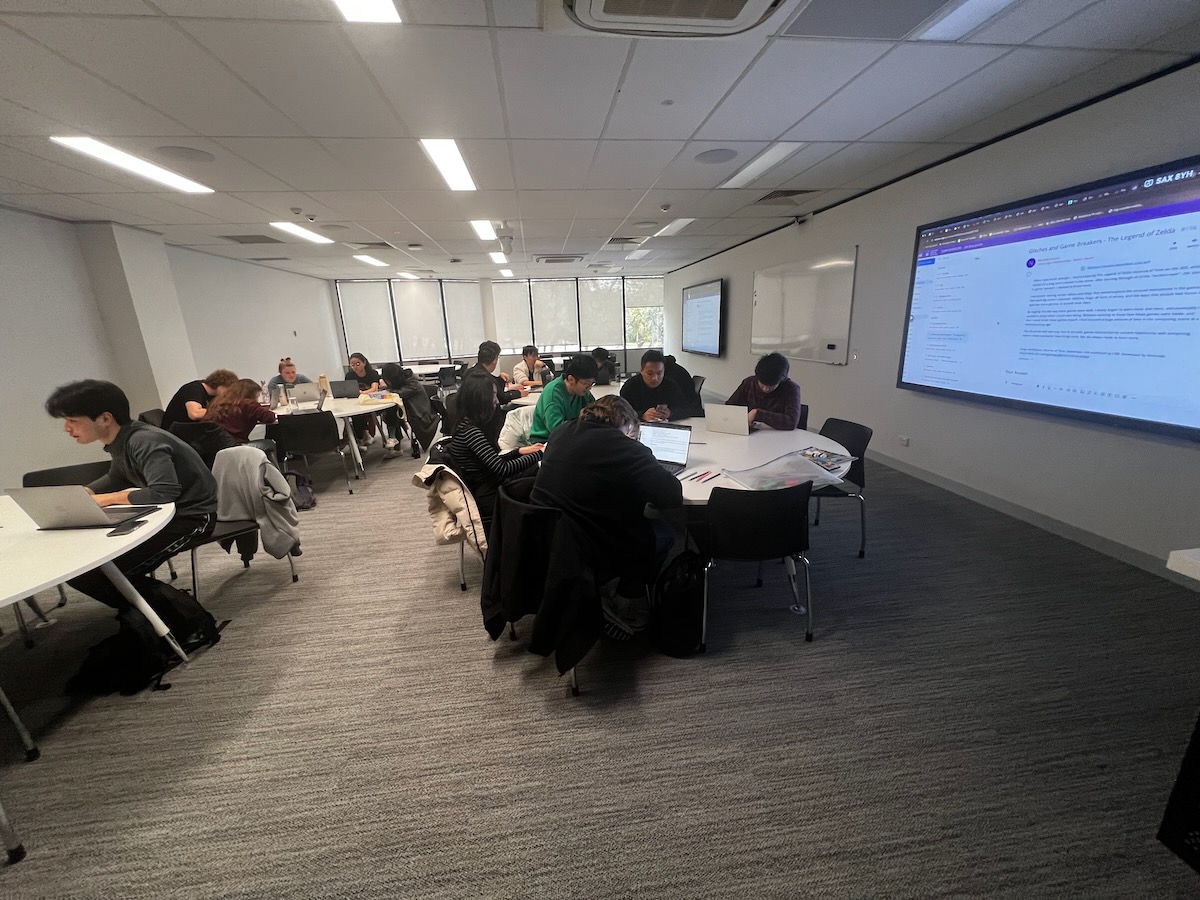
Shared principles across nearly all the variants:

- **Postpone criticism:** don’t throttle the generative phase
- **Divergence:** encourage wild, diverse ideas
- **Quantity:** as many as possible
- **Build** on others’ ideas
- **Equal significance:** every participant and idea counts

The named variants mostly change *who writes when*: **braindump** (individually, then share), **brainwrite** (write, pass on, elaborate), **brainwalk** (move between ideation stations).

</div>

<div class="column" width="45%">

<figure>
<img src="img/tables-2025.jpg" alt="HCI tutorial tables in 2025" />
<figcaption aria-hidden="true">HCI tutorial tables in 2025</figcaption>
</figure>

</div>

</div>

## How to run a brainstorm

Some ecommendations ([Hornbæk et al., 2025, Section 31.2](#ref-hornbaek-intro-hci:2025)):

<div class="columns">

<div class="column" width="50%">

1.  **Sharpen the focus:** clear, but not so narrow it limits solutions
2.  **Playful rules:** no criticism, no debating the brief
3.  **Number your ideas:** aim for ~100 in an hour
4.  **Build and jump:** when the rate drops, jump to another part of the problem

</div>

<div class="column" width="50%">

5.  **Use the space to remember:** spread ideas over tables, walls, whiteboards
6.  **Stretch first:** warm up with a word game
7.  **Props:** bring physical props, materials, competitors’ products

</div>

</div>

## Lateral Thinking: Worst Possible Idea

<div class="columns">

<div class="column" width="50%">

Is this the opposite of brainstorming?

- Come up with the worst ideas you can think of
- Playful, fun, adventurous, effective
- Know that ideas won’t be scrutinised for being wrong

Dix argued that *bad is the new good* ([Dix et al., 2006](#ref-dix2006bad)) using this as a class exercise.

</div>

<div class="column" width="50%">

<figure>
<img src="img/andre-hunter-5otlbgWJlLs-unsplash.jpg" style="width:100.0%" alt="Photo by Andre Hunter on Unsplash" />
<figcaption aria-hidden="true">Photo by Andre Hunter on Unsplash</figcaption>
</figure>

</div>

</div>

## Activity: What’s the worst possible idea

<div class="think-box">

**Think:** (let’s try it!) What’s the worst idea for:

> A way to help students balance work and study.

Think for a minute or two and then we’ll hear some answers. ⭐️🎙️🗣️

Prepare for this question: “Why is that bad?”

</div>

## Does lateral thinking work?

Not everybody likes lateral thinking.

- **Lateral thinking** techniques (provocation, random words, worst possible idea) are a bit controversial ([Hornbæk et al., 2025, Section 31.2](#ref-hornbaek-intro-hci:2025))
- Wild ideas can be easy to find, but it’s not clear that they are valuable.
- Forced ideas are often variations on existing solutions.

So why do we do it? Because it gets a room talking and lowers the stakes for contributing; but it may not lead to better designs.

## Analogies and metaphors

<div class="columns">

<div class="column" width="50%">

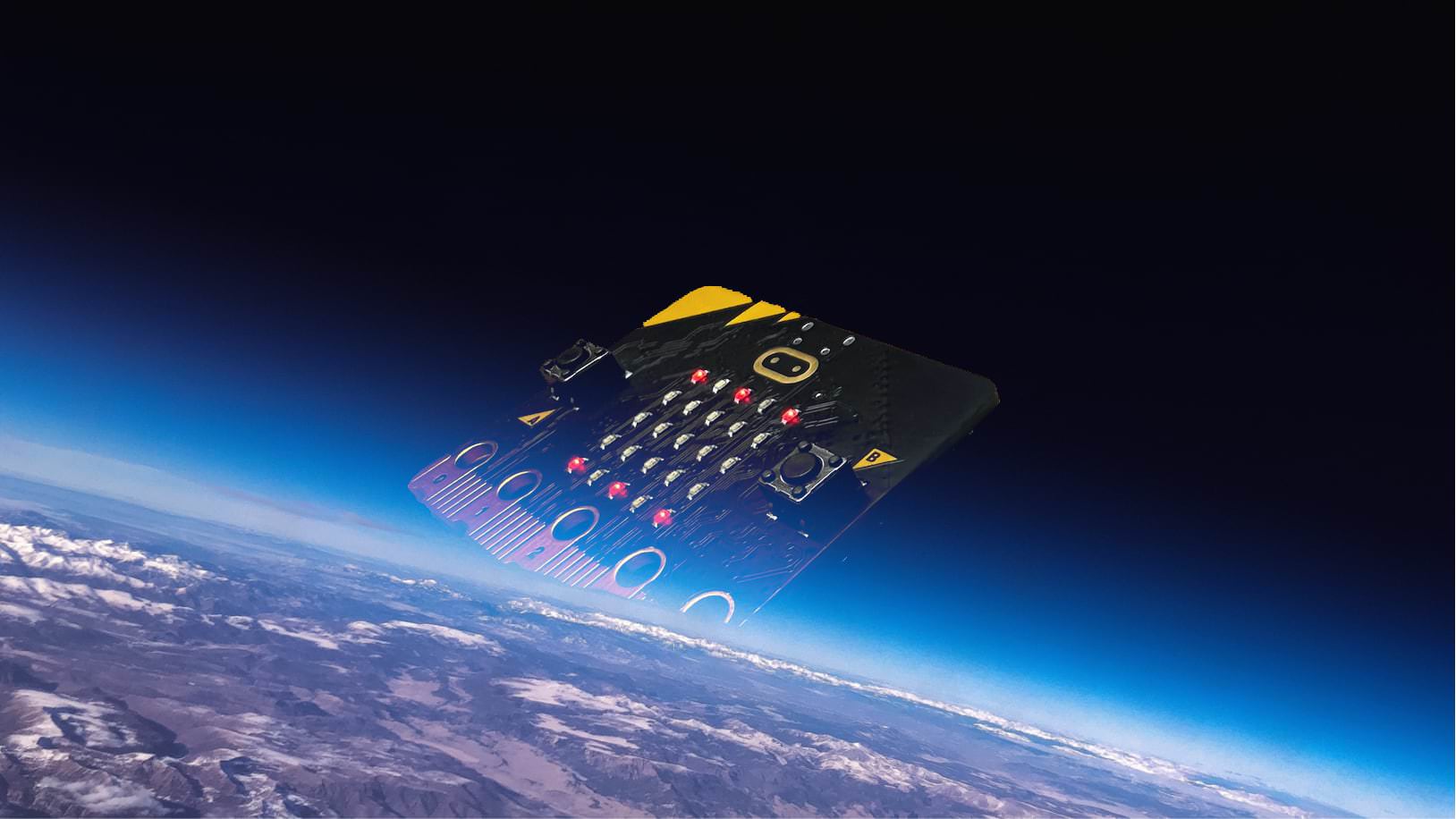
- **Analogy:** a comparison between two things — powerful for both communication and sparking ideas
- **Metaphor:** carry a structure from a domain the user *already knows* into your interface
- **Provocation:** challenge the status quo to explore new realities (a lateral thinking technique)

Both analogy and metaphor are in the professional top eight — these are not warm-up games.

</div>

<div class="column" width="50%">

<figure>
<img src="img/macrobit.jpg" alt="What if the microbit was really REALLY big." />
<figcaption aria-hidden="true">What if the microbit was really REALLY big.</figcaption>
</figure>

</div>

</div>

## Analogies in practice: interface metaphors

<div class="columns">

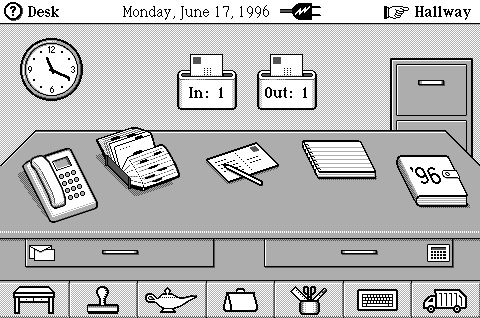
<div class="column" width="40%">

Exploit similarities to user’s knowledge of other domains. E.g.,

- **Cards:** Familiar, strong associations (playing, business, credit), flick through, sort, themed, structured
- **Desktop** and **Recycle bin**
- **Shopping trolley** and **checkout**
- ***Surfing the web***

We’ll come back to design metaphors for AI in week 12.

</div>

<div class="column" width="60%">

<figure>
<img src="img/gentner-anti-mac-interface.jpg" style="width:100.0%" alt="A highly metaphorical interface. (Gentner &amp; Nielsen, 1996)" />
<figcaption aria-hidden="true">A highly metaphorical interface. <span class="citation" data-cites="gentner-anti-mac:1996">(<a href="#ref-gentner-anti-mac:1996" role="doc-biblioref">Gentner &amp; Nielsen, 1996</a>)</span></figcaption>
</figure>

</div>

</div>

## Inspiration cards

<div class="columns">

<div class="column" width="55%">

A structured way to force distant associations ([Hornbæk et al., 2025, Section 31.2](#ref-hornbaek-intro-hci:2025)):

- **Technology cards** — a technical opportunity or threat
- **Domain cards** — an experience or activity from users’ lives
- Draw at random, **pair them**, and ideate from the collision

E.g., *distributed smart speakers* × *a family dinner*.

Keeps ideas metaphorical **and** technically realistic. Card decks are a real HCI research contribution — see the SMeFT Decks for hybrid boardgames ([Rogerson et al., 2023](#ref-rogerson-smeft-decks:2022)).

</div>

<div class="column" width="45%">

<figure>
<img src="img/nime2015-cardboard-prototypes.jpg" style="width:100.0%" alt="Prototyping weird stuff at NIME2015" />
<figcaption aria-hidden="true">Prototyping weird stuff at NIME2015</figcaption>
</figure>

</div>

</div>

## Ideating in other representations

Not everything is a sticky note.

<div class="columns">

<div class="column" width="50%">

- **Sketch:** simple, rough, quantity over quality enough detail to convey meaning, no more (much more next week)
- **Storyboard:** a visual story
- **Prototype:** building forces decisions and provokes new ideas. Thinking by doing.
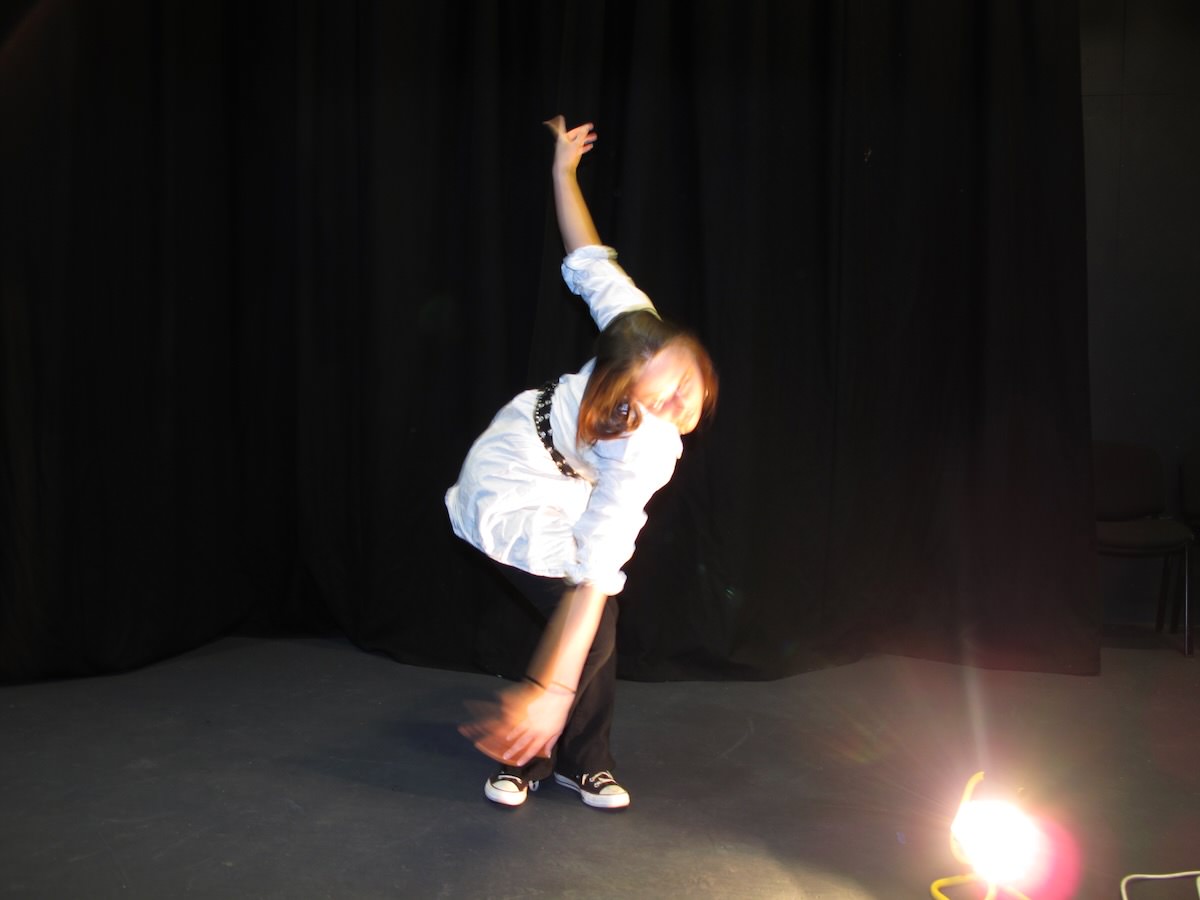
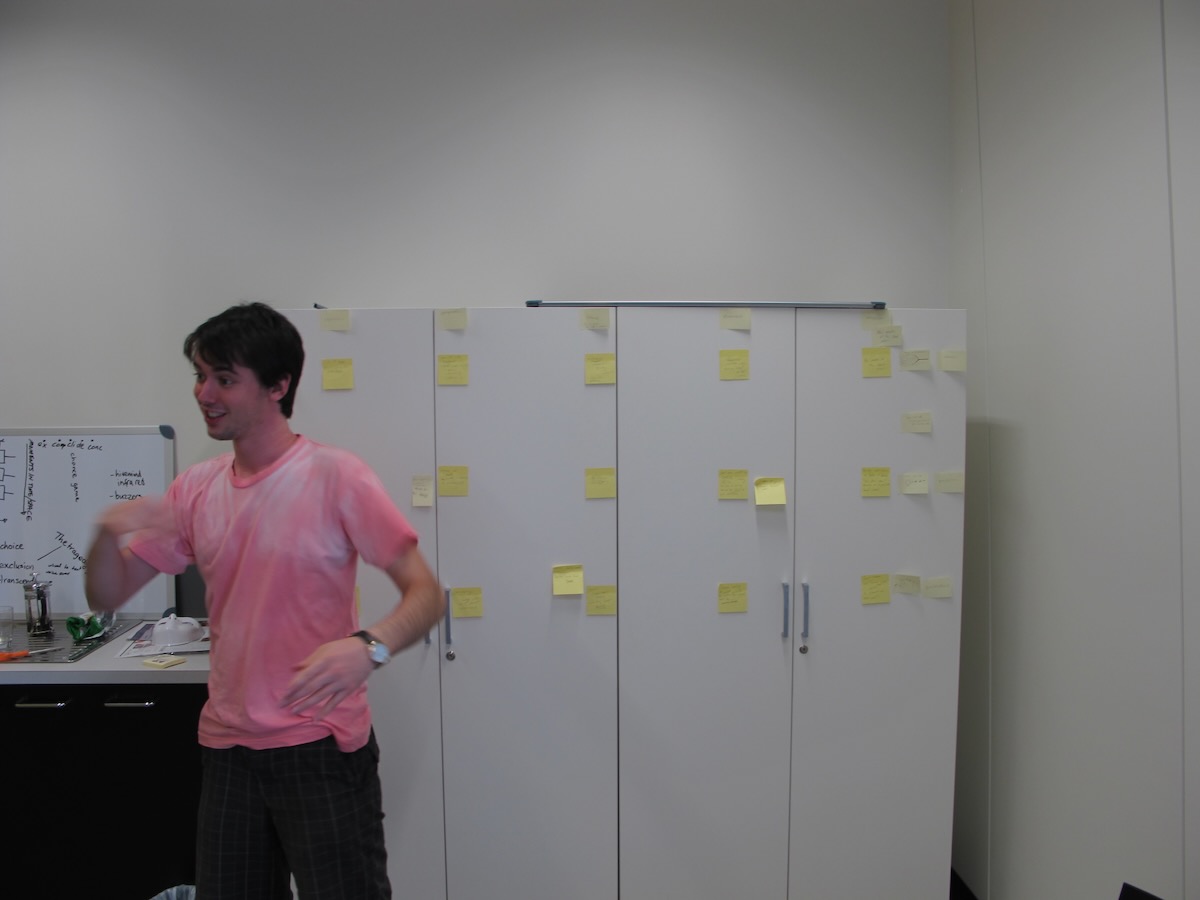
- **Bodystorm:** physically act out the scenario, with props — combines empathy, brainstorming and prototyping

</div>

<div class="column" width="50%">

<figure>
<img src="img/bodystorm.jpg" alt="Bodystorming some art in 2008." />
<figcaption aria-hidden="true">Bodystorming some art in 2008.</figcaption>
</figure>

</div>

</div>

## Unsticking a blocked session

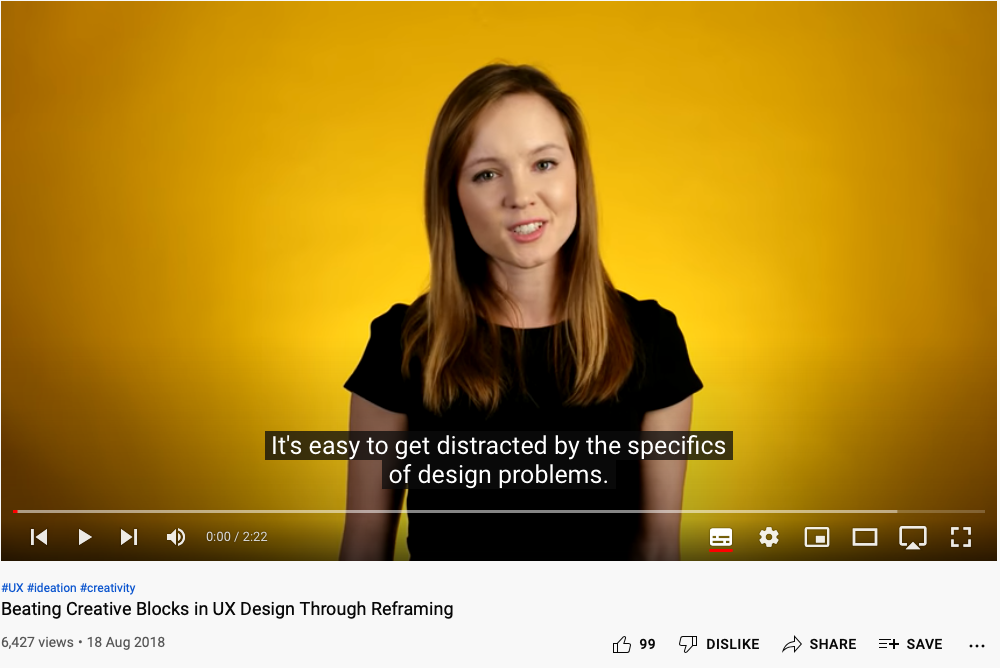
Ideation gets stuck: you hit a wall, or anchor on an early idea (**design fixation**, more next week).

<div class="columns">

<div class="column" width="50%">

- **Challenge assumptions:** what did we assume about users, context, activities? Are those accurate *and* important?
- **Mindmap:** problem in the middle, ideas around it, connect with lines
- **[SCAMPER](https://www.interaction-design.org/literature/article/learn-how-to-use-the-best-ideation-methods-scamper):** Substitute, Combine, Adapt, Modify, Put to another use, Eliminate, Reverse
- **[Movement](https://thoughtegg.com/provocations-creative-technique/):** turn a provocation into something usable
- **Creative pause:** step back, reflect, go outside. Proactive rather than reactive thinking

</div>

<div class="column" width="50%">

<figure>
<img src="img/06_ideation_2.png" alt="Beating Creative Blocks Through Reframing" />
<figcaption aria-hidden="true"><a href="https://www.youtube.com/watch?v=-GC8a5sRfC0&amp;list=PLJOFJ3Ok_idsd431mj7czplN1PNEaJbHE&amp;index=2">Beating Creative Blocks Through Reframing</a></figcaption>
</figure>

</div>

</div>

## Involving other people

<div class="columns">

<div class="column" width="50%">

- **[Gamestorming](https://gamestorming.com/):** gamified ideation for energy and engagement — Fishbowl, Anti-Problem, Cover Story
- **[Cheatstorm](https://www.interaction-design.org/literature/topics/cheatstorming):** reuse ideas from earlier sessions as stimulus
- **Crowdstorm:** the target audience generates or approves ideas — social media, surveys, focus groups
- **Co-creation workshops:** combine methods over hours or days — icebreakers, vision, empathy, insight mining, framing, ideation, prototyping

</div>

<div class="column" width="50%">

<figure>
<img src="img/cocreation.jpg" alt="Co-creation in 2010." />
<figcaption aria-hidden="true">Co-creation in 2010.</figcaption>
</figure>

</div>

</div>

<!-- ## Online Ideation Tools
&#10;- Miro:  _[https://miro.com/online-brainstorm-tool/](https://miro.com/online-brainstorm-tool/)_
- Mural:  _[https://www.mural.co/](https://www.mural.co/)_
&#10;Collections and Templates:
&#10;- _[https://www.sessionlab.com/library/idea_generation](https://www.sessionlab.com/library/idea_generation)_
- _[https://uxdesign.cc/the-master-online-ideation-toolbox-part-1-2-47401c3ad861](https://uxdesign.cc/the-master-online-ideation-toolbox-part-1-2-47401c3ad861)_
- _[https://uxdesign.cc/the-master-online-ideation-toolbox-part-2-2-414f5122f8b7](https://uxdesign.cc/the-master-online-ideation-toolbox-part-2-2-414f5122f8b7)_ -->

## Questions: Who has a question?

<div class="columns">

<div class="column" width="60%">

<div class="questions">

**Who has a question?**

- I can take *cathchbox* question up until end of the lecture
- For after class questions: meet me outside the classroom at the bar (for 30 minutes)
- Feel free to ask about **any aspect of the course**
- Also feel free to ask about **any aspect of computing at ANU**! I may not be able to help, but I can listen.

</div>

</div>

<div class="column" width="40%">

<figure>
<img src="img/kambri-bar.jpg" alt="Meet you at the bar for questions. 🍸🥤🫖☕️ Unfortunately no drinks served! 🙃" />
<figcaption aria-hidden="true">Meet you <em>at the bar</em> for questions. 🍸🥤🫖☕️ Unfortunately no drinks served! 🙃</figcaption>
</figure>

</div>

</div>

# References

<div id="refs" class="references csl-bib-body hanging-indent" data-entry-spacing="0" data-line-spacing="2">

<div id="ref-contextual-design:1997" class="csl-entry">

Beyer, H., & Holtzblatt, K. (1997). *Contextual design: Defining customer-centered systems*. Morgan Kaufmann Publishers Inc. <https://doi.org/0.5555/2821566>

</div>

<div id="ref-buxton-sketching:2007" class="csl-entry">

Buxton, B. (2007). *Sketching user experiences: Getting the design right and the right design*. Morgan Kaufmann Publishers Inc.

</div>

<div id="ref-carroll-task-artifact:1992" class="csl-entry">

Carroll, J. M., & Rosson, M. B. (1992). Getting around the task-artifact cycle: How to make claims and design by scenario. *ACM Transactions on Information Systems*, *10*(2), 181–212. <https://doi.org/10.1145/146802.146834>

</div>

<div id="ref-choi2024scenario" class="csl-entry">

Choi, M., Andres, J., Hunter, A., & Martin, C. P. (2025). Scenario-based design to envision how GenAI can support sound design practices. *Proceedings of the 36th Australasian Conference on Human-Computer Interaction*, 640–646. <https://doi.org/10.1145/3726986.3727042>

</div>

<div id="ref-double-diamond-model" class="csl-entry">

Design Council. (2025). *The double diamond: A universally accepted depiction of the design process*. <https://www.designcouncil.org.uk/our-resources/the-double-diamond/>

</div>

<div id="ref-dix2006bad" class="csl-entry">

Dix, A., Ormerod, T., Twidale, M., Sas, C., Silva, P. A., & McKnight, L. (2006). Why bad ideas are a good idea. *HCI Educators Workshop 2006*. <https://alandix.com/academic/papers/HCIed2006-badideas/HCIED2006-badideas-CRC-v2.pdf>

</div>

<div id="ref-frayling-research-art-design:1993" class="csl-entry">

Frayling, C. (1993). Research in art and design. *Royal College of Art Research Papers*, *1*(1), 1–5.

</div>

<div id="ref-gaver-annotated-portfolios:2012" class="csl-entry">

Gaver, B., & Bowers, J. (2012). Annotated portfolios. *Interactions*, *19*(4), 40–49. <https://doi.org/10.1145/2212877.2212889>

</div>

<div id="ref-gaver-cultural-probes" class="csl-entry">

Gaver, B., Dunne, T., & Pacenti, E. (1999). Design: Cultural probes. *Interactions*, *6*(1), 21–29. <https://doi.org/10.1145/291224.291235>

</div>

<div id="ref-gaver-expectations-rtd:2012" class="csl-entry">

Gaver, W. (2012). What should we expect from research through design? *Proceedings of the SIGCHI Conference on Human Factors in Computing Systems*, 937–946. <https://doi.org/10.1145/2207676.2208538>

</div>

<div id="ref-gentner-anti-mac:1996" class="csl-entry">

Gentner, D., & Nielsen, J. (1996). The anti-mac interface. *Commun. ACM*, *39*(8), 70–82. <https://doi.org/10.1145/232014.232032>

</div>

<div id="ref-gould-usability:1985" class="csl-entry">

Gould, J. D., & Lewis, C. (1985). Designing for usability: Key principles and what designers think. *Commun. ACM*, *28*(3), 300–311. <https://doi.org/10.1145/3166.3170>

</div>

<div id="ref-hallewell2022deriving" class="csl-entry">

Hallewell, M. J., Hughes, N., Large, D. R., Harvey, C., Springthorpe, J., & Burnett, G. (2022). Deriving personas to inform HMI design for future autonomous taxis: A case study on user requirement elicitation. *Journal of Usability Studies*, *17*(2).

</div>

<div id="ref-hornbaek-intro-hci:2025" class="csl-entry">

Hornbæk, K., Kristensson, P. O., & Oulasvirta, A. (2025). *Introduction to human-computer interaction*. Oxford University Press. <https://doi.org/10.1093/oso/9780192864543.001.0001>

</div>

<div id="ref-je-elevate:2021" class="csl-entry">

Je, S., Lim, H., Moon, K., Teng, S.-Y., Brooks, J., Lopes, P., & Bianchi, A. (2021). Elevate: A walkable pin-array for large shape-changing terrains. *Proceedings of the 2021 CHI Conference on Human Factors in Computing Systems*. <https://doi.org/10.1145/3411764.3445454>

</div>

<div id="ref-maclean-qoc:1991" class="csl-entry">

MacLean, A., Young, R. M., Bellotti, V. M. E., & Moran, T. P. (1991). Questions, options, and criteria: Elements of design space analysis. *Human-Computer Interaction*, *6*(3–4), 201–250. <https://doi.org/10.1207/s15327051hci0603&4_2>

</div>

<div id="ref-maclean-argument-behind-artifact:1989" class="csl-entry">

MacLean, A., Young, R. M., & Moran, T. P. (1989). Design rationale: The argument behind the artifact. *ACM SIGCHI Bulletin*, *20*(SI), 247–252. <https://doi.org/10.1145/67450.67497>

</div>

<div id="ref-parnas-fake-it:1986" class="csl-entry">

Parnas, D. L., & Clements, P. C. (1986). A rational design process: How and why to fake it. *IEEE Transactions on Software Engineering*, *SE-12*(2), 251–257. <https://doi.org/10.1109/TSE.1986.6312940>

</div>

<div id="ref-rogers-beyond-hci:2023" class="csl-entry">

Rogers, Y., Sharp, H., & Preece, J. (2023). *Interaction design: Beyond human-computer interaction, 6th edition*. John Wiley & Sons, Inc. <https://quicklink.anu.edu.au/kv9b>

</div>

<div id="ref-rogerson-smeft-decks:2022" class="csl-entry">

Rogerson, M. J., Sparrow, L. A., & Freeman, S. O. (2023). The SMeFT decks: A card-based ideation tool for designing hybrid digital boardgames for distanced play. *Proceedings of the 34th Australian Conference on Human-Computer Interaction*, 298–309. <https://doi.org/10.1145/3572921.3572933>

</div>

<div id="ref-zimmerman-research-through-design:2007" class="csl-entry">

Zimmerman, J., Forlizzi, J., & Evenson, S. (2007). Research through design as a method for interaction design research in HCI. *Proceedings of the SIGCHI Conference on Human Factors in Computing Systems*, 493–502. <https://doi.org/10.1145/1240624.1240704>

</div>

<div id="ref-zimmerman-rtd-critique:2010" class="csl-entry">

Zimmerman, J., Stolterman, E., & Forlizzi, J. (2010). An analysis and critique of research through design: Towards a formalization of a research approach. *Proceedings of the 8th ACM Conference on Designing Interactive Systems*, 310–319. <https://doi.org/10.1145/1858171.1858228>

</div>

</div>

[^1]: This one is pretty normal in academic HCI research.