Remember that your portfolio relies on your weekly computer music diary for content.
This page is about two assessments: Portfolio 1, and Portfolio 2 which have the same structure but cover different workshops.
Outline
- Due dates:
- Portfolio 1: 24/03/2025 23:59AEDT
- Portfolio 2: 12/05/2025 23:59AEST
- Mark weighting: Portfolio 1: 20%, Portfolio 2: 20%
- Submission: upload via GitLab
- Policies: Late submissions not accepted without an extension; this is an individual task.
- GitLab Template Repos: weeks 1–5 and weeks 6–10
Specification
The portfolio submissions include your weekly reflections and a significant discussion on your work. You will write a significant extra reflection covering four weeks of the semester where you will critically engage with your progress and the computer music concepts we have discussed.
- Portfolio 1 discussion plus diary entries for the first four diaries.
- Portfolio 2 discussion plus diary entries for the last four diaries.
You have already written your diary entries, so for this assessment, you only have to write the discussion part (GitLab will automatically combine them into one document for you).
The discussion must articulate your overall reflections on the diary submissions for the specified weeks. Specifically, you need to make connections between the creative criteria for each week, the computer music concepts explored, your response to that challenge, and how your response was used in the workshops. The discussion should use examples from your diary entries and also reference your colleague’s work or examples external to the class (references to work you didn’t create should be listed in the reference section).
You must include figures, screenshots and code excerpts of your SMC software in your documents to demonstrate your understanding of computer music concepts covered during the specified weeks. Each portfolio should be 1000–1500 words (including the four weekly reflections). This task should be completed in markdown format in the GitLab template repository and marked through the PDF that is automatically created in Gitalb..
Your portfolio submissions:
- must be written in markdown format in the portfolio template files in your GitLab repository.
- must be a maximum of 1500 words + 10% acceptable buffer (i.e., reflections + discussion = no more than 1650 words)
- must use examples from your diaries to support new reflections and insights
- must include at least two references to external sources (in each portfolio). At least one reference must be to work produced by another student in the class.
- can include diagrams, screenshots, links (put them in same folder as the portfolio or relevant week)
- can involve editing to tidy up your earlier reflections (don’t go over 200 words on these), but doesn’t have to.
- should not be a straight up summary of what you did in your diaries. That’s what the diaries are for. You need to dig deeper into your experiences and engage with your diaries to provide new insights.
Submission process
- Write your portfolio in the provided template markdown file in your GitLab repository.
- Download the PDF artefact to check that it looks the way you want and update it in GitLab by the deadline.
Creative Notes
There are different ways to “articulate reflections” and “make connections”, here’s some examples of ways to frame your discussion:
-
Tell the story of how you have explored the key music computing concepts through your submissions. Provide examples from your diary entries that are particularly important to your creative journey.
-
Distill your experiences into “important lessons” about sound and music computing. Support each lesson with examples from one or more diary entries.
-
Find “common threads” through your diary reflections and videos. How do these threads reflect the computer music concepts and what do they tell us about your (emerging) identity as a computer musician?
Don’t just give us a week-by-week description of what you submitted—your reflections already do that.
You should include figures, screenshots, and code excerpts in your documents as necessary to support the reflections you are making. Remember that we will not know what you are talking about if you don’t show us.
Your whole Portfolio is actually a big PDF document generated from your weekly reflections and portfolio discussion. We’ll show you how to access this in the labs.
If you have missed any workshop reflections, you will need to go back and complete them to submit your portfolio. This task is fairly straightforward if you work consistently each week.
Formatting Notes
Here’s a few tips to make a better looking and more readable portfolio:
- Have a read about markdown to revise the syntax and update your knowledge.
- We mark portfolios from your PDF and diary videos, don’t assume we can dive into your repo and make sure your PDF looks the way you expect.
- Please include a record of the “main thing” you did in each week’s reflection
either as a screenshot or a code listing. You can store
images directly in any of the
week-Norportfolio-Nfolders. The code won’t count towards your word count. - The PDF works best with headings starting from one-pound-sign-level (e.g.,
#
Heading
). - Please make sure URLs in your portfolio have angle brackets around them:
<http://example.com>so that they work properly in the PDF. - If you want to see expected formatting look at Charles’ sample repo and the PDF file.
Marking Rubric
- We primarily mark the PDF document of your portfolio as submitted.
- To understand the context of your comments, we may review the video of your diary entries, and code/patches uploaded into GitLab.
The marking rubric for this task is the same for COMP4350 and COMP8350 (see the links to programs and courses).
| Criteria | HD | D | CR | P | N |
|---|---|---|---|---|---|
| Sophistication of articulation and application of fundamental concepts in sound and music computing. (50%) | Excellent to outstanding SMC implementations going beyond learning materials. | Very good application of SMC concepts, but not beyond learning materials. | Application of SMC at level of learning materials. May have gaps in some areas. | Some effort to replicate SMC learning materials resulting in functional SMC software. May have only applied some SMC concepts covered. | Very little SMC software or software that is below the level of learning materials. |
| Sophistication of critical reflections obtained through collaboration. (20%) | Very detailed reflections on collaborations that distill outstanding insight into workshops and group diaries. | Detailed reflections on collaborations showing very good insights into workshops and group diaries. | Some reflection on collaborations showing good engagement, but not a high level of insight into the workshops and group diaries. | Minor reflections on collaboration. May not have completed all group diary entries or participated in all collaborative work. | No reflection on collaboration or reflections that do not show a sufficient engagement in workshops and group diaries. |
| Sophistication of critical examination of responses to computer music diary prompts. (20%) | Very detailed reflections on all diary prompts. Excellent critical reflection on process and independent research to address prompts and supplement learning materials. | Detailed reflections on responses to the diary prompts. Evidence of critical reflection on process and detailed engagement with all learning materials. | Some reflection on responses to the diary prompts. Evidence of good preparation and regular engagement with most learning materials. | Minor reflections on responses to the diary prompts. Evidence of preparation and engagement with most learning materials. | Very little reflection on responses to the diary prompts or reflections showing insufficient engagement with learning materials. |
| Clarity of communication including adherence to submission formats and specifications for the diary and portfolio. (10%) | Excellent adherence to submission format and clarity of communication. | Good submission format with very clear communication. | Acceptable submission format. Good communication. | Poor adherence to submission formats. Communication may not be clear. | Very poor adherence to submission format with incoherent communication. |
Reference format
We prefer ACM reference format: https://www.acm.org/publications/authors/reference-formatting
Some example references in Markdown format are as follows:
# References

1. Alice McGuffing. 2022. Ideas for creating the animated ripple effect
2. Jerry Wang. 2022. Background Artwork (artwork.jpg)
3. Howzit (StackOverflow user). 2018. p5js-image-array (CC BY-SA 2.5). Retrieved from: <https://stackoverflow.com/questions/51233447/p5js-image-array>
4. p5 Reference. No Date. MouseWheel Example (CC BY-NC 4.0). Retrieved from: <https://p5js.org/reference/#/p5.Element/mouseWheel>
5. Scott Bauer. 2004. Photo of Potatoes (Public Domain). Retrieved from: <https://en.wikipedia.org/wiki/Potato#/media/File:Patates.jpg>
6. Aaron Wu. 2018. Boat Photo on Unsplash. Retrieved from: <https://unsplash.com/photos/_8rjlHwN4uk>
7. Wikipedia. 2022. J M W Turner Article. Retrieved from: <https://en.wikipedia.org/wiki/J._M._W._Turner>
Help and Howtos
Downloading your Portfolio PDF from Gitlab
When you add text and images to the markdown template files in your SMC GitLab repository, PDFs are automatically created for your portfolio. You need to download these PDFs to check that they are created correctly.
Downloading your PDF takes a few clicks (annoyingly), but it’s not hard and you should do it regularly to check that your PDF is looking the way you expect. These instructions are for “portfolio 1” but they process is almost the same for the other PDF-based assessments.
If there’s something about your PDF that you don’t understand, ask on the course Team well before the assignment deadline—ideally, on a week day!
Step 1
Go to your repo and click on the little tick/exclamation mark/cross icon shown here. This takes you to the CI jobs associated with your latest commit.
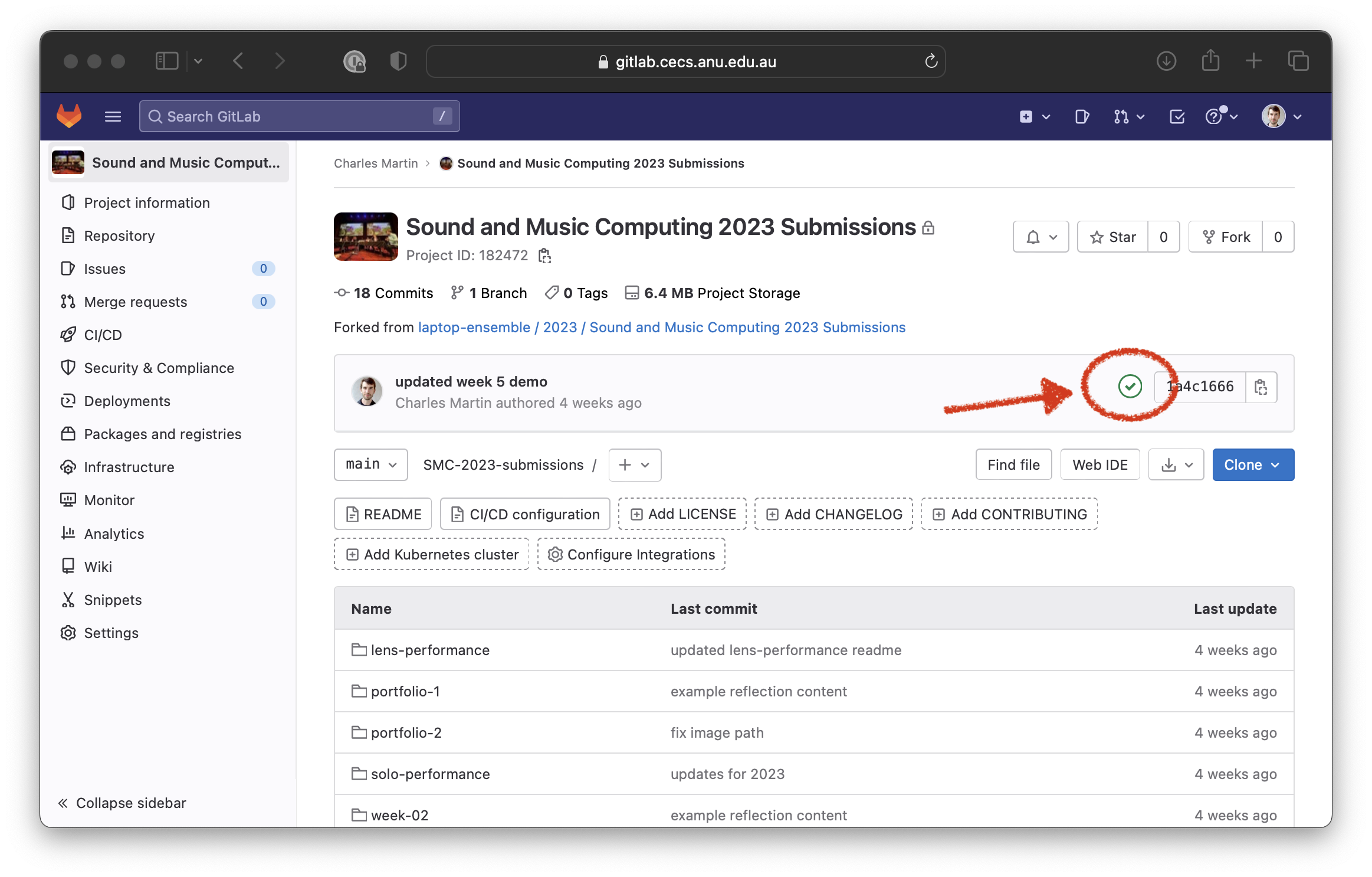
Step 2
Click the “portfolio 1” button (text or icon—doesn’t matter which.
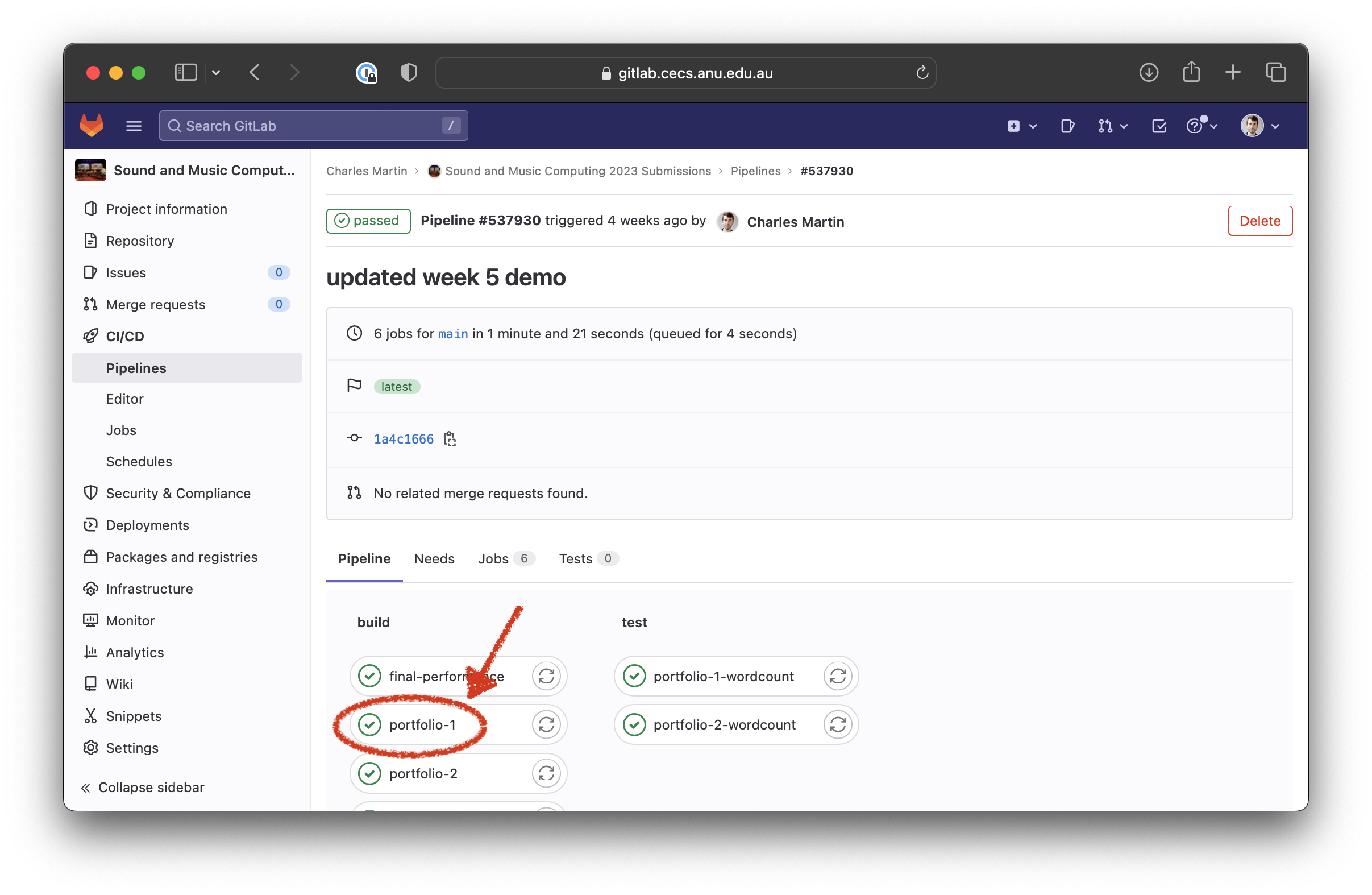
Step 3
You should see the terminal output from the CI job that creates your portfolio 1 PDF (any errors will be shown here). Click the “Browse” button under “Job Artifacts”.
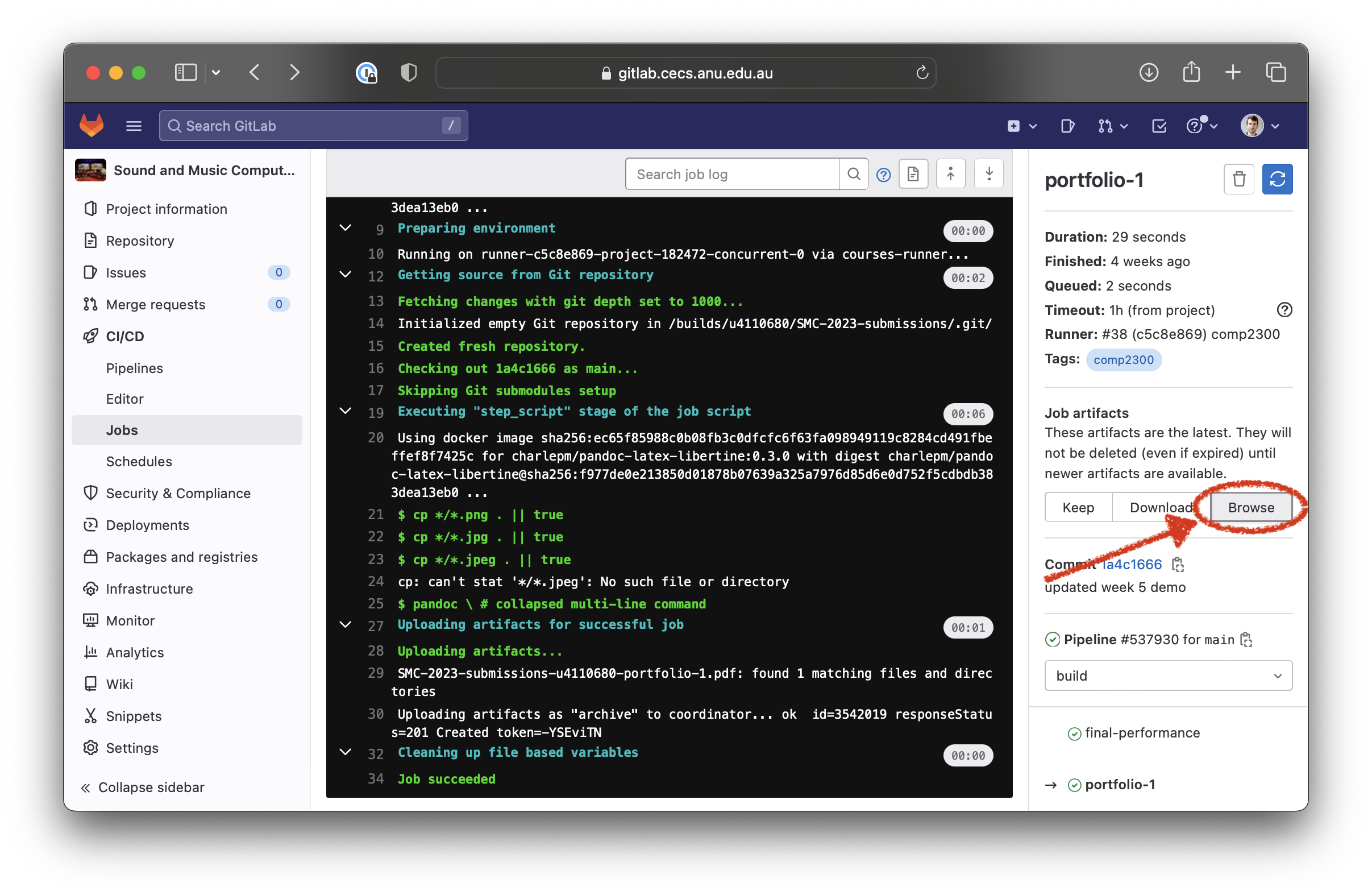
Step 4
You should see the pdf file for your portfolio, click it’s name to download it.
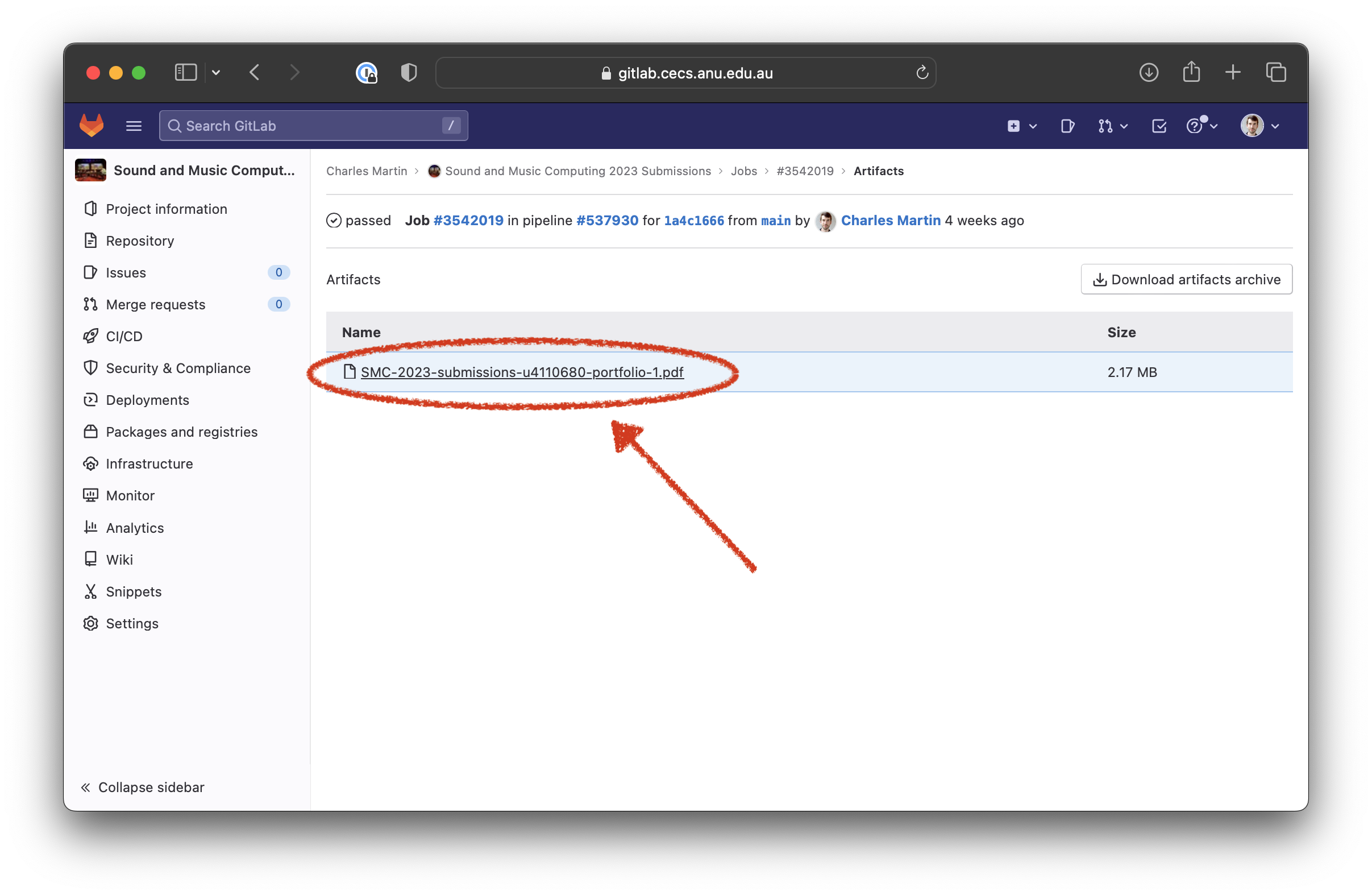
You did it! Now check the PDF carefully for errors or issues and then update your GitLab repository as necessary. Here’s an example portfolio 1 showing how it might look.
Images not working in portfolio
For images to work in your portfolio, check the following:
- Your images are stored in a
week-NNorportfolio-Nfolder (i.e., notweek-03/materials). - You referred to your images in your reflections/portfolio just by their filename (no folders/path), e.g.,
 - Your images are in jpg or png format and have file extension
.jpg,.png,.jpegin lower case letters (capital letters likeimage.JPGwon’t work)
If in doubt, look at how it is done in the sample portfolio repo: https://gitlab.cecs.anu.edu.au/u4110680/comp4350-2025-portfolio-1
Images are showing up in different locations
This expected behaviour, the tool chain (pandoc and LaTeX) does not let you specify image locations specifically.
Make sure you give each image a descriptive caption and refer to it in your text (see sample repo above).
You may have better results with wider landscape-format images than tall narrow images in terms of LaTeX finding a sensible placement.